
You’ve done the hard work. Your page ranks on page one. But the clicks just aren’t coming. Sound familiar? A low click-through rate (CTR) is one of SEO’s most frustrating problems because the fix isn’t more backlinks or better content. The fix is your title tag. And the only way to know which title tag works best? Test it. This guide walks you through everything you need to start split-testing title tags, even if you’ve never run an SEO experiment before.
What Is Title Tag Split-Testing?
A title tag is the clickable blue headline that appears in Google’s search results. It’s often the first thing a searcher reads before deciding whether to click or scroll past.
Split-testing (also called A/B testing) for title tags means changing the title on a group of pages, measuring how it affects CTR and traffic, and comparing it against a control group of pages you left unchanged. The goal is to find out, with actual data, which version of a title gets more clicks.
The catch: unlike traditional A/B testing where you show two versions of a page to different visitors simultaneously, SEO title tag split testing works differently. Google indexes one version of a page at a time. So instead of splitting users, you split pages – some get the new title, others stay as-is.
That makes it a time-based, group-comparison experiment rather than a true simultaneous A/B test. But done correctly, it still gives you reliable, actionable signal.
Why it’s important to do title tag split testing?
Because the stakes are surprisingly high.
A single title tag change can double your traffic or cut it in half. Consider what’s been documented in the wild:
- A site called Coderwall saw a 57% traffic increase from one title tag test.
- TrustRadius grew sitewide traffic by 22% with a single title change.
- Moz saw a 20% uplift by removing a boilerplate phrase from their titles.
- Primary Arms increased organic revenue by 47% through title testing alone.
These aren’t flukes. Title tags sit at the intersection of two systems: the ranking algorithm and human click behavior. A well-optimized title can make your result stand out even above competitors who outrank you because it speaks more directly to what the searcher actually wants.
There’s also a ranking feedback loop at play. CTR is, at least indirectly, a ranking signal. If you rank fourth but consistently earn more clicks than the second and third results, your odds of moving up increase. Better titles don’t just bring more clicks, they can improve your position too.
Before You Start: Are Your Pages Ready to Test?
Not every page is a good candidate. Here’s what you need:
Enough traffic. Split tests need statistical significance to mean anything. As a rough benchmark, aim for pages with at least a few hundred organic clicks per month. If you’re working with very low-traffic pages, you’ll need to run tests for longer (think months, not weeks) or use a time-based approach instead.
Stable rankings. If a page’s rankings are volatile bouncing between position 5 and 15 every week that noise will drown out the signal from your title change. Test pages that have held a reasonably consistent position for at least 30–60 days.
A clear problem. The best pages to test are those ranking in positions 2–10 with a CTR lower than you’d expect. A page ranking position 3 with a 1% CTR is screaming for attention. A page ranking position 9 with 5% CTR is probably doing fine.
Google Search Console access. This is your primary data source. If you’re not already set up with GSC, do that first. It’s free, and everything impressions, clicks, CTR, average position lives there.
Setting Up Your First Test: Step by Step
Follow the below steps one by one to effectively do the title tag split testing!
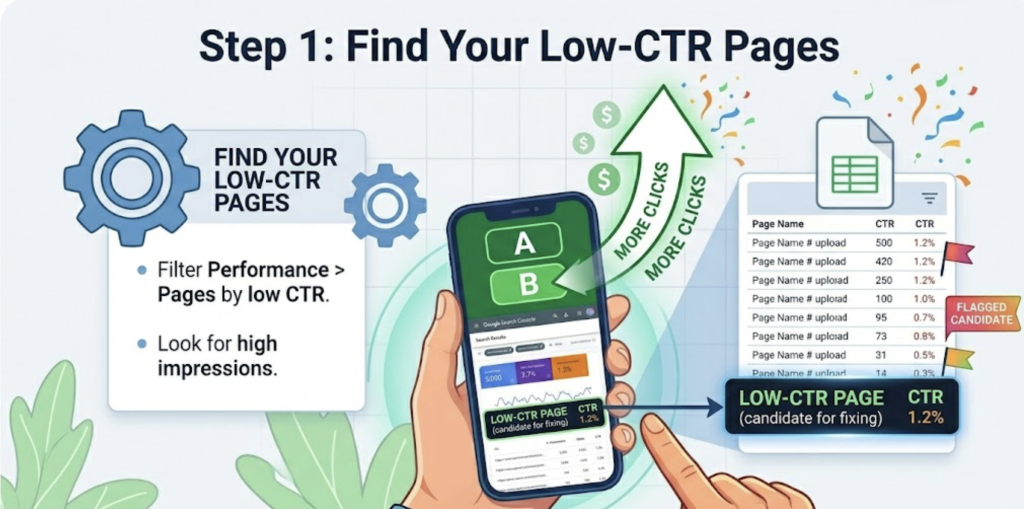
Step 1: Find Your Low-CTR Pages
Open Google Search Console and navigate to Performance > Search Results. Filter by pages and sort by CTR (low to high). Look for pages with decent impressions but disappointing click rates.
A page with 5,000 impressions and a 1.2% CTR is leaving roughly 50 clicks per month on the table compared to what a 2.5% CTR would deliver. That’s worth fixing.
Export this data to a spreadsheet and flag your top 10–20 test candidates.
Step 2: Diagnose Why the Title Is Underperforming
Before writing a new title, understand what’s wrong with the current one. Common culprits:
- Missing the primary keyword: or burying it at the end
- Too vague: doesn’t tell the searcher what they’ll actually get
- Too clever: wordplay that obscures relevance
- Generic brand-first structure: “BrandName | Article Topic” wastes prime real estate
- No emotional hook: reads like a filing cabinet label, not a promise
Compare your title to what’s ranking above you. Are competitors using numbers? Power words? Questions? Specific promises?
Step 3: Write Your Challenger Title
Now write a new version. One version only, resist the urge to test multiple changes simultaneously. If you change five things at once, you’ll have no idea which one moved the needle.
Here are the highest-impact variables to test, one at a time:
- Keyword placement. Moving the primary keyword to the front of the title is one of the most consistently effective changes. Conventional wisdom says front-load it and for most industries, the data backs that up.
- Power words and modifiers. Adding words like “proven,” “complete,” “essential,” or a current year marker can lift CTR by making the title feel more authoritative and timely. Test whether these additions help or hurt for your specific audience.
- Numbers and specificity. “7 Ways to Lower Your Bounce Rate” outperforms “How to Lower Your Bounce Rate” in most cases. Specific numbers set clear expectations and signal a structured, scannable piece.
- Question format vs. declarative. “How to Reduce Churn” versus “Reduce Churn: A Practical Guide” different formats resonate differently depending on the intent behind the search query.
- Title length. Google truncates titles beyond roughly 60 characters (580 pixels on desktop). Shorter titles display fully and feel cleaner. Longer titles pack in more context. Test where the sweet spot is for your page type.
- Brand inclusion. For well-known brands, including the brand name adds credibility. For lesser-known ones, it may just waste characters that could reinforce relevance.
A strong hypothesis looks like this: “Adding a specific number and moving the primary keyword to the front of the title will increase CTR by at least 10% on our how-to blog posts.”
Write the hypothesis before you test. It keeps you honest and prevents you from reinterpreting results after the fact.
Step 4: Create Your Control and Variant Groups
If you have 20 similar pages to test, split them randomly into two groups of 10. Apply the new title pattern to the variant group. Leave the control group unchanged.
The key word is randomly. Don’t hand-pick which pages get the new title your biases will skew the result. Use a random number generator or just alternate down your sorted list.
Both groups should have similar characteristics: same page type, comparable traffic levels, similar content length and topic cluster. Comparing your top 10 product pages against your 10 least-visited ones will produce meaningless data.
Step 5: Implement and Track
Update your title tags in your CMS for the variant group. Note the exact date you made the change – this is your test start date.
In Google Search Console, you’ll monitor:
- CTR: your primary metric. Did the variant pages earn a higher click rate?
- Average position: did rankings improve, hold steady, or drop?
- Clicks and impressions: absolute traffic numbers.
If you have Google Analytics or another analytics tool, also monitor bounce rate. If your new title sets expectations the page doesn’t deliver on, bounces will spike. That’s a warning sign the title is clickbait, not a genuine improvement.
Step 6: Wait (This Is the Hard Part)
Run the test for at least 3–4 weeks. Ideally 6–8 weeks for lower-traffic pages. Don’t make decisions based on the first week of data, there’s too much natural volatility to draw conclusions that fast.
Resist the urge to peek daily and adjust. Every intervention resets your measurement window.
Step 7: Analyse and Decide
At the end of your test window, compare the CTR of your variant group against the control group in Search Console.
Calculate the absolute change in CTR, for example, a move from 1.3% to 1.5% is a +0.2 percentage point improvement (not a 15% improvement, which is the proportional change). Absolute change is more honest and more useful for comparing across pages.
If the variant group shows a consistent, positive CTR improvement: roll the winning title pattern out to more pages.
If results are mixed or neutral: the test is still valuable. You’ve learned that variable didn’t matter and that’s real information.
If CTR improved but rankings dropped: your new title may have changed the content signal Google uses for ranking. Proceed carefully.
Common Mistakes to Avoid
- Testing too many changes at once. If you rewrite the title, update the meta description, and change the H1 simultaneously, you’ll never know what drove the result.
- Stopping too early. A week of data is almost never enough. Seasonality, crawl delays, and normal ranking fluctuations will mislead you.
- Ignoring position shifts. If your ranking changed significantly during the test period, your CTR data is confounded. A page jumping from position 8 to position 4 will naturally get more clicks regardless of the title.
- Testing on pages that already perform well. Don’t experiment on your highest-traffic, highest-converting pages. Test on underperformers first. If you find a winning pattern, then scale it upward.
- Writing titles for Google, not humans. Stuffing keywords into a title tag might feel smart, but if a searcher can’t understand your offer in three seconds, they’ll click the competitor below you who made their value obvious.

Quick Reference: Title Tag Best Practices Going Into a Test
- Keep titles under 60 characters (roughly 580 pixels)
- Lead with the primary keyword when relevance isn’t obvious
- Include a specific number if the content is list-based or step-based
- Use active, concrete language over vague or clever phrasing
- Match the searcher’s intent: informational, commercial, or transactional
- Make a clear promise the page actually delivers on
- Avoid CMS-auto-generated titles that just pull the page name
Conclusion
Title tag split testing is not a one-time task. It’s an ongoing practice because SERPs evolve, competitors change their titles, and what works today may not hold up next year.
The teams and sites that compound their organic growth over time aren’t just the ones with the best content or the most backlinks. They’re the ones that treat every ranking as an experiment waiting to be optimized. This proactive approach is similar to how top-tier teams manage their existing library; if you want to see how to apply this “optimization first” mindset to your broader strategy, check out our guide on [Why Updating Your Top 100 Posts Beats Writing 1,000 New Ones].
Your title tag is the first impression you make on a searcher. Start treating it like the asset it is.