
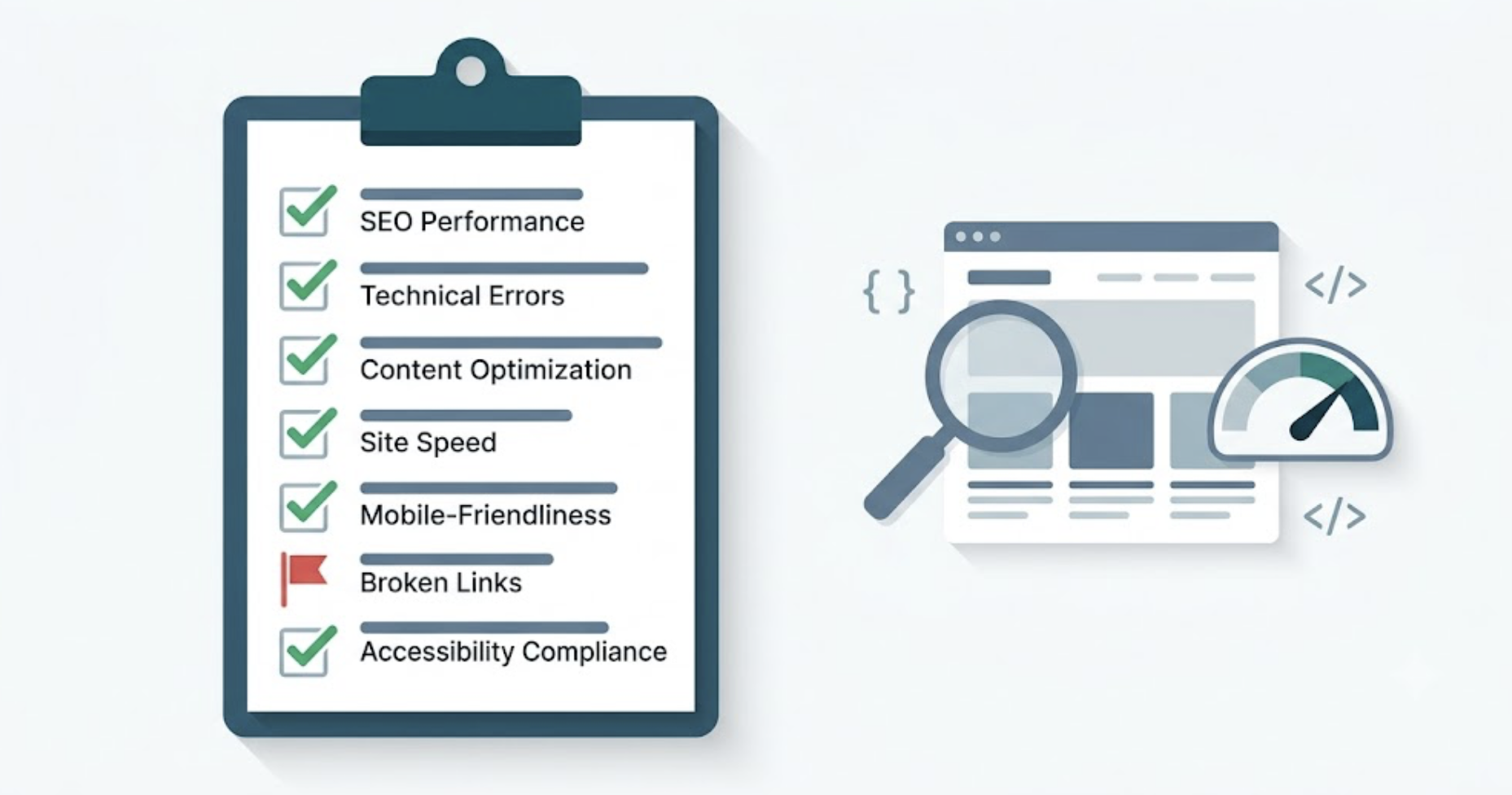
Most technical SEO audits produce a 50-item issue list. Most teams fix six of them — usually the six easiest ones — and wonder why rankings don’t move. An SEO technical audit checklist is only useful if you know which problems are costing you traffic today versus which are just background noise you can fix next quarter.
This guide gives you a seven-category checklist, a framework for triaging by actual traffic impact, and a clear signal for when technical problems and content decay are working against the same page at the same time.
At a Glance: The 7 Technical SEO Audit Categories
| Category | What You’re Checking | Severity if Broken |
|---|---|---|
| Crawlability & Indexation | Robots.txt, sitemaps, noindex tags | Critical |
| Site Architecture & URLs | Canonicals, redirects, URL structure | High |
| Core Web Vitals & Speed | LCP, INP, CLS, page load time | High |
| Mobile Usability | Viewport, tap targets, font sizing | High |
| On-Page Signals | Title tags, meta descriptions, H1s | Medium |
| Structured Data & Schema | Article markup, author entities, E-E-A-T | Medium–High |
| Internal Linking & Link Health | Orphan pages, broken links, anchor text | Medium |
Why Most Technical SEO Audits Don’t Move Rankings?
Run a crawl on any established site and you’ll surface a mess: duplicate titles, redirect chains, missing alt attributes, schema warnings, unlinked pages. The audit looks thorough. Rankings stay flat.
The problem isn’t the checklist — it’s the sequence. Teams fix the visible, low-effort issues first (meta descriptions, image compression) while leaving untouched the ones that determine whether Google can access and trust the page. Crawl blocks, broken canonicals, and Core Web Vitals failures don’t announce themselves loudly. They drag a page down two positions a week until it falls off the first page entirely.
A useful technical SEO audit checklist doesn’t just catalog problems. It orders them by the traffic they’re costing you right now.
What to Have Ready Before You Start?
You don’t need ten tools. You need three:
- Google Search Console: coverage errors, Core Web Vitals report, manual actions, and performance data by URL. Always your first stop.
- Screaming Frog SEO Spider: full-site crawl for broken links, redirect chains, duplicate content, missing tags. Free up to 500 URLs.
- PageSpeed Insights / Google Lighthouse: per-page Core Web Vitals diagnostics with specific improvement recommendations.
Optional additions: Ahrefs or Semrush for backlink profiles; schema.org’s validator or Google’s Rich Results Test for structured data verification.
Start with GSC before crawling anything. It tells you exactly which pages Google has already tried and failed to index — and that’s where the critical findings almost always live.
If you need help collecting and prioritizing this data, compare these content audit software for different website sizes and SEO workflows.
The 7-Category SEO Technical Audit Checklist
1. Crawlability & Indexation
If Google can’t access and index your pages, nothing else matters.
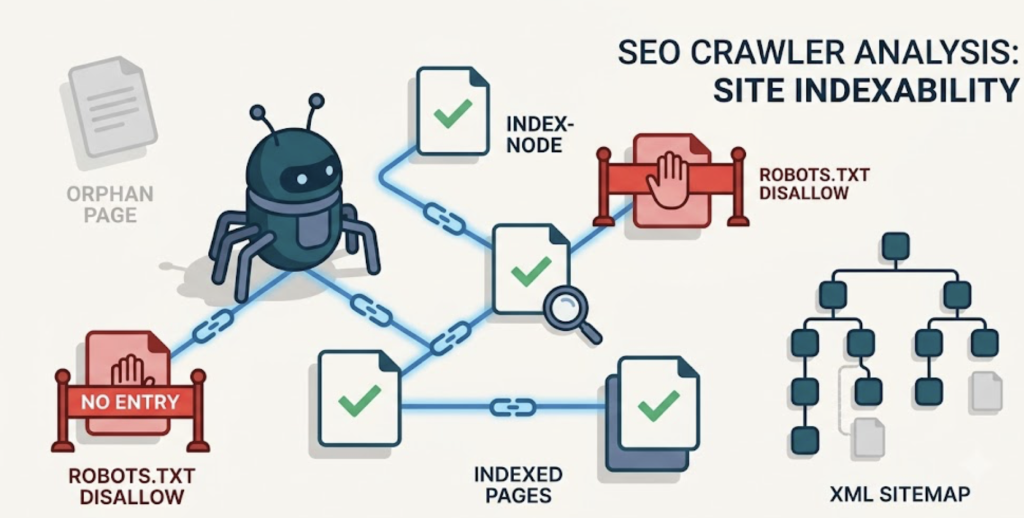
- Robots.txt: confirm no critical directories or page templates are blocked. Visit
/robots.txtdirectly and cross-check any disallow rules against your sitemap. - XML sitemap: exists, submitted to GSC, and contains only indexable canonical URLs. No 301-redirect destinations, 404s, or noindex pages should appear in the sitemap.
- Index coverage in GSC: check “Pages” → “Not indexed.” The two flags requiring immediate investigation: “Excluded by noindex tag” on pages you intend to rank, and “Discovered – currently not indexed” on high-value content.
- Crawl budget (large sites): for sites over 1,000 URLs, check GSC’s Crawl Stats report. If Google crawls a small fraction of your site per day, thin or duplicate pages are diluting crawl budget away from high-value content.
- Orphan pages: pages with no internal links pointing to them. Screaming Frog surfaces these by comparing your crawl output against your submitted sitemap.
- Flag immediately: any page showing “Excluded by noindex” that you didn’t deliberately set. Every day it stays excluded costs you ranking equity.
2. Site Architecture & URL Structure
- Canonical tags: every page carries a self-referential canonical. Paginated series, filtered pages, and archive or tag pages are the most common sources of duplicate content without them.
- Redirect chains: 301s pointing to other 301s bleed link equity. Trace chains in Screaming Frog and collapse each one to a single-hop redirect.
- HTTP status codes: audit for 4xx errors on pages that should be live. Any 5xx errors are infrastructure issues requiring immediate escalation.
- URL structure: consistent lowercase, hyphenated slugs. No session IDs or tracking parameters in canonical URLs.
- Duplicate content from URL variants: confirm www vs. non-www, HTTP vs. HTTPS, and trailing-slash variants all redirect to one canonical version.
Step-by-Step Technical SEO Audit Template (How It Works)
Most checklists hand you categories and wish you luck. This is the order to actually work in — start to finish, GSC open in one tab, Screaming Frog crawling in another. Follow it top to bottom and you’ll clear the findings that cost you traffic before you burn an afternoon on the ones that don’t.
Copy the steps below into a doc, work down the list, and check each one off as you go. That’s the whole template. No 50-row spreadsheet you’ll abandon by row 12.
Step 1: Pull your traffic baseline first
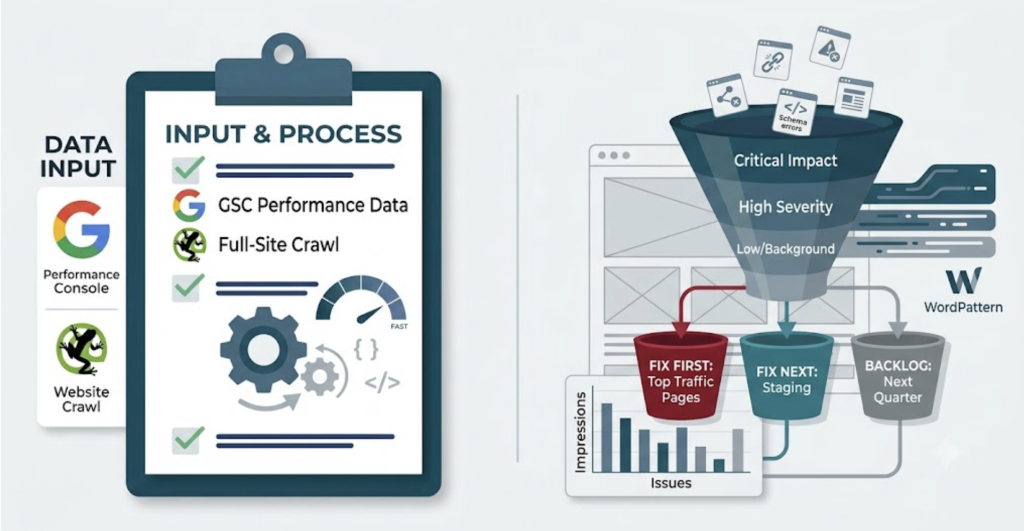
Before you crawl a single URL, open Google Search Console and export the last 90 days of performance data, sorted by impressions.
Why first? Because every finding later in this audit means nothing until you know which pages actually earn traffic. A broken canonical on a page nobody visits is a Tuesday-afternoon job. The same bug on your top landing page is an emergency. You can’t tell them apart without this list in front of you.
Save it. You’ll cross-reference everything against it in Step 8.
Step 2: Confirm the pages you want ranked are actually indexed
Still in GSC. Go to Pages, then Not indexed.
You’re looking for two specific flags. “Excluded by noindex tag” on any page you meant to rank — that’s a page telling Google to stay away, usually by accident. And “Discovered – currently not indexed” on high-value content, which means Google found the URL and chose not to bother.
Anything critical showing up here jumps to the front of your fix list. A page that isn’t indexed can’t rank. Full stop.
Step 3: Validate robots.txt before you trust anything else
Visit /robots.txt directly in your browser. Read it line by line.
This is your fail-fast check — the one that catches disasters in thirty seconds. A single stray Disallow: /blog/ can wall off your entire content library, and it won’t throw an error anywhere. It just quietly stops Google from reaching those pages.
Cross-check every disallow rule against your sitemap. If a directory you’re actively trying to rank shows up in both, you’ve found your problem. Fix this before you spend an hour anywhere else.
Step 4: Crawl the full site
Now open Screaming Frog and run a complete crawl. Free tier handles up to 500 URLs, which covers most sites that aren’t running a storefront.
This is the pass that surfaces the mechanical stuff: broken internal links, redirect chains, duplicate titles, missing tags, orphan pages. Let it finish before you start reading results. A half-finished crawl gives you a half-true picture.
Step 5: Trace and collapse redirect chains
In your crawl output, sort by status code and find the 301s pointing at other 301s.
Each hop in a chain bleeds a little link equity and adds load time. A redirect that goes A → B → C → D should go straight A → D. Automated redirect chain identification is one of the least glamorous jobs in an audit and one of the biggest quiet time-sinks — ⚠️[INSERT REAL Z: “WordPattern flags these automatically, saving teams an average of Z hours per audit” — or CUT this clause if no measured figure exists].
Collapse every chain you find to a single hop. Then confirm your www/non-www and HTTP/HTTPS variants all land on one canonical version.
Step 6: Run Core Web Vitals on your money pages
Open PageSpeed Insights. Test your top traffic pages from Step 1 — not every page, just the ones that earn.
Look at Field Data, not Lab Data. Field Data is real Chrome users; Lab is a simulation that can look rosy while actual visitors suffer. If GSC already flagged a URL “Poor” in its Core Web Vitals report, start there.
For each failing page, find the specific culprit. An oversized hero image tanking LCP. A layout that jumps as ads load, wrecking your Cumulative Layout Shift score. Note the fix next to each one — you’ll batch them in Step 9.
Step 7: Spot-check schema and on-page basics
Run one page of each template type through Google’s Rich Results Test.
You’re confirming that Article markup carries a real author entity (a Person with a URL, not just a name), that dates are present, and that the publisher is set. While you’re in each template, eyeball the title tag and H1 — one H1, keyword near the front, no duplicates across the site.
This is a spot-check, not a line-by-line review. You’re catching template-level breaks that repeat across hundreds of pages, because fixing the template fixes all of them at once.
Step 8: Cross-reference every finding against traffic
Pull up your Step 1 export. Go down your list of findings and tag each one with the traffic of the page it affects.
This is the step that separates a useful audit from a busywork audit. You now have two columns: what’s broken, and how much traffic it’s costing you. Sort by the second column.
Step 9: Fix in traffic order, not severity order
Start at the top of that sorted list and work down.
Clear every critical and high-severity finding on your top 20% of pages by impressions before you touch anything else. A crawl block on a top-five landing page beats forty duplicate meta descriptions on pages nobody reads — every time.
The rest goes on a backlog. Not because it doesn’t matter, but because it doesn’t matter yet. You’ll get to it after the fixes that move the needle are live.
Step 10: Re-test and set a monitoring baseline
After the fixes deploy, re-run PageSpeed Insights on the pages you changed and confirm GSC picks up the newly-indexable URLs over the next week or two.
Then set your baseline for ongoing monitoring — because the audit you just ran is a snapshot, and rankings erode between snapshots. More on that below.
Prioritized Technical SEO Checks & Core Web Vitals Assessment
(Replaces the five separate sections: Core Web Vitals, Mobile Usability, On-Page Signals, Structured Data & Schema, Internal Linking. Mobile coverage is preserved here — do not lose it.)
Once crawlability is clear, these are the checks that matter most, roughly in the order they affect rankings. Don’t treat them as equal. A Core Web Vitals failure on a top page outranks a missing meta description on every level.
Core Web Vitals assessment
Core Web Vitals are a confirmed ranking signal, and they’re where speed problems turn into lost positions. The 2026 thresholds:
| Metric | Good | Needs Work | Poor |
|---|---|---|---|
| LCP (Largest Contentful Paint) | < 2.5s | 2.5s–4s | > 4s |
| INP (Interaction to Next Paint) | < 200ms | 200ms–500ms | > 500ms |
| CLS (Cumulative Layout Shift) | < 0.1 | 0.1–0.25 | > 0.25 |
The one most teams get wrong is Cumulative Layout Shift — the annoying jump when a page loads and the button you were about to tap slides out from under your thumb. The usual causes: images without dimensions, and ad or embed slots with no reserved space. The fix is boring and effective. Set explicit width and height attributes on every image, reserve space for anything that loads late, and CLS drops on its own.
For LCP, find what the browser paints last above the fold — usually a hero image — and compress it, convert it to WebP, and stop lazy-loading it.
Mobile usability
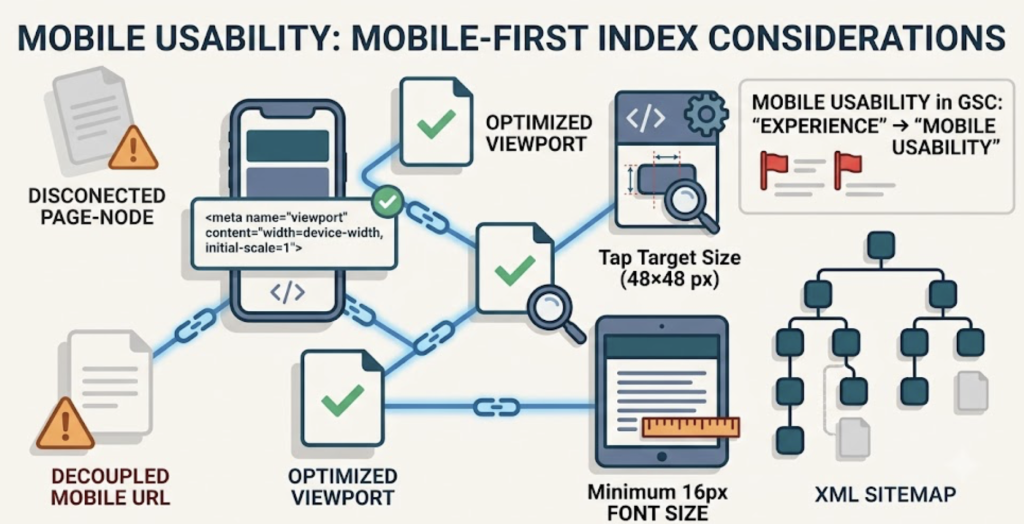
Google indexes your mobile version first, so a desktop-only pass isn’t enough. Confirm the viewport meta tag is on every template, tap targets are at least 48×48 pixels with room between them, and body text is 16px or larger with no horizontal scroll on a narrow screen. GSC’s Mobile Usability report flags live issues from Google’s own crawlers, which beats any simulator.
On-page signals
Titles unique per page, 50–60 characters, keyword near the front. Meta descriptions written to earn the click, not just describe the page. One H1 per page. Clean H2 → H3 nesting with no skipped levels. A sharp title on a page already sitting at position 8 can lift click-through with zero backlink work — so don’t skip this in favor of “bigger” fixes.
Structured data & schema
Every content page needs Article or BlogPosting markup with a real author Person entity (with a URL), published and modified dates, and a publisher. Add Organization schema on the homepage and BreadcrumbList where you have clear hierarchy. Validate each template type once through Google’s Rich Results Test. Skip FAQ schema for commercial content — Google restricted those rich results to government and health sites in late 2025.
Internal linking & link health
Broken internal links waste equity — Screaming Frog finds them site-wide in one crawl. Point descriptive anchor text at your priority pages, keep high-value pages within three clicks of the homepage, and make sure no indexed page is left orphaned without a single internal link.
How to Prioritize Which Issues to Fix First?
The checklist gives you a list. It doesn’t give you a sequence.
Fix order should track traffic impact, not issue severity scores. A duplicate title tag on a page drawing 15 visits per month costs you almost nothing to defer. A crawl block on your top five landing pages costs you rankings every day it stays unfixed.
The fastest triage: cross-reference your audit findings against GSC performance data. Sort your pages by impressions over the last 90 days. For every page in your top 20% by impressions, clear every critical and high-severity finding before touching anything else.
Pages already showing a consistent week-over-week position decline are your second tier. A pattern of losing two or three positions over six to eight consecutive weeks isn’t random volatility — it’s a signal that something has changed in how Google values the page.
That change might be technical. But it might also be that the content itself has decayed: a competitor added entity coverage you’re missing, a statistic on the page is now outdated, or a section that once matched search intent no longer does. Technical audits and content decay rarely hit different pages. They usually hit the same ones.
Case Study: Finding the Four Fixes That Actually Move Rankings
A B2B SaaS content team managing 47 published blog posts ran a full technical audit and surfaced 61 issues across all seven categories. Fixing all 61 would have consumed three weeks of engineering and editorial time.
Instead, they cross-referenced every finding against GSC data for the prior 90 days and narrowed to four critical items:
- A robots.txt disallow rule accidentally blocking the entire
/blog/directory – live for six weeks, had already pushed 11 posts out of the index entirely. - Missing canonical tags on tag and category archive pages, creating duplicate content signals that competed directly against their best-ranking editorial posts.
- LCP failure on their highest-converting landing page – the hero image was a 1.4MB uncompressed PNG. Replacing it with a WebP dropped LCP from 6.1s to 2.0s.
- No author Person schema on any content page – a single template fix that rolled out across all 47 posts in one deployment, strengthening E-E-A-T signals site-wide.
Three weeks later: the 11 de-indexed posts returned. The top landing page climbed four positions. The other 57 issues stayed on the backlog — correctly.
The audit wasn’t the work. The prioritization was.
Running Ongoing Monitoring with WordPattern
A quarterly technical audit catches structural issues. It doesn’t catch the week-by-week ranking erosion that compounds between audits.
Here’s how teams use WordPattern to bridge the gap:
- Connect Google Search Console via read-only API: WordPattern has no ability to alter site settings, delete properties, or publish anything without your approval.
- Select your monitoring scope: target your top 100 posts, all product pages, or a specific URL pattern.
- WordPattern baselines 90 days of GSC history per page and flags any URL showing a consistent decline in average position or click-through rate.
- For each flagged page, it pinpoints the specific paragraphs driving the drop and generates a Word Pattern suggestion — a targeted draft adding the entities and updated facts your top competitors carry but your page currently doesn’t.
- Review and approve before anything publishes. Every suggestion is a draft for human sign-off, not an autopilot edit.
The technical audit tells you whether Google can access your pages. WordPattern tells you whether Google still wants to rank them.
Your technical SEO audit checklist only works if you act on the findings in the right order. Start with crawlability — fix anything blocking Google from your top-traffic pages first. Then move through Core Web Vitals, schema, and internal linking by traffic impact. Build the monitoring habit so the next audit isn’t your first warning that something’s been bleeding for months.
The sites that rank well aren’t the ones that ran the most thorough audit. They’re the ones that fixed the right things fastest — and kept watching after the audit was done.
FAQs
Run a comprehensive technical SEO audit quarterly. Between audits, do monthly spot-checks on Core Web Vitals and GSC’s index coverage report — these two signals catch the fastest-moving problems before they compound. Sites that recently migrated, relaunched, or made major CMS changes should run a full audit immediately after the change, regardless of schedule.
A technical SEO audit checks whether Google can access, crawl, and render your pages correctly — robots.txt, sitemaps, canonicals, page speed, schema. A content audit checks whether the content on those pages still matches search intent and satisfies E-E-A-T signals. Both can hurt rankings independently: a technically clean page with stale content will still lose ground over time. The most common mistake is running one and skipping the other.
Crawlability and indexation. Before anything else, confirm that the pages you want to rank are actually in Google’s index. Check GSC’s “Pages → Not indexed” report for unintended noindex tags, blocked directories in robots.txt, and pages stuck in “Discovered – currently not indexed” status. Every other audit item is irrelevant if Google can’t reach the page.
Yes. Google Search Console is free and covers the most critical checks: index coverage, Core Web Vitals, mobile usability, and manual actions. Screaming Frog’s free tier crawls up to 500 URLs and surfaces broken links, redirect chains, missing tags, and duplicate content. PageSpeed Insights is also free. Paid tools like Ahrefs or Semrush add backlink analysis and keyword-level data, but they’re optional for a solid technical audit.
Ready to stop running quarterly audits and start catching decay in real time? Start your free audit with WordPattern →