

Zapier runs over 800,000 programmatic pages. Wise built more than 260,000 currency-converter pages that pull in 46 million monthly organic visits. And neither company built that on a single tool.
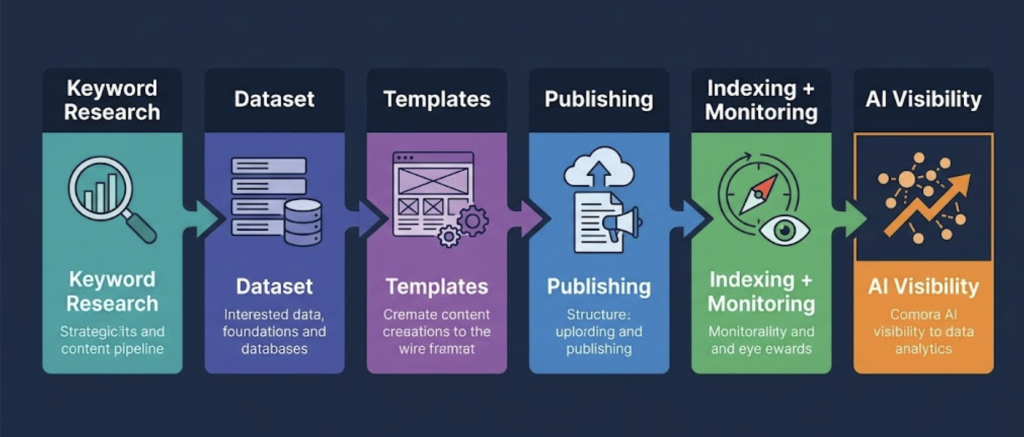
Programmatic SEO is six distinct jobs. Keyword research. Dataset building. Template design. Publishing at scale. Indexing and monitoring. And in 2026, a sixth function most stacks completely skip: AI search visibility. Miss one layer and your pages either don’t get built, don’t get indexed, or don’t get found anywhere a real buyer might look.
Most programmatic SEO tools articles hand you a flat list of 12 products. Wrong framing. Here’s what the stack actually looks like – layer by layer, best tool per function, and how the pieces connect.
What the Stack Actually Looks Like?
SaaS companies now attribute 35–45% of their organic traffic to pSEO pages, up from 20–25% in 2024. The teams behind those numbers aren’t winging it, they’ve built a deliberate stack.
Six functions. One pipeline:
| Layer | Job | Entry-point budget |
| 1 — Keyword research | Find modifier pools, validate demand | $0 (LowFruits free) |
| 2 — Dataset building | Structure the data powering every page | $0 (Google Sheets) |
| 3 — Template building | Design the skeleton every variation inherits | $0–$29/month (WordPress) |
| 4 — Publishing at scale | Connect data → template → live pages | $0 (Make free tier) |
| 5 — Indexing + monitoring | Get indexed, track rankings, catch decay | $0 (Google Search Console) |
| 6 — AI visibility | Get cited in ChatGPT, Perplexity, Gemini | $0 (QuickSEO free) |
A gap at any one layer breaks the whole program. Most pSEO programs that stall are missing Layer 3 (solid templates) or Layer 5 (publish and forget). The ones newly failing in 2026? Layer 6.
Layer 1 – Keyword Research
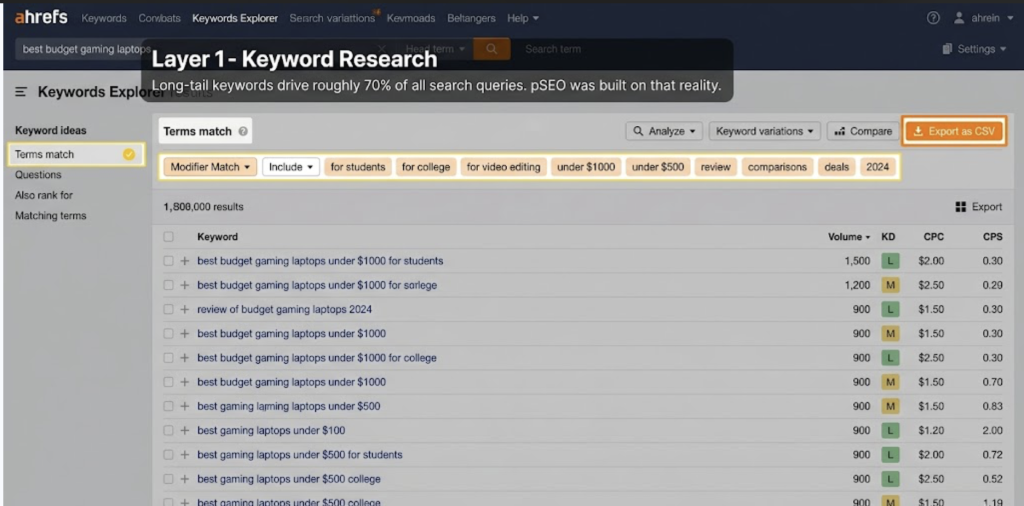
Long-tail keywords drive roughly 70% of all search queries! pSEO was built on that reality. But the job starts before you open any template builder.
- Ahrefs is the industry standard for modifier pool expansion. Drop a head term into Keywords Explorer, filter by “Terms match” or “Questions,” and you get thousands of keyword variations with volume, difficulty, and CPC. Export as CSV and it feeds straight into your data pipeline. The Site Explorer function lets you reverse-engineer competitors: drop in their domain, filter rankings by a head term, and their entire modifier pool is mapped. Starts at $129/month.
- Semrush’s Keyword Magic Tool automatically clusters keywords by topic and modifier type. Enter a seed keyword and it shows which modifier groups have enough volume to justify a template build. Useful before you commit 500 pages to a cluster that gets 10 combined searches per month. Also tracks how your brand appears in AI-driven platforms, which ties directly into Layer 6. Starts at $139.95/month.
- LowFruits is purpose-built for finding low-competition keywords. It analyzes SERPs in bulk and flags queries where weak pages and forums, thin UGC, stale content, are ranking. Your template-generated pages have a realistic shot at outranking those. Good free tier available, and a practical starting point before committing to Ahrefs or Semrush pricing.
What breaks at this layer: sizing the total opportunity after you’ve already built the templates. Validate modifier pool volume before you start templating, not after.
Layer 2 – Dataset Building
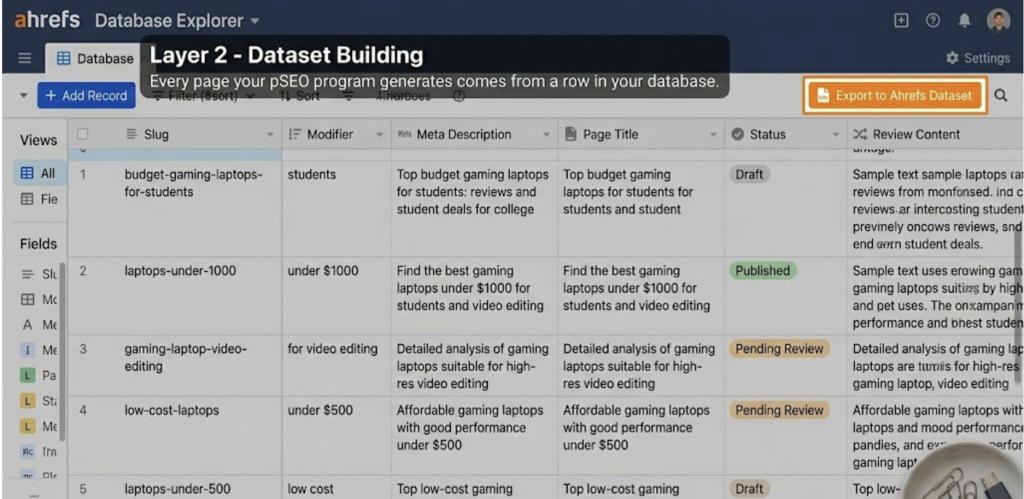
Your dataset is your long-tail keyword templates made concrete. Every page your pSEO program generates comes from a row in your database. Thin data means thin pages regardless of how clean your templates are.
- Airtable is the most common pSEO data layer. Relational database, clean API, visual interface that non-developers can actually work with. Free plan handles up to 1,000 records; paid plans start at $20/user/month. Most teams run keyword slug, page title, meta description, modifier value, and any dynamic content fields as columns. Use the free tier for a pilot; upgrade before the program scales.
- Google Sheets is free and deeply integrated with Webflow, Zapier, and Make. Works fine for programs up to ~500 pages. It starts showing cracks past that – version control gets messy, concurrent edits cause problems, complex filtering gets slow. Use it to prototype. Move to Airtable when it matters.
- Notion databases handle content-heavy datasets well and integrate natively with Zapier. Not the strongest choice for pure data volume, but if your pSEO pages are long-form guides rather than thin location-or-comparison pages, Notion’s editor makes drafting per-record significantly cleaner.
- Clay is worth knowing for data enrichment. It pulls real-time data from APIs – company information, review scores, stats, social proof – and injects unique, fresh content into each page. This is how you keep the average cost per pSEO page at $5–$50 while avoiding thin content. Versus $500–$2,000 per manually written page. The math is hard to argue with.
Layer 3 – Template Building
The most underinvested layer in most pSEO stacks, by a distance. Teams spend weeks on keyword research, hours setting up Airtable, and then knock together a template in an afternoon. That’s the layer that gets hit first when algorithm updates roll through.
- SEOmatic is purpose-built for programmatic page generation. It connects your dataset to a template and handles publishing without needing a developer. Visual template editor, variable insertion, bulk deployment with preview before you push hundreds of pages live. That preview matters – catching a template error before publishing is a very different problem than after. Good free trial available.
- Webflow CMS Collections work well for programs up to ~10,000 pages (Webflow’s CMS item limit). Each CMS item becomes a page following a shared Collection template. Connect Airtable or Google Sheets via Make or Zapier to auto-populate items from your dataset. Best for teams already on Webflow who want design control. Webflow published 300 programmatic pages in a single week and hit 6,000 daily impressions within six weeks.
- Framer is the newer alternative: faster page performance, cleaner component system, lower item limit. Best for design-forward teams on Framer who don’t need the page-count ceiling of WordPress.
- WordPress + WP All Import is still the workhorse for high-volume programs – 100,000+ pages. The plugin imports structured CSV or XML data and maps it to custom post types. More technical setup than Webflow or SEOmatic, but the scale ceiling is effectively unlimited.
What breaks here: templates that only swap one variable. If Page A and Page B differ by swapping “Austin” for “Dallas” in two fields, you have thin content at scale. Good templates pull multiple unique data points per page.
Layer 4 – Publishing at Scale
You have your data. You have your template. Now you need something to connect them and push pages live without clicking “publish” 2,000 times.
- Make (formerly Integromat) is the standard entry-level automation layer. Connect Airtable or Google Sheets to Webflow, WordPress, or Framer with a visual workflow builder. Free plan handles a solid mid-size pSEO program. Every new row in Airtable can trigger Make to create a CMS item in Webflow and publish it automatically.
- Zapier handles the same job with broader integrations, more polished UX, and a higher price point. Better for non-technical teams who want something that runs without configuration headaches. Premium tiers add up quickly for large programs, though.
- AirOps is a different animal. It’s an AI workflow builder for content teams running large-scale publishing – not just page generation. It handles content brief creation, AI-powered writing enrichment, and CMS publishing in a single chain. Integrates with Semrush for live SERP data, which lets templates stay fresh with real search context. Good for teams who want content at scale that doesn’t look or read like a template.
For technical teams: direct CMS API access. Write a script that reads from Airtable and pushes to Webflow or WordPress via API. Zero automation tool cost per run. Higher setup time, no per-task pricing at scale.
Common mistake at this layer: metadata. Title tag collisions, missing canonicals, duplicate meta descriptions across hundreds of pages. Build metadata fields into your dataset before you start publishing – not after.
Layer 5 – Indexing and Monitoring
Publishing 2,000 pages doesn’t mean 2,000 indexed pages. And indexed today doesn’t mean indexed in six months – content decay is a real threat at scale.
- Google Search Console is free and non-negotiable. The Coverage reports tell you what’s indexed, what’s crawled but not indexed, and what’s blocked. “Discovered – currently not indexed” is the first warning sign for a pSEO program. Check indexation rates weekly during launch. When pages start losing rankings, catching it early is the difference between a quick fix and a months-long recovery.
- IndexNow is the underused free API that notifies Bing (and signals Google’s crawl pace) at the moment of publishing. Properly structured pSEO pages index 60% faster than manual content, and IndexNow is part of why. Most CMS platforms and page generation tools support it natively or via plugin.
- Ahrefs Rank Tracker and Semrush Position Tracking both give you cluster-level views of ranking performance across thousands of pSEO pages. Individual URL monitoring doesn’t work at this scale – you need group-level alerts for drops above five positions. Catching a dip at week two is very different from noticing it at month four.
129 of 130 sites hit by Google’s Helpful Content Update never recovered. Per Lily Ray’s analysis. Most had no monitoring when the drop started. By the time they noticed, recovery was already off the table.
Monitoring isn’t where teams want to spend their budget. It’s where most lose their rankings.
Layer 6 – AI Search Visibility (The Layer Most 2025 Guides Missed)
Your pages can rank on page one of Google and still be invisible to a growing slice of your audience. That’s the 2026 reality.
- Gartner predicts traditional search volume will decline 25–50% by 2028. McKinsey projects $750 billion in consumer spending will flow through AI search. The long-tail queries that make pSEO profitable are exactly the queries migrating to ChatGPT and Perplexity fastest.
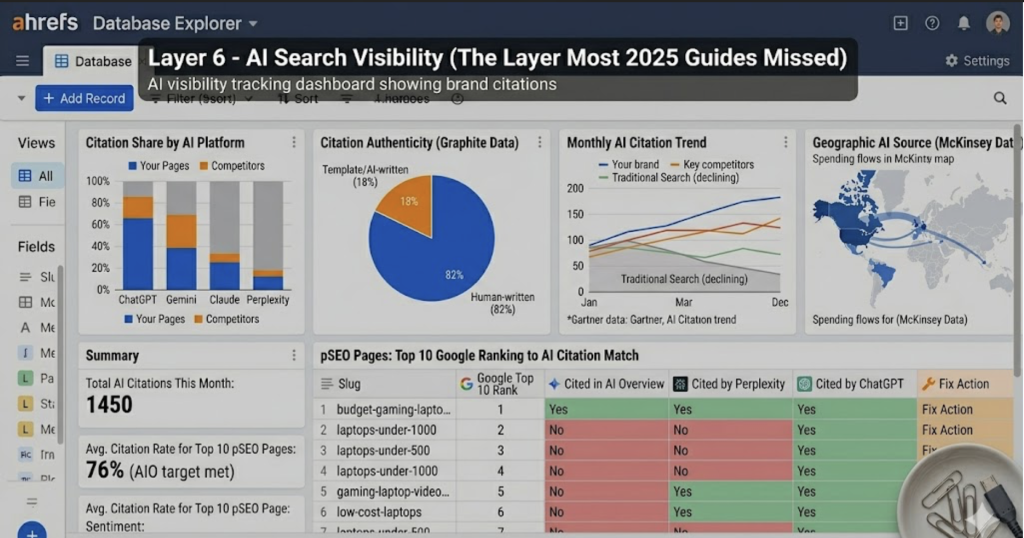
- The challenge for pSEO specifically: template-generated pages struggle to get cited by AI. 82% of articles cited by ChatGPT and Perplexity are human-written (Graphite research). Only 14% of AI-written articles rank in Google. The production economics of pSEO still work – but the ranking economics are tighter than they look on paper.
- Here’s the partial fix. 76% of AI Overview citations come from URLs already ranking in Google’s top 10. Get your pSEO pages ranking in Layers 1–5, and AI visibility partly follows. But you need to know which pages are getting cited and which aren’t.
- QuickSEO tracks brand mentions and page citations across ChatGPT, Claude, Gemini, and Perplexity. Shows which prompts surface your content, how often, how that compares to competitors. Free tier available.
- Semrush AI Toolkit / Enterprise AIO monitors brand presence across AI platforms with sentiment scoring and share-of-voice data. Overkill for small programs; worth it at real scale where AI citations are a measurable pipeline input.
On the content side: generative engine optimization for pSEO pages means schema markup, direct factual sentences, entity-rich content that clearly identifies the page topic, and real external citations. The AI search citations go to templates that look like well-sourced reference pages – not thin location-swapper pages with one unique sentence per URL.
Ignoring AI search visibility in 2026 is roughly the equivalent of ignoring mobile optimization in 2015. You have a window to get ahead of most competitors who are still running five-layer stacks.
Putting the Stack Together
The data flow is linear:
- Ahrefs (keyword CSV) → Airtable (dataset) → SEOmatic or Webflow (pages) → IndexNow + GSC (indexing) → Rank Tracker (monitoring) → QuickSEO (AI visibility)
- Two budget configurations that actually work:
- Lean/free-first (~$0–$50/month): LowFruits free + Google Sheets + WordPress + WP All Import + Google Search Console + QuickSEO free plan. Runs a real pSEO program. Hits limits around 500 pages but covers all six functions.
- Mid-market (~$400–$550/month): Ahrefs Lite ($129) + Airtable ($20) + Webflow CMS ($29) + Make ($9) + Semrush Pro ($139.95) + QuickSEO paid. Scales cleanly to 10,000 pages with portfolio visibility across Google and AI search.
The stack is only as strong as its weakest layer. Spend heavily on keyword research and skip monitoring — you lose rankings without knowing it. Publish at scale without Layer 6 – you’re building organic traffic on a foundation that’s actively shrinking.
Start with the layer you’re actually missing.
FAQs
Regular SEO tools, Ahrefs, Semrush, Surfer, handle research, auditing, and tracking for manually written content. Programmatic SEO tools are the additional layer that automates dataset building, template-to-page generation, and bulk publishing. In practice, most pSEO stacks use the traditional tools at Layers 1 and 5, then add purpose-built tools (SEOmatic, Webflow CMS, Make) for Layers 2–4. Different job, same team.
Yes. SEOmatic, Webflow CMS Collections, Make, and Google Sheets can run a complete pSEO program without writing any code. Technical teams can push further via direct API publishing, but the barrier to entry is lower than it was two years ago. Most small teams start on the no-code stack and bring in a developer only when scaling past ~5,000 pages.
Thin content usually comes from templates that swap a single variable across every page. The fix is richer data: pull multiple unique data points per page (reviews, statistics, comparisons), vary sentence structures across different page clusters, and use Clay-enriched data for competitive topics. Pages that answer a specific question with specific data hold up through algorithm updates.
Genuinely $0 for a pilot. LowFruits free tier + Google Sheets + WordPress + WP All Import + Google Search Console + QuickSEO free plan covers all six stack layers. You’ll feel the limits around 300–500 pages, but that’s enough to validate the strategy before committing to paid tools.
For low-competition keywords on an established domain: initial rankings in 7–14 days. Meaningful traffic: 4–8 months. Top implementations see 300–500% organic traffic growth within 6 months, but those programs have strong datasets, solid templates, and active monitoring. Not set-and-forget.