
Pages at the top of Google have 3.8 times more backlinks than pages in positions 2–10. You probably knew links mattered. What’s less obvious is how quietly you can lose them – not to a competitor, not to an algorithm update, just to a 404 nobody noticed.
Broken links are the slow leak in your SEO strategy. You spend months building a solid backlink profile, restructure your site (or let a vendor do it), and a chunk of that link juice starts draining into dead URLs. The frustrating part? Most guides on this treat “broken links” as one problem.
It’s not. There are three separate problems. Each needs a different fix.
Here’s how to find all three, prioritize what actually matters, and recover equity that’s already yours.
What Actually Happens When a Link Goes Broken?
Think of link equity like water through a hose. When the hose is intact, water flows from the source to the destination. A 404 is a hole in the hose. The equity doesn’t get redistributed — it evaporates. Got a DR 70 site linking to a dead URL on your domain? That authority is going nowhere useful.
There’s a crawl budget problem too. Every time Googlebot follows a link and hits a 404, that request is wasted on a dead end instead of indexing content that actually exists. On large sites, entire sections can go weeks without being recrawled because the crawler spent its budget chasing ghosts.
Users notice, too. A broken link in a blog post signals something they won’t always say out loud: if the links are broken, the information might be outdated. Trust erodes fast.
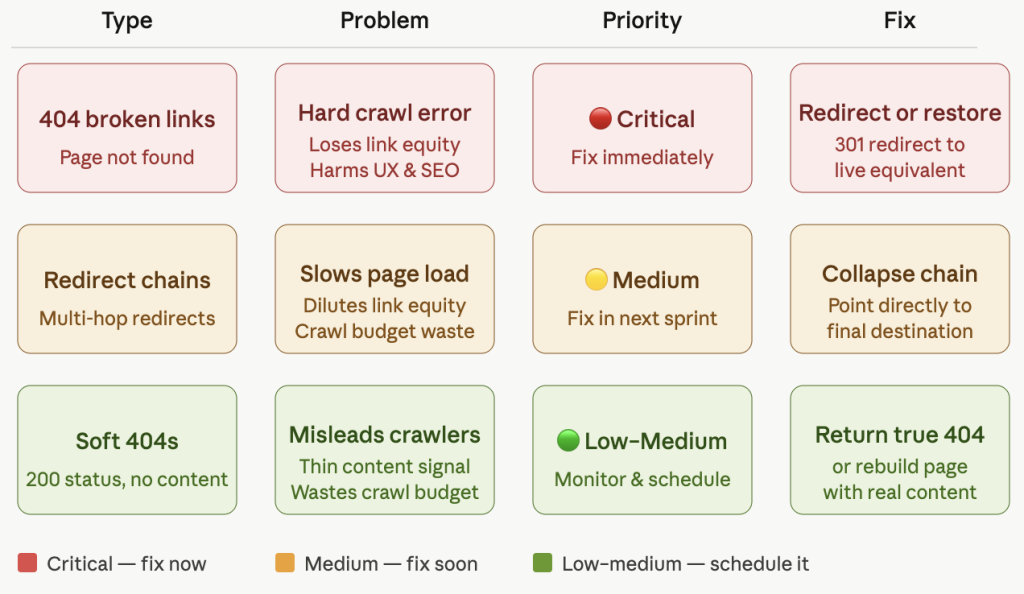
Here’s the complication — “broken links” is actually three different problems wearing the same hat.
The Three Broken-Link Problems (And Why They’re Different)
Before you open any tool, get clear on which problem you’re solving. Most people conflate these and end up fixing the wrong thing first.
Problem 1: Broken internal links. A link on your site pointing to another page on your site that’s dead. Deleted the page, changed the slug, restructured your URL hierarchy – happens all the time. You control these entirely. Fix priority: high.
Problem 2: Broken outbound links. A link on your pages pointing to someone else’s content that’s since gone dead. You’re not losing link juice here (you’re sending it, not receiving it), but it’s bad for user experience and makes your site look neglected. Fix priority: medium.
Problem 3: Broken backlinks. Other sites linking TO pages on your domain that no longer exist. This is the real equity problem. That external site’s authority is flowing toward a 404. Fix priority: high.
| Problem | Who Controls It | Link Juice Impact | Your Fix |
| Broken internal links | You | Pages lose internal equity | Redirect or fix the URL |
| Broken outbound links | External site | You’re sending juice to a dead page | Update the href |
| Broken backlinks | External site → your domain | You’re losing incoming equity | 301 redirect or outreach |
Each one gets its own step. Don’t skip ahead.
Step 1: Find Your Broken Internal Links
Start here. These are entirely under your control and usually quickest to fix.
Google Search Console (free): Pages → Not Found (404). GSC surfaces every broken URL it’s crawled recently. Not exhaustive, but zero setup and a solid first pass.
Screaming Frog (free up to 500 URLs): Enter your domain, run the crawl, then click the Response Codes tab. Filter by Client Error (4xx). Click the Inlinks tab, and you’ll see exactly which source pages are pointing to each broken URL. Full picture – dead URL plus where it’s coming from.
Once you’ve got the list, sort by how many internal links point to each broken page. Twelve internal links pointing to a 404 is a bigger fire than one nobody links to.
One thing that catches people: don’t redirect everything to your homepage. It feels tidy. It isn’t. Google treats homepage redirects as soft 404s — the link juice still evaporates. Always redirect to the most relevant live page. No relevant page? That’s your signal to recreate the content.
Step 2: Hunt Down Your Broken Backlinks
This is where real link equity recovery happens. Someone else’s site is pointing at your dead URL. Fixing this means capturing equity you’ve technically already earned.
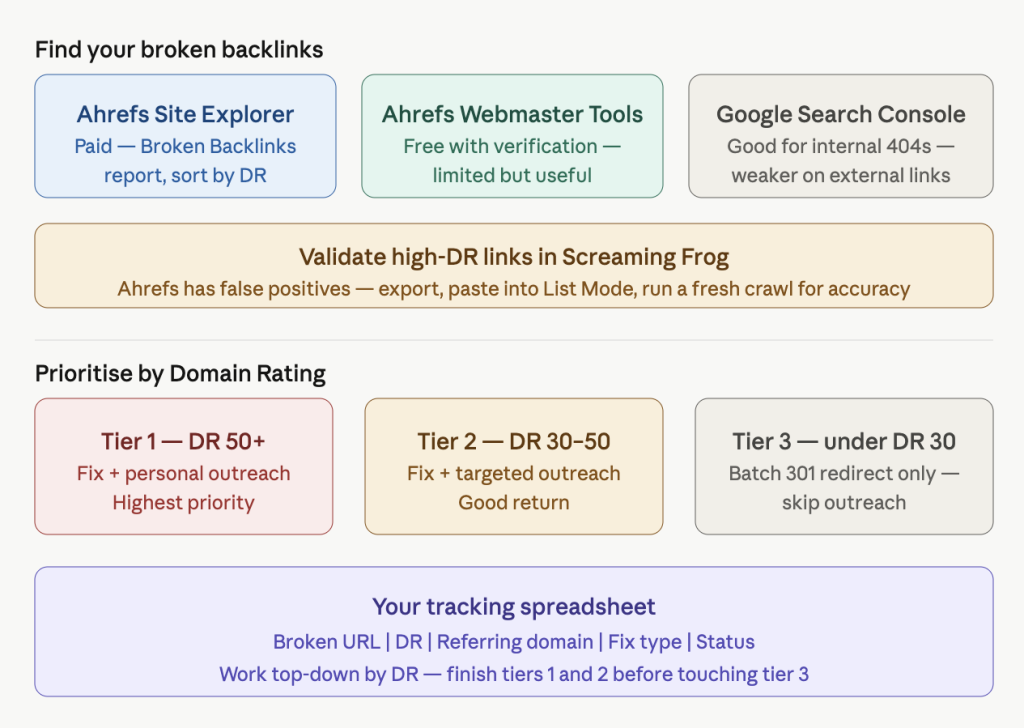
Ahrefs Site Explorer(paid): Your domain → Broken Backlinks report. Filter for Dofollow, 404 Not Found, sort by Domain Rating. Your highest-DR broken backlinks are where to start.
Ahrefs Webmaster Tools (free, with domain verification): Verify your site, and you get limited but useful broken backlink data without a subscription. Worth doing before you commit to a paid plan.
One thing that often gets skipped: Ahrefs’ Broken Backlinks report has false positives. It flags live URLs as broken and misses some real ones. For anything high-DR, export the full backlink list, paste the target URLs into Screaming Frog’s List Mode, and run a fresh crawl. More accurate than either tool on its own.
Google Search Console: Useful for internal 404s. Less thorough than Ahrefs for external backlinks, but worth checking.
Build a working spreadsheet: broken URL | DR of referring domain | referring domain | fix type | status. DR 50+ is tier one. DR 30–50 is tier two. Under 30, batch fix with 301s and skip outreach — the return doesn’t justify the time.
Step 3: Fix and Recover (Your Priority Playbook)
You’ve got a list. Work through it in order.
Tier 1: High-DR broken backlinks and heavily linked internal pages: Set up a 301 redirect from the broken URL to the closest relevant live page. A 301 tells Google the page has permanently moved and transfers most of the link equity. “Most” isn’t “all” – a Moz case study found redirects can cause up to a 15% drop in organic traffic per hop, but it beats a 404 by a long margin.
Redirect chain warning. If you already have redirects in place and you’re stacking another hop — A goes to B, which goes to C — you’re diluting equity with every jump. Google recommends redirecting directly to the final destination and keeping chains as short as possible. Before adding a new redirect, check whether you’re building on top of an existing one.
Tier 2: Pages with significant backlinks but no good redirect target: Recreate the page. If a dead URL has 15 referring domains and there’s nothing close to redirect to, a homepage redirect is essentially a waste. A shorter, updated version of the original content lets those backlinks flow correctly again.
Tier 3: Broken outbound links: Find the dead href, update it to the correct URL or remove the link. Check web.archive.org for the dead URL — that’ll tell you what the page used to contain and whether there’s a live replacement worth linking to.
Step 4: Reach Out When You Can’t Control the Fix
301 redirects handle the equity problem on your end. But if a referring site has your old URL hardcoded with a typo, or linked to a page from before a domain change, no redirect will fix it. The page they’re linking to doesn’t exist on your domain. Period.
That’s when you email.
Cold outreach succeeds at a painful rate – only 8.5% of outreach emails get a response. Broken-link outreach is different. You’re not asking for a favor. You’re flagging their broken link and handing them a fix. That distinction matters. Use an email outreach platform to set up and launch a broken links campaign. For teams managing outreach campaigns at scale, Outreach Empress can help organise and streamline the outreach process.
Keep it short:
Subject: Broken link on [their page title]
Hi [Name],
Quick heads-up – the link on your [article title] page pointing to [broken URL] returns a 404.
We moved that content to [new URL]. Happy for you to update the link if it’s still useful to your readers.
Either way, hope it helps!
[Your name]
Under 80 words. No pitch. No attachment. You’re solving their problem and let that do the work.
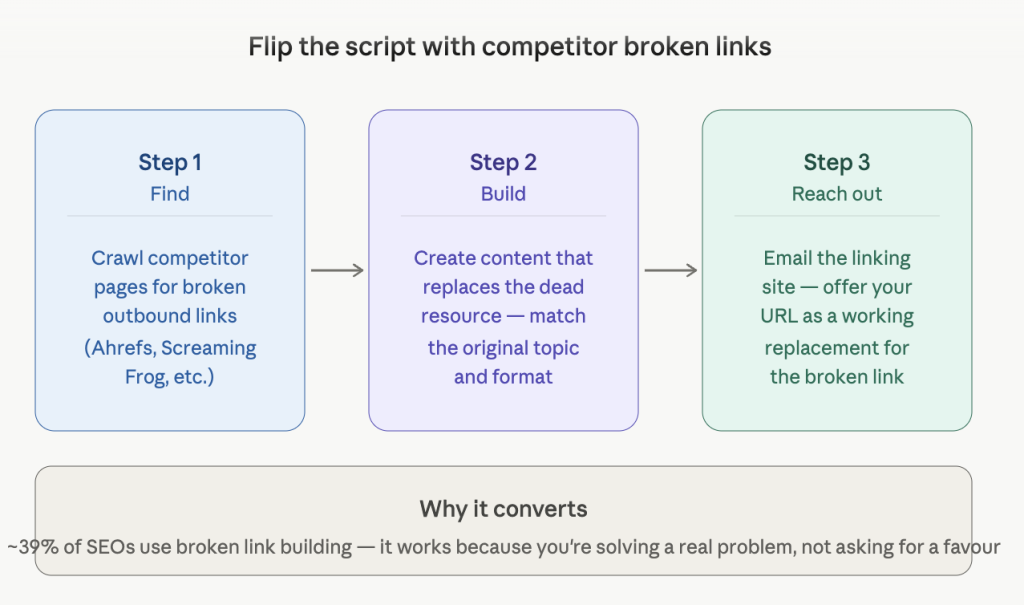
Bonus – Flip the Script With Competitor Broken Links
The same workflow applies to your competitors. Find their pages with broken outbound links, build content that replaces the dead resource, and reach out with your URL as the replacement.
Around 39% of SEOs already use broken link building as a link acquisition tactic. The reason it converts better than cold outreach is the same reason your own reclamation emails work: you’re solving a real problem instead of asking for something.
The Links You’ve Earned Are Worth Protecting
Link building is slow. A broken-link cleanup isn’t glamorous work, but it’s the fastest form of link building you’ll ever do — because you’ve already done the work.
Run a quarterly audit. GSC plus Screaming Frog takes under two hours on most sites. Ahrefs Webmaster Tools covers your broken backlink exposure without a subscription. And if you catch a broken link before Google’s crawl budget cycles through it, you’re recovering equity that hasn’t fully drained yet.
The links you’ve built are your ranking capital. Don’t let them rot.
FAQs
Mostly, yes. A 301 transfers the bulk of link equity from the broken URL to the destination page. There’s a small loss in the transfer — research suggests up to 15% per redirect hop — but it’s dramatically better than leaving a 404 in place. The key: redirect to a topically relevant page, not your homepage. Google treats homepage redirects as soft 404s and passes almost no equity through them.
Quarterly works for most sites. Done a recent migration, rebrand, or URL structure change? Run one immediately and again 30 days later. Screaming Frog and Google Search Console together cover both internal and external broken links in under two hours.
A broken backlink points from someone else’s site to a page on yours that returns a 404 — fixable with a redirect or outreach. A lost backlink is one where the referring site removed the link entirely or took down the page — that one’s gone, and reclaiming it typically requires fresh outreach from scratch.
Not directly in terms of link juice — outbound links don’t bring equity in. But broken outbound links signal neglect to both users and crawlers. If Googlebot repeatedly finds broken external links on your site, it can affect how your content is evaluated for freshness and quality. Worth fixing, but prioritize your broken backlinks first.
You may also like: