
Here’s a number that should bother you: around 96.55% of pages get no traffic from Google at all, per an Ahrefs study. And of the pages that do earn traffic, a good chunk are quietly losing it right now. Not because of a penalty. Not because of a migration gone wrong. Just slow, silent erosion nobody notices until the quarterly numbers land.
Most SEO audit checklists won’t help you with that. They’re built to find broken things: a stray noindex tag, a redirect chain, a failing Core Web Vital. Useful stuff. But a broken canonical tag gets fixed once and it’s done. A page that’s slowly bleeding traffic keeps bleeding for months while your checklist says everything’s green.
So this one does both. The full technical and on-page audit every guide covers, plus a second pass that catches the pages sliding out from under you.
What an SEO audit actually is (and the one thing most checklists skip)
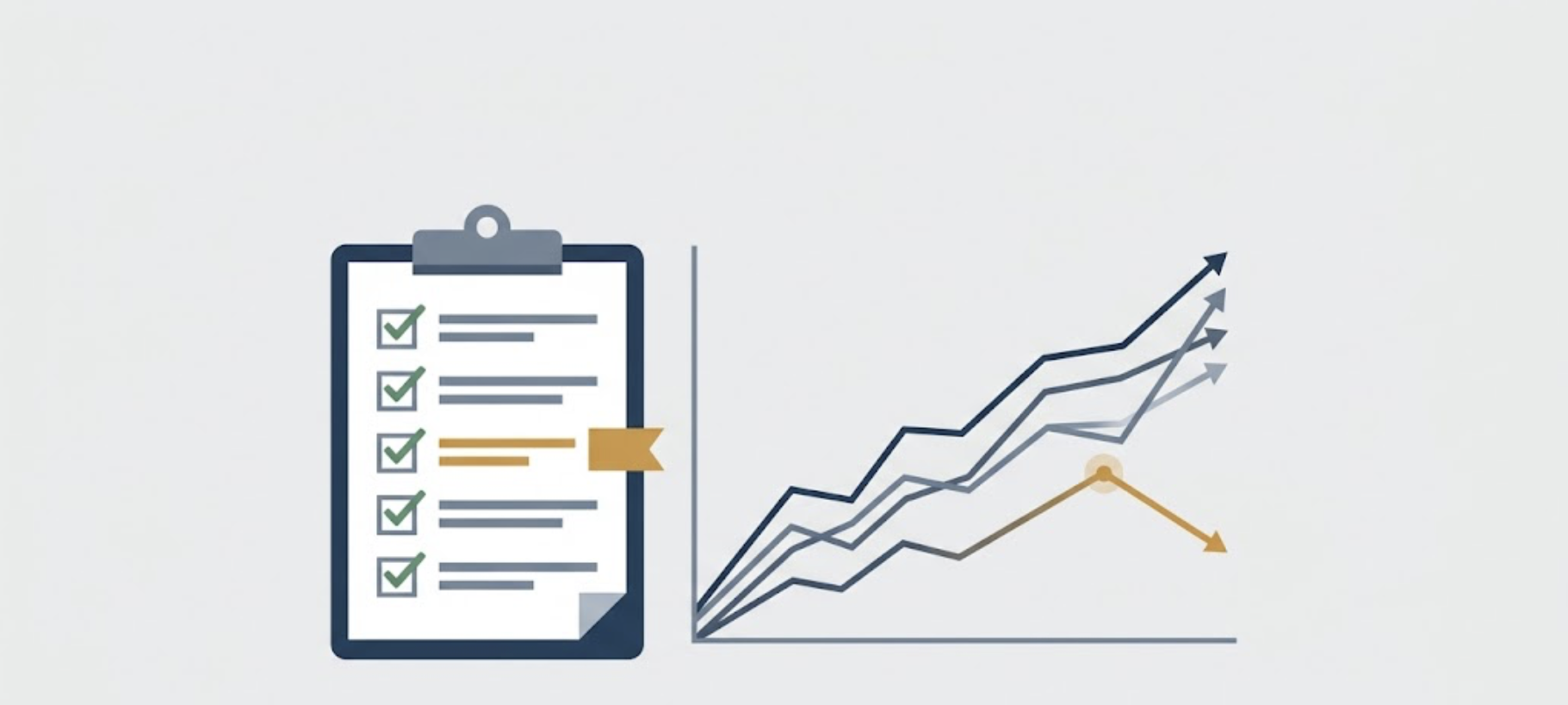
An SEO audit is a structured review of everything affecting whether your site can rank and hold onto organic traffic. Crawlability, technical health, on-page factors, links, content quality. Run the list, flag the problems, fix them in priority order.
That’s the standard audit. It’s a broken-things audit.
The problem? It treats your site like a snapshot. Fix the red flags today, come back in a quarter. What it misses is everything degrading between audits: pages that ranked beautifully last year and sit three positions lower now, shedding clicks a little at a time.
This is content decay, and it slips past most people for a dumb reason. It’s boring. Your sitewide clicks dashboard looks fine because new pages mask the dying ones, as one SEO teardown puts it. Total traffic holds steady while individual winners quietly rot. You only see it if you look page by page, over months, not days.
So think of this checklist in two parts. Part 1 is the standard audit, the stuff that’s broken. Part 2 is the decay pass, the stuff that’s dying. You need both.
Before you start: the tools and setup
You don’t need an expensive stack. The free core covers most of it:
- Google Search Console — indexing, impressions, clicks, and position data
- Google Analytics 4 — engagement and conversion behavior
- PageSpeed Insights — Core Web Vitals with real field data
- A crawler — Screaming Frog’s free tier handles up to 500 URLs
- A rank/backlink tool — Ahrefs or Semrush for the off-page and decay work
One setup note matters more than people realize. GSC only keeps about 16 months of performance history. That window is your decay baseline. Haven’t connected Search Console yet? Do it today, because the clock on your historical data is already running.
Set your scope before you start. Auditing a 2,000-page site the way you’d audit a 30-page site is a recipe for never finishing. Begin with your priority templates and top pages, then work outward.
Part 1: Crawlability and indexation
If Google can’t crawl and index a page, nothing else on this list matters. Start here.
- robots.txt. Read every line. Watch for accidental blocks. Entire blog directories get disallowed by mistake and sit that way for months before anyone notices the traffic gone quiet.
- XML sitemap. Confirm it exists, is referenced in robots.txt, and contains only your canonical, indexable URLs. Broken sitemaps turn up on roughly one in four sites, according to one agency’s audit data. More common than you’d think.
- noindex tags. Check both the HTML meta robots tag and the X-Robots-Tag header for pages that should be indexed but aren’t. CMS updates and staging-to-production pushes are the usual culprits, and they’re sneaky because the page looks perfectly normal to a human visitor.
- Canonical tags. Every indexable page should carry a self-referencing canonical. Mismatches between canonicals, sitemaps, and internal links confuse Google more than most people expect, and that confusion shows up as pages Google refuses to rank.
- Orphan pages and soft 404s. Orphans are pages with no internal links pointing to them, so Google struggles to find or value them. Soft 404s return a 200 status while showing empty or error content, which wastes crawl budget on pages that help nobody.
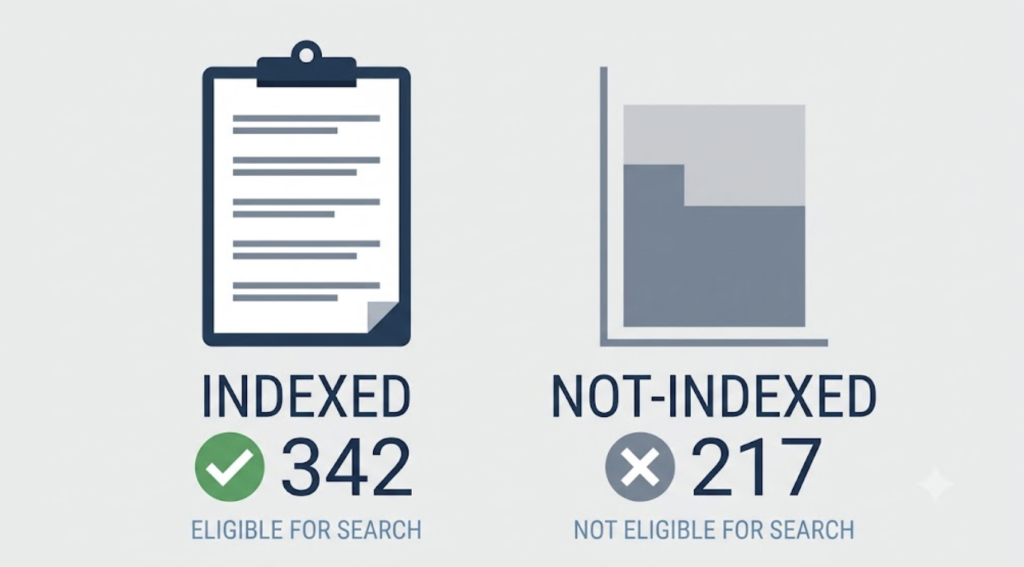
Then open the Pages report in GSC and check the indexed count against what you actually want indexed. Big gap? That’s your first work order.
Part 1: Technical health: status codes, redirects, HTTPS
With crawlability sorted, look at how your pages respond.
Status codes first. Important pages should return 200. Retired pages should 301 to a relevant replacement, not the homepage, which just throws away whatever link equity those old URLs built up over the years. Keep an eye out for 4xx and 5xx errors too, especially the 5xx ones that only surface under load and vanish when you check manually.
Redirects are the next trap. Chains that hop through two or three URLs lose equity at each step, and redirect loops break things outright. Point internal links straight at the final destination so nothing leaks along the way.
Check that HTTPS is clean, with no mixed content, meaning pages loading images or scripts over plain HTTP. Browsers flag it, and it dents how secure your site looks to both users and Google.
Last, run the whole thing on a phone. Mobile rendering issues still tank sites that look flawless on desktop, and mobile is where most of your visitors actually are. Tap through the navigation, check that text is readable without zooming, and confirm buttons aren’t crammed together.
Part 1: Page speed and Core Web Vitals (with the 2024 change most checklists missed)
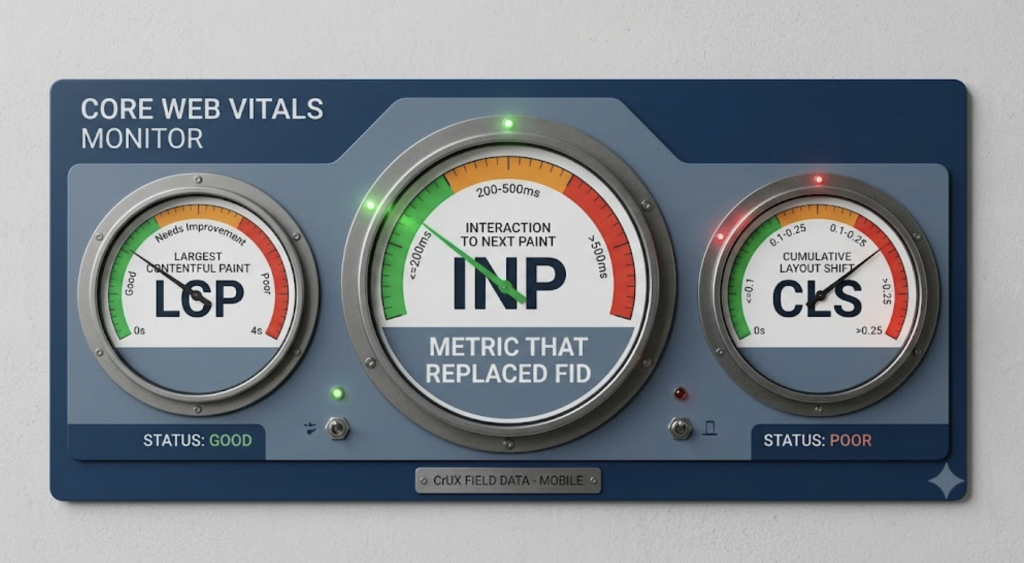
Core Web Vitals are three metrics. LCP measures how fast the main content loads. INP measures how fast the page responds to interactions. CLS measures how much the layout jumps around while loading.
Now the part a surprising number of checklists still get wrong. INP replaced First Input Delay on March 12, 2024, and FID was deprecated in that switch, as Google’s Search Central team documented. So if the checklist you’re following still tells you to measure FID, it’s out of date. That’s a quick way to spot a guide nobody’s touched in two years.
The INP thresholds are worth memorizing: 200 milliseconds or less is good, 201 to 500 needs improvement, anything over 500 is poor. And only about a third of sites pass all three Core Web Vitals, per Ahrefs data reported by RebelMouse. So if you’re failing, you’re in crowded company. There’s also real ground to gain, since most of your competitors are stuck in the same spot.
Pull your numbers from field data in PageSpeed Insights, not just the lab score, because lab scores run on ideal conditions your real visitors never get. And don’t only test the homepage. Test a blog post, a product page, a category page. The templates carrying your actual traffic are the ones that need to pass.
Part 1: On-page SEO
On-page SEO is where most sites have easy wins sitting untouched.
Titles and meta descriptions come first. Every page needs a unique, front-loaded title that fits without truncating in the SERP, plus a description written to earn the click rather than just describe the page. Then one H1 per page, with H2s and H3s in a logical hierarchy underneath. Pick them for how they structure the content, not for how they look.
Check intent match next. Does each page actually answer the query it targets, or has it drifted? While you’re there, hunt for cannibalization. Two pages chasing the same keyword split their own clicks and neither one wins.
Images need descriptive alt text (accessibility first, keywords a distant second) and should be compressed and sensibly named instead of IMG_4471.jpg. Then validate your structured data, because broken schema fails silently and you’d never know from looking at the page.
Get this consistent and your on-page SEO stops leaking the small signals that quietly add up to lower rankings.
Part 1: Site architecture and internal linking
The way your pages connect tells Google which ones matter.
Map your click depth. Can a crawler reach your important pages within three clicks of the homepage? Anything buried deeper gets crawled less often and tends to rank worse, simply because Google treats hard-to-reach pages as lower priority.
Fix broken internal links. Every internal 404 is a dead end for users and crawlers both. Look at your anchor text while you’re in there. If every link to your pricing page says “click here,” you’re wasting a signal that should be describing the destination for Google.
Group related content into topic clusters and link them together. It’s one of the clearest ways to build topical authority, and it’s mostly free labor you already control. Breadcrumbs with proper structured data help too, reinforcing your site architecture for people and search engines alike.
Part 1: Off-page: the backlink profile
Your backlink profile is the part of the audit you have the least direct control over, which is exactly why it needs attention.
Quality beats quantity, and it isn’t close. A handful of real editorial dofollow links from relevant sites does more than hundreds of spammy directory or PBN links. So the first job is honest assessment: how many of your referring domains are actually legitimate, and how many are noise you’d be embarrassed to show Google?
Scan for toxic links, but resist the urge to disavow everything that looks slightly off. Google ignores most junk on its own, and aggressive disavows can backfire by cutting links that were quietly helping. Save the disavow file for genuine, manipulative spam.
Then look at anchor text distribution and your referring-domain trend over time. Flat or declining? Compare against a competitor who’s outranking you and the gap usually jumps out fast.
Part 1: Content quality and E-E-A-T
Google’s February 2026 core update rewarded three things: depth, real human experience, and regular upkeep. It favored those over big archives nobody maintains (Memorable Design). That tells you where the E-E-A-T bar sits now.
Look for thin or duplicated pages. Look for stats that have aged out. And look for missing expertise signals: author bios, credentials, and first-hand experience that proves you know the topic instead of paraphrasing whatever ranked.
Here’s the thing about content quality, though. It isn’t fixed. A post that was excellent in 2023 can be weaker today without one word changing. The world moved and the page didn’t. Quality decays. Which is the bridge into the half of the audit almost nobody runs.
Part 2: The decay pass: auditing what’s quietly losing traffic
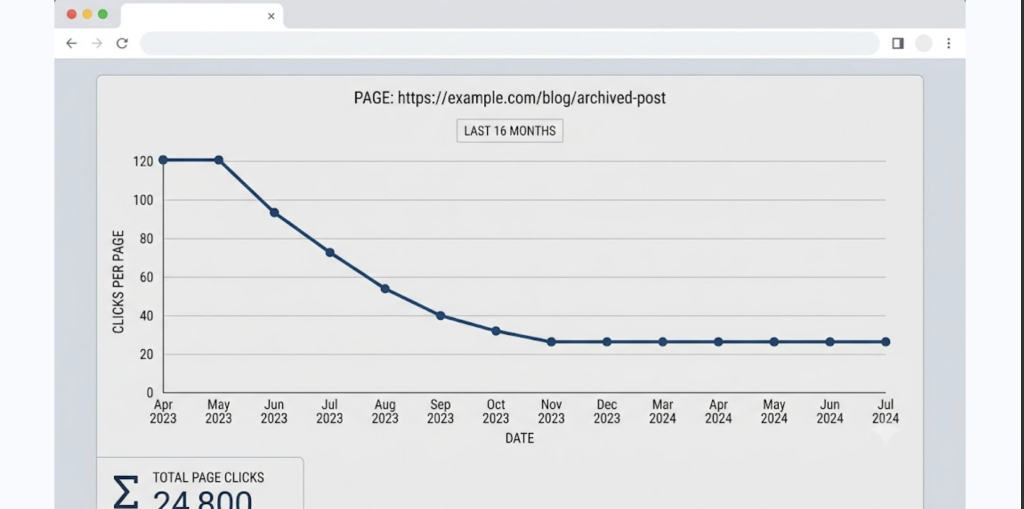
Content decay is the gradual, sustained decline in clicks and rankings on pages that used to perform. No penalty notice. No alarm in Search Console. The page just earns a little less each month until one day it’s off page one and you’re left wondering what happened.
The typical damage is steep. A decaying page tends to lose 20 to 40% of its organic clicks over roughly 8 to 18 months (User Growth). Slow enough that no single month looks alarming. Add it up across a whole content library and it’s the difference between a site that compounds and one that stalls out.
So how do you catch it? Open GSC and compare organic clicks per page across the full 16-month range. Not month over month, which hides the trend, but the long view. Watch for the tell-tale pairing: average position drifting up (that’s worse) while CTR drifts down.
There’s a quick diagnostic for sorting what you’re actually looking at, drawn from Conbersa’s breakdown of organic decline:
- Impressions and rankings both dropped → probably a technical or algorithm issue, so head back to Part 1.
- Impressions steady but clicks fell → AI answers or SERP features are eating your clicks.
- Some pages sliding while others hold → page-level content decay.
The causes cluster into five: search intent shifted, competitors published something fresher, your information went stale, internal links broke, or AI-generated answers absorbed the clicks. Each one has a different fix, which is why naming the cause always comes before the refresh.
This is the pass that’s genuinely tedious to run by hand every month, and it’s exactly what WordPattern was built to automate, surfacing pages that have started sliding before the loss shows up in a report you have to explain to your boss. The manual version works fine. It just doesn’t get done consistently, and content decay punishes inconsistency more than almost anything else in SEO.
Part 2: The AI-citation decay curve (the newest blind spot)
There’s a second kind of decay that breaks the usual rules, and it’s spreading fast.
Normally, losing traffic means losing rank. Not here. Your page can hold position one and still lose traffic, because AI Overviews and answer boxes have expanded above you and now answer the query before anyone scrolls to your result. A number-one informational page can shed 20 to 30% of its CTR as AI Overviews spread to more query types, based on ContentForce’s decay analysis.
This isn’t a blip to wait out. AI search users are projected to grow from roughly 13 million to 90 million by 2027. The SERP is being rebuilt around AI answers, and “rankings fine, traffic down” is on its way to becoming a routine diagnosis.
The audit move here: check whether your best informational pages are structured to be the source AI pulls from. Tight, direct answers in the first 100 words, backed by clean schema, raise your odds of being the cited page instead of the buried one below the fold.
Part 2: Prioritize: what to fix, refresh, or prune first
You’ve now got two lists. Broken things from Part 1, decaying things from Part 2. Fixing them in the order you found them is a mistake. So is the single most common approach out there: working through decaying pages alphabetically (gwcontent). That’s effort with no strategy behind it.
Prioritize your decaying pages by three factors, multiplied together:
- Historical traffic peak — how much this page can realistically win back.
- Business relevance — does it drive leads, sales, or signups, or just vanity pageviews?
- Realistic recovery ceiling — can it actually climb again, or has the SERP moved on for good?
A page that once pulled serious traffic, still has backlinks, and targets an intent that’s still relevant goes straight to the top of the refresh pile. A page with no backlinks, no business value, and an intent the market abandoned? Don’t refresh it. Consolidate it into a stronger page or prune it entirely.
For the technical fixes, a plain impact-versus-effort matrix does the job. High impact, low effort goes first. Obviously.
The payoff makes the sorting worth it. A targeted refresh recovers most decaying pages within about 4 to 12 weeks. Fast return for work you’ve already scoped.
Make it a system, not a one-off
An audit you run once is a fire drill. An audit you run on a rhythm is an early-warning system. Big difference.
A sensible cadence looks like this. Run the full Part 1 technical audit quarterly, plus any time you migrate, redesign, or watch traffic suddenly drop. Run the Part 2 decay pass monthly, on your top 100 to 500 URLs by sessions and conversions. That’s where the traffic and the risk both concentrate.
Most teams never do this. They pour effort into launching new content and almost none into maintaining what they’ve already got (ALM Corp). Which is precisely why the decay pass is such an edge. Most of your competitors aren’t running it. Keeping continuous decay monitoring going is what makes the monthly rhythm realistic, instead of spelunking through Search Console by hand every single time.
Conclusion
A real SEO audit does two jobs. It finds what’s broken, and it finds what’s quietly dying. Most checklists stop at the first, which is why so many sites pass every technical check and still lose traffic year over year.
The decay pass and the prioritization framework are what turn a pile of findings into an actual recovery plan. One that tells you not just what’s wrong, but what to fix first and what to leave alone.
So run the standard checklist once to clear the obvious problems. Then set up the recurring decay pass. That second habit is the one that compounds, and it’s almost certainly the one your competitors haven’t built yet.
FAQs
Run a full technical audit quarterly, and any time you migrate your site, redesign, or see a sudden traffic drop. The content-decay pass should happen more often. Monthly is ideal, focused on your top 100 to 500 pages by traffic and conversions. Decay moves slowly, so catching it early is the whole game.
An SEO audit covers everything affecting rankings: technical health, crawlability, on-page factors, links, and content. A content audit is narrower, focused specifically on your existing pages and what’s performing, decaying, or worth pruning. The decay pass in this checklist is basically a content audit folded into the larger SEO review.
Google Search Console and GA4 cover indexing, traffic, and engagement at no cost. PageSpeed Insights handles Core Web Vitals with real field data. Screaming Frog’s free tier crawls up to 500 URLs. You’ll want a paid tool like Ahrefs or Semrush for deep backlink and decay analysis, but you can get surprisingly far on the free stack alone.
Look at the trend over months, not weeks. Normal fluctuation bounces around a stable average. Decay is a sustained decline, a page steadily giving up clicks and drifting down in average position over 8 weeks or more, with no offsetting change in demand. Seasonality and time-bound topics decay naturally, so factor that in before you act.
Yes. Interaction to Next Paint replaced First Input Delay on March 12, 2024, and it’s a live Core Web Vitals metric measuring responsiveness. A good INP is 200 milliseconds or less. If a checklist still references FID, it hasn’t been updated since the change.