

You open Search Console and something looks off. Two of your own URLs are trading places for the same query, week after week. One week the older post sits at #8, the next week the newer one does. Neither cracks the top five. Neither converts.
Here’s the part that trips people up. Internal overlap like this is normal. In a 2026 analysis of 2,500 high-traffic keywords, the average successful site ranked about 4.7 different URLs for a single top keyword. So “you have overlap” isn’t the diagnosis. The real question is which overlap is quietly costing you rankings and which is doing no harm at all. Most advice skips that step and tells you to audit and merge. Then the problem comes back six months later, and you’re left wondering why the cleanup didn’t stick.
What content cannibalization actually is
Content cannibalization happens when two or more pages on your site compete for the same topic and search intent. Search engines can’t confidently decide which one deserves the spot, so instead of backing your strongest page, they split the ranking signals across both. Neither page ranks as well as one consolidated page would.
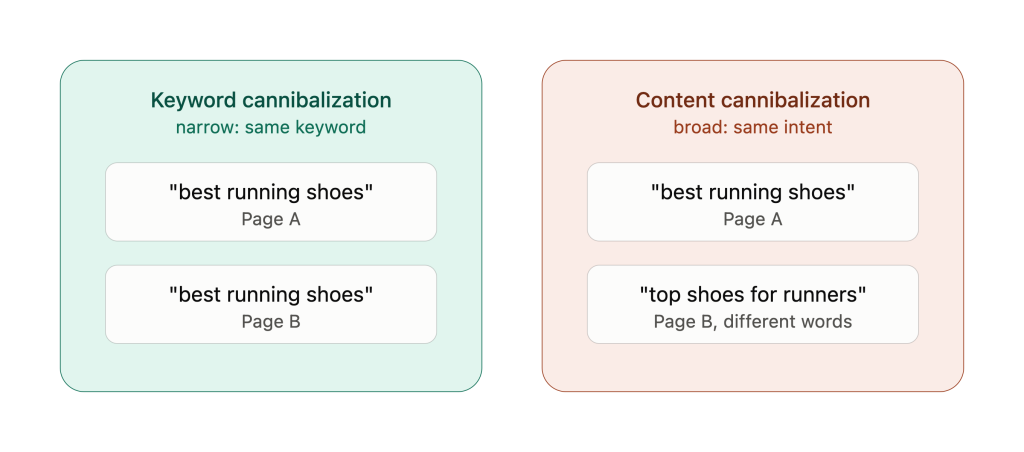
The nuance most definitions rush past: it’s about intent, not just the exact keyword. “Best running shoes” and “top running shoes” look like different phrases. To a search engine reading what the user actually wants, they’re the same question. Two pages, one job, and now they’re fighting each other for it.
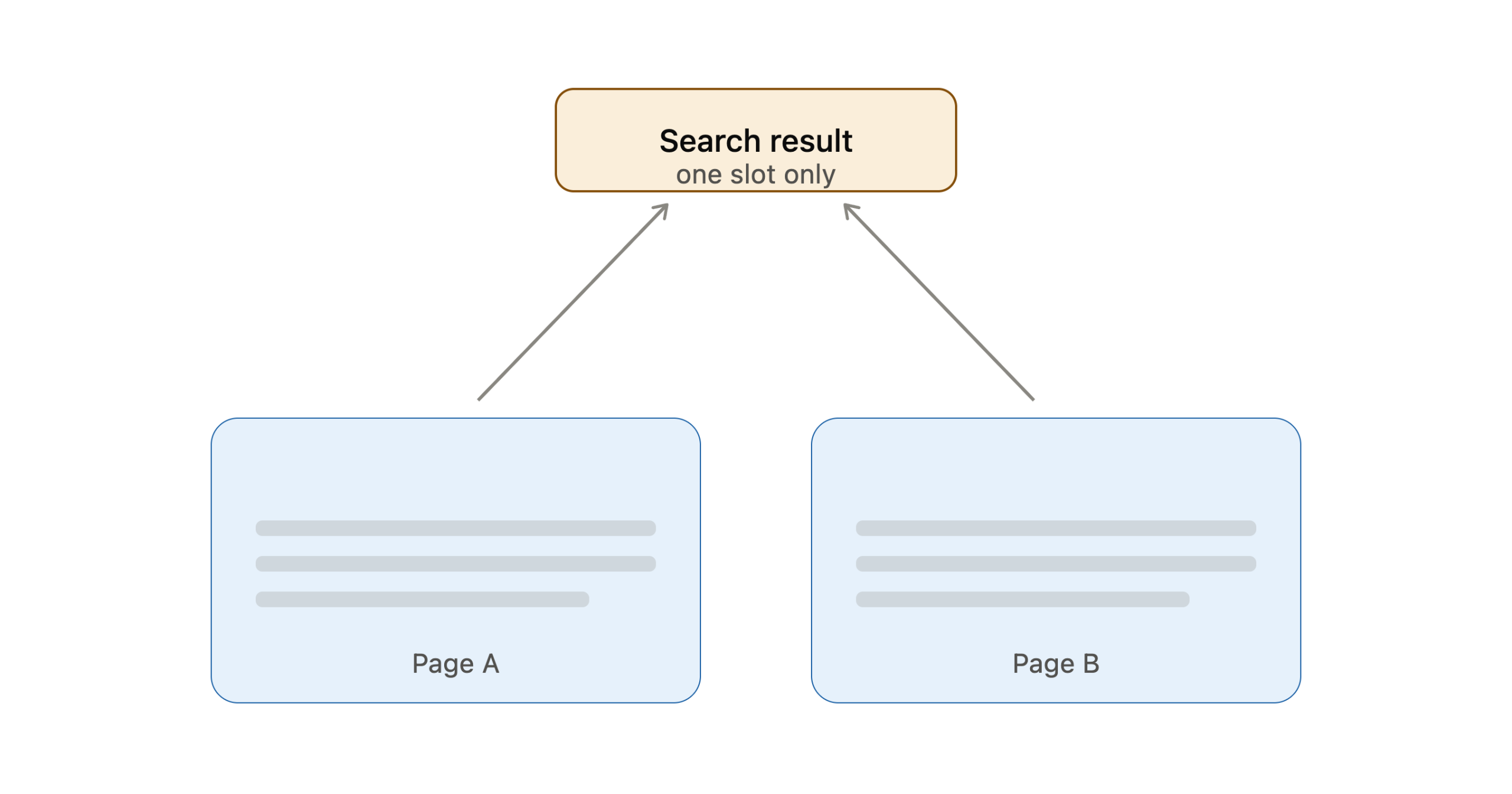
Why does that fighting hurt? Because Google generally shows only one result from a single domain per query. Your two pages aren’t stacking up the SERP. They’re competing for one slot, and the tie-breaking gets messy.
Google’s John Mueller once described near-duplicate pages as a bunch of schoolkids all trying to be first in line. Eventually one slips ahead, but the jostling helps no one. His advice, paraphrased: a few strong pages beat a pile of weaker ones. Don’t water down your own site.
That’s the topical authority problem in a sentence. Do you want to be spread thin across three okay pages, or concentrated into one that actually ranks?
Content cannibalization vs keyword cannibalization
People use these two terms like they mean the same thing. They don’t. And the gap between them decides your fix.
Keyword cannibalization is the narrow one. Two pages target the same keyword. Content cannibalization is wider. Two pages cover the same topic and the same intent, even when the words look nothing alike. Take three posts: “email marketing basics,” “email marketing for beginners,” and “getting started with email.” None share a primary keyword. They still compete, because they answer one question for one reader.
Here’s the link worth remembering. Content cannibalization is the parent problem. Keyword cannibalization is just the symptom you can see, the bit that shows up in your rank tracker. Fix the content overlap and the keyword overlap tends to clear up with it.
| Keyword cannibalization | Content cannibalization | |
|---|---|---|
| What it is | Multiple pages target the same keyword | Multiple pages cover the same topic and intent |
| Root cause | Duplicate keyword targeting | Overlapping scope with no clear differentiation |
| How you spot it | Search Console query data, rank tracking | Topic-level content audit |
| The fix | Consolidate, canonicalize, or split intent | Merge, redirect, restructure internal linking |
| Scope | Narrow, keyword level | Broad, exists even without keyword overlap |
Why does the label matter? Treat every case as keyword cannibalization and you go hunting for matching phrases. You miss the pages that overlap on intent but use different words. YYou might even merge two pages that were fine on their own. Both problems show up in the same data, though. The query-level steps for confirming them are in How to find cannibalization in Search Console below. This piece stays on the wider topic-level problem.
Why it keeps coming back: cannibalization as content drift
Now for the part almost every guide gets wrong. They treat cannibalization as a one-time mistake. Someone published two pages on the same thing, you find them, you merge them, done.
That’s not usually how it happens, though. Most cannibalization forms slowly, and nobody makes a mistake at all.
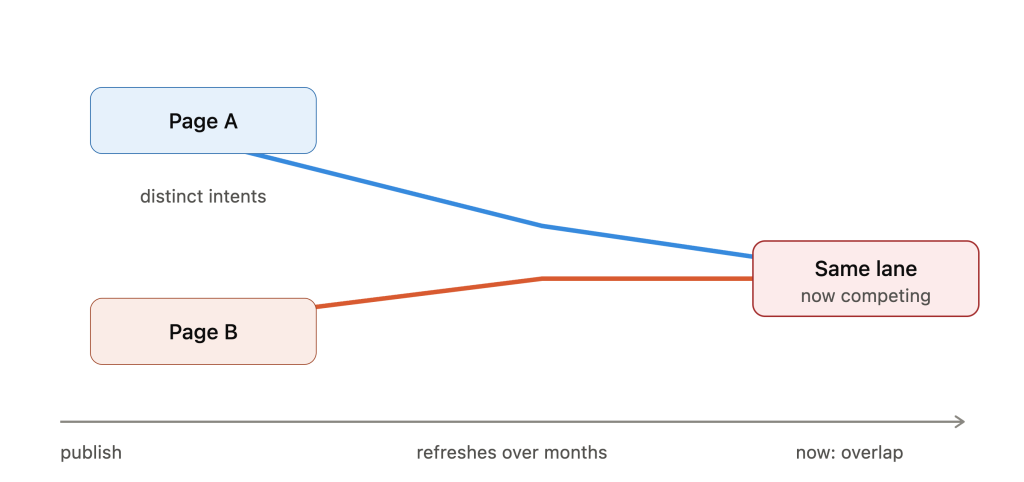
Think about how a page changes over its life. You publish “content strategy for startups” with a tight, specific angle. Eighteen months later someone refreshes it, adds a few sections, expands the intro to cover more ground. Meanwhile a different post, “how to build a content plan,” gets re-optimized toward a broader keyword. Neither edit was wrong. But now the two pages have drifted into the same lane. They cover the same intent they didn’t cover before.
This is the same mechanism as content decay. Pages don’t sit still. Their content shifts, the SERP shifts around them, and their relationship to each other shifts too. Cannibalization isn’t a state you clean up once. It’s a process that keeps producing new overlap as you keep publishing and refreshing.
Which is exactly why the annual content audit fails. A once-a-year sweep catches the wreckage after months of split equity have already piled up. By the time two URLs are visibly rotating in your rank tracker, the damage has been compounding quietly since the refresh that caused it. Teams that “fixed cannibalization last year” keep hitting it because they treated a continuous problem as a one-off chore.
Catching drift as it forms is the whole game. It’s what WordPattern is built to watch for: pages changing relative to each other and to the SERP, not just a snapshot taken once a quarter.
Is it always a problem? When overlap is fine
Short answer: no. And this is where blanket “one page per keyword” advice does real harm.
An Ahrefs researcher once pulled a sample of 80 keywords where multiple pages from the same site were ranking. Classic SEO theory says every one of those is a cannibalization problem to fix. When he actually reviewed them, only one case genuinely needed action. The rest were either harmless or actively good.
So when is overlap fine? A high-authority site can hold #1 and #2 for the same term without breaking a sweat. News and brand queries, the kind where freshness matters, routinely surface many internal pages with no penalty. And two pages targeting genuinely different intents, like a buyer’s guide and a how-it-works explainer, aren’t competing at all. They cover different needs.
When is it reliably bad? Two patterns. First, commercial-intent keywords: when multiple pages split traffic for a buy or signup term, conversion rates drop regardless of how strong your domain is. Second, lower-authority sites. Pages on sites under DR 50 with three or more competing URLs consistently got stuck in positions #8 to #20, while DR 75+ sites often held the top two spots at once.
The takeaway isn’t “overlap bad.” It’s that overlap is a signal to investigate, not an automatic order to merge.
How to detect it before your rankings drop
Three checks will surface most overlap. None of them takes long.
Run a site search first. Type site:yourdomain.com "your keyword" into Google and see how many of your pages come back for that term. If two or three show up covering the same intent, you’ve found a candidate.
Next, check Search Console. Filter the Performance report by the query you’re worried about and open the Pages tab. If more than one URL is pulling impressions, they’re splitting the visibility. The full walkthrough, including how to compare two URLs side by side, is in the next section.
Third, watch for rank instability. Pull the position history for a keyword over the last 30 to 90 days. If two of your URLs keep swapping the same rankings, that’s the clearest live signal there is. Search engines are telling you, plainly, that they can’t decide.
Here’s the catch with all three. They’re snapshots. They confirm overlap exists right now. They don’t tell you it’s forming, and they won’t warn you the week a refresh pushed two pages together. That slow, unseen slide is exactly how posts start losing traffic without anyone noticing. There’s a 2026 wrinkle too: AI Overview citations regularly skip the top organic results, so an audit that only looks at classic rank positions is now missing a chunk of where visibility actually lives.
The fix for the snapshot problem is continuous monitoring. Track which URL owns each query over time, and get flagged when a second page starts drifting into the same intent lane while it’s happening, not a quarter later during your next manual audit.
How to find cannibalization in Search Console
A site search tells you two pages exist. Search Console tells you whether Google is treating them as rivals. It’s free, it works query by query, and each check takes about ten minutes.
Step 1: Start from the query, not the page
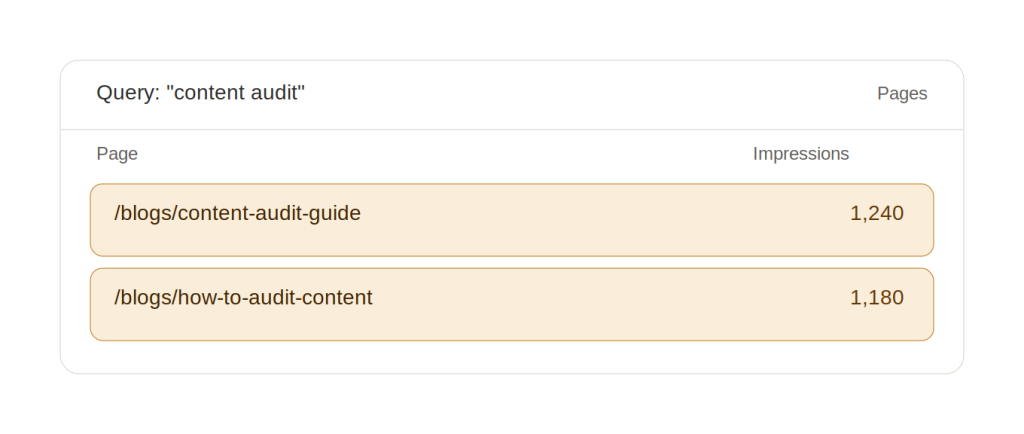
Open Performance → Search results and set the date range to the last three months. Click Add filter → Query, choose Exact query, and enter the term you’re worried about. Then open the Pages tab under the chart.
If one URL is listed, there’s no conflict for that query. If two or more URLs are pulling impressions, Google is testing more than one of your pages for the same search, and you have a candidate pair.
Start with the queries that matter most: commercial terms and your highest-impression queries.
Step 2: Compare the two URLs head to head
Remove the query filter. Click Add filter → Page, switch to the Compare tab, and enter URL A and URL B. Turn on Average CTR and Average position at the top of the report. The Queries tab now lists every query each page appeared for, with both pages’ metrics side by side.
A few shared long-tail queries is normal. The warning sign is shared head terms, meaning the queries that make up most of each page’s impressions.
Step 3: Check whether positions are swapping
This is the clearest signal there is. Go back to your query filter and add a Page filter for URL A. Watch the Average position line over the date range, then repeat for URL B. If one page climbs while the other drops, and then they swap back, Google is rotating them because it can’t pick a winner.
Step 4: Read the three numbers together
- Impressions on both URLs: Google is indexing both as answers to the same query.
- Positions trading places week to week: Google is still undecided.
- CTR well below what that position normally earns: something above you is taking the click. If that something is your own other page, you’re losing the click twice.
Step 5: Log the pair
For each confirmed case, record the query, both URLs, each URL’s impressions and average position, and the date you checked. That log feeds directly into the scorecard in the next section, and later into your keyword-to-page ownership map.
Three caveats before you act on what you find:
- Search Console hides anonymized queries, so low-volume overlap may not appear at all.
- If the “two pages” are the same URL with and without a trailing slash or a parameter, you have a canonicalization problem, not content cannibalization.
- Two URLs on one query makes a candidate, not a verdict. Check intent first, as covered in Is it always a problem?
Which page do you keep? A score you can actually repeat
Every guide says “keep the stronger page.” Then they hand you a vague checklist and wish you luck. Let’s make it repeatable.
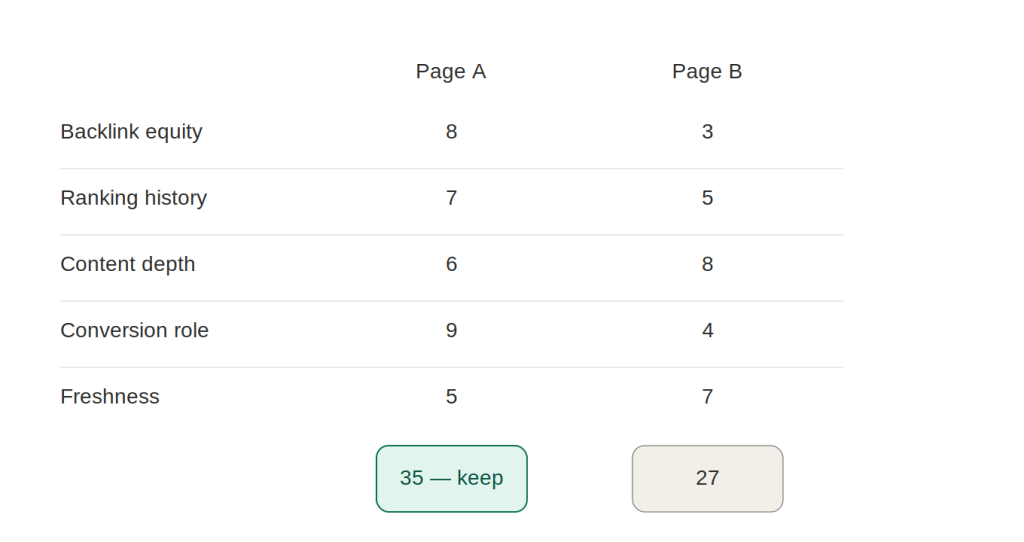
Score each competing URL on five things:
- Backlink equity — how many referring domains point to it?
- Ranking history — which one has ranked higher, more consistently, over time?
- Content depth — which better matches what’s actually ranking for the term today?
- Conversion role — does one sit closer to a signup, demo, or sale?
- Freshness — which is more current, or easier to bring current?
Add it up. The highest total is your survivor. Everything else either merges into it or gets redirected to it.
Then decide which conflicts to fix first, because you can’t do them all at once. One useful prioritization method scores each confirmed case on three factors: query value (search volume times how likely that query is to convert), the AI-citation gap (are competitors getting cited in AI answers where you aren’t?), and fix complexity (a quick 301 versus a week-long merge across three long posts). Fix your top five to ten cases a cycle. Leave the rest for next time.
One reassurance before you start merging. It’s tempting to think you’ll lose half your traffic by killing the second page. You won’t. When two pages both rank in the top ten, the weaker one typically pulls only 2 to 10% of the additional traffic, not 50%. Content consolidation trades a small, temporary loss for a much bigger gain.
How to fix it
You’ve picked the survivor. Here’s how to actually resolve the overlap.
Merge the content. Pull the best material from the weaker pages into your chosen URL: the unique examples, the sections that ranked, the data nobody else had. Publish the combined version under the strongest URL.
Set 301 redirects. Point every retired URL at the survivor with a 301 redirect so the accumulated link equity transfers instead of evaporating. Then update your internal links to point directly at the final URL. Don’t leave them aimed at the redirected pages, because redirect chains add crawl overhead and weaken the signal over time.
Use canonical tags when pages must stay live. Product variants or regional versions that can’t be merged? A canonical tag tells search engines which version is primary. It’s a secondary tool, though, not a substitute for a 301 when one page should genuinely replace another.
Differentiate by intent instead of merging. Sometimes two pages serve genuinely different goals, and the right move is to pull them further apart. Re-optimize each for its distinct angle rather than combining them.
Reinforce with internal linking. Point your supporting articles at the primary page using consistent anchor text. That tells search engines which URL holds the authority for the topic.
Does it work? Backlinko consolidated two competing articles with a single 301 and saw a 466% increase in clicks year over year in the eight weeks after. The social tool Planable, whose posts had been rotating between positions 15 and 45, merged overlapping pages and redirected the weaker URLs. Organic traffic climbed 176% within six months.
How to stop it forming again
Fixing overlap once is satisfying. Not creating it again is the actual win.
Start with a keyword-to-page ownership map. It’s a simple document: every page gets one primary keyword and one clear intent, and no two pages in the same intent group are allowed to overlap. Before anything new ships, you check it against the map. The cheapest cannibalization fix is the page you didn’t publish into a collision.
Watch the refresh cycle in particular. Refreshing and expanding an older post is the single most common way two distinct pages drift into each other. So don’t only check intent at publish. Re-check it after any major update, when the page’s scope has actually changed.
And swap the calendar audit for a monitoring cadence. The point of catching drift continuously is that a spreadsheet review every twelve months can’t see a problem that formed in month three. A content audit still has its place. It just shouldn’t be the only thing standing between you and a slow-building overlap.
The real skill isn’t merging
Overlap between your own pages is normal. The average site is full of it, and most of it is harmless. The skill worth building isn’t merging pages on sight. It’s telling the harmful drift apart from the harmless diversity, then acting only where it counts.
The durable fix has two parts. A keyword-ownership discipline that stops most collisions before they happen, and a detection loop that catches the ones that slip through while they’re still cheap to fix.
Want somewhere to start this week? Run the site search and the Search Console check on your three most valuable commercial queries. That’s where split rankings cost you actual money, and it’s the fastest place to find out whether your own pages are getting in each other’s way.
FAQs
Keyword cannibalization is narrow: multiple pages target the exact same keyword. Content cannibalization is broader, where pages compete on the same search intent even when their keywords differ. Content cannibalization is usually the parent problem, and keyword cannibalization is the symptom you can see in your rank tracker. Fixing the first often clears the second.
Most sites see movement within a few weeks of merging, redirecting, or re-optimizing. Larger sites, or ones Google crawls less often, take longer, simply because the changes take more time to process. Watch your rank tracker weekly after a fix. Steady improvement on the surviving URL means the consolidation is landing.
Depends on the page. If it has real content or backlinks, merge its best parts into the survivor so nothing valuable is lost. If it’s thin but still has links pointing to it, 301 redirect it to the nearest relevant page to salvage that equity. Only delete outright when a page has no value and no links worth keeping.
Use a canonical when both pages need to stay live: product variations, regional versions, anything users still need to reach. Use a 301 when one page should permanently replace another and you want to hand its link equity over cleanly. Canonicals suggest a preference; 301s make the decision final.
Less likely, just because fewer pages means fewer chances to overlap. But the habit of mapping one keyword and intent per page is far cheaper to build early than to retrofit onto a big library later. Authority helps too. Smaller, lower-authority sites feel the sting of overlap harder than established ones do.