


If you’ve ever wondered why some of your content gets crawled by Google but still fails to appear in search results, you’re not alone. Many website owners struggle with pages Google crawls but never ranks, and fixing this issue can unlock serious SEO growth.
In this guide, you’ll learn how to identify these pages, understand why they don’t rank, and apply proven fixes to improve visibility.
What Does “Pages Google Crawls but Never Ranks” Mean?
Before diving deeper, it helps to understand the basics.
- Crawling: Googlebot discovers and scans your pages
- Indexing: Google stores those pages in its database
- Ranking: Google displays those pages in search results
Sometimes, pages Google crawls but never ranks may not even be indexed—or they may be indexed but fail to gain impressions.
In simple terms, Google sees your page but doesn’t consider it valuable enough to show in search results.
Why Pages Google Crawls but Never Ranks?
Understanding the root cause makes it easier to fix the problem.
1. Thin or Low-Quality Content
Pages with little value, weak structure, or outdated information often get crawled but ignored.
2. Duplicate or Similar Content
If multiple pages target the same topic, Google may choose one and ignore the rest.
3. Poor Keyword Targeting
If your page doesn’t match search intent, it won’t rank—even if it’s crawled.
4. Weak Internal Linking
Pages buried deep in your site structure may not get enough SEO value.
5. Technical SEO Issues
- Incorrect canonical tags
- Accidental noindex tags
- Slow loading speed
6. Low Authority
Without backlinks or topical authority, ranking becomes difficult.
How to Find Pages Google Crawls but Never Ranks?
Now, let’s get practical.
Use Google Search Console
This is the most effective way to identify pages Google crawls but never ranks.
Steps:
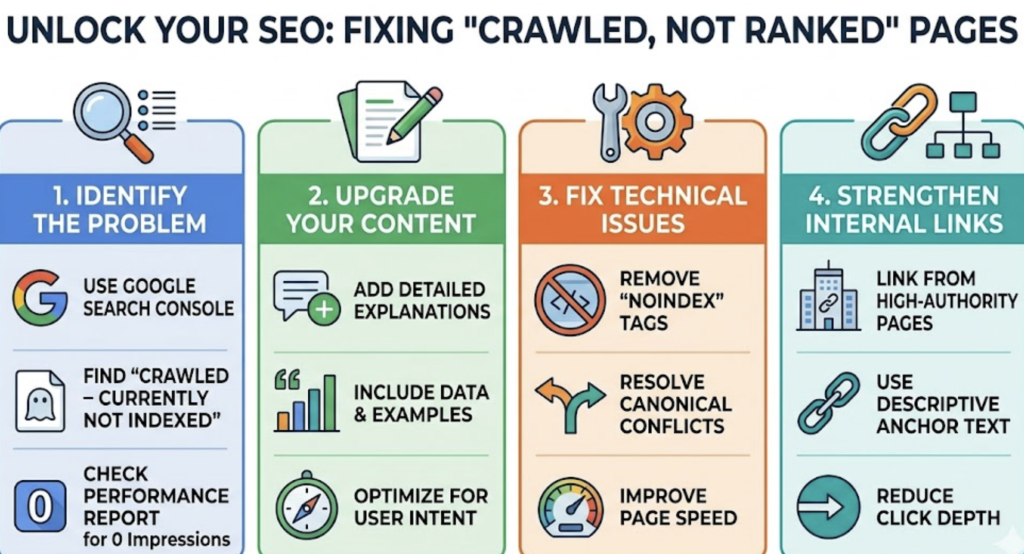
- Open the Pages or Coverage report
- Look for: “Crawled – currently not indexed”
- Check the Performance report for pages with 0 impressions
These are your problem pages.
Analyze Server Log Files
Log files show exactly how Googlebot interacts with your site.
- Identify frequently crawled URLs
- Spot pages that receive crawl activity but no traffic
- Detect crawl budget waste
Use SEO Tools
Tools can simplify the process.
- Screaming Frog → Crawl your site and find index issues
- Ahrefs / SEMrush → Identify pages with no rankings or traffic
Look for URLs that exist but generate zero organic visibility.
Key Metrics to Analyze
When evaluating pages Google crawls but never ranks, focus on:
- Index status
- Impressions (or lack of them)
- Keyword rankings
- Internal link count
- Content depth
These signals reveal why your page isn’t performing.
How to Fix Pages Google Crawls but Never Ranks?
Once you’ve identified the issue, take action.
Improve Content Quality
Start by upgrading your content.
- Add detailed explanations
- Include examples and data
- Update outdated sections
High-quality content increases your chances of ranking.
Optimize for the Right Keywords
Revisit your keyword strategy.
- Use the focus keyphrase: pages Google crawls but never ranks
- Add relevant secondary keywords
- Align with user intent
Strengthen Internal Linking
Internal links help search engines understand importance.
- Link from high-authority pages
- Use descriptive anchor text
- Reduce click depth
Fix Technical Issues
Technical errors can silently block rankings.
- Remove accidental noindex tags
- Fix canonical conflicts
- Improve page speed and mobile usability
Build Authority
Google favors trusted pages.
- Earn backlinks from relevant sites
- Update and republish content
- Promote your pages
When to Remove or Consolidate Pages
Not every page is worth saving.
Consider cleanup if you have many pages Google crawls but never ranks:
- Merge similar content into one strong page
- Redirect weak pages
- Use canonical tags wisely
👉 This improves overall site quality and crawl efficiency.
Pro Tips to Prevent Crawled-but-Unranked Pages
Stay ahead with these strategies:
- Create content based on search intent
- Maintain a clean site structure
- Run regular SEO audits
- Monitor crawl activity
Consistency matters more than quick fixes.
FAQs
1. Why are pages Google crawls but never ranks not indexed?
This usually happens due to low-quality content, duplication, or lack of relevance. Google crawls the page but decides not to include it in the index.
2. Can a page be crawled but not indexed?
Yes. Many pages Google crawls but never ranks fall into the “crawled but not indexed” category in Search Console.
3. How do I fix “crawled – currently not indexed” pages?
Improve content quality, fix technical issues, and strengthen internal linking. These steps help Google reconsider indexing.
4. How long does it take for a crawled page to rank?
It varies. Some pages rank within days, while others may take weeks or never rank if they lack value.
5. Should I delete pages that never rank?
If they provide no value, yes. Otherwise, update, merge, or optimize them before removing.
Final Thoughts
Fixing pages Google crawls but never ranks can dramatically improve your SEO performance. Instead of creating more content, focus on optimizing what already exists.
When you align content quality, search intent, and technical SEO, you give Google a clear reason to rank your pages—and that’s where real growth begins.