

Semrush’s free plan tracks 10 keywords in one project. Search Console tracks every query you show up for, but its interface only exports 1,000 rows of data.
Both are free. Both are useful. And both ration something different.
That’s the pattern with every Google rank tracker free plan. Something gets capped: keywords, refresh rate, locations, or history. Most free tool pages mention that cap three scrolls down. Some never mention it.
So we did it the other way around. Each tool below starts with its limit.
The free Google rank trackers at a glance
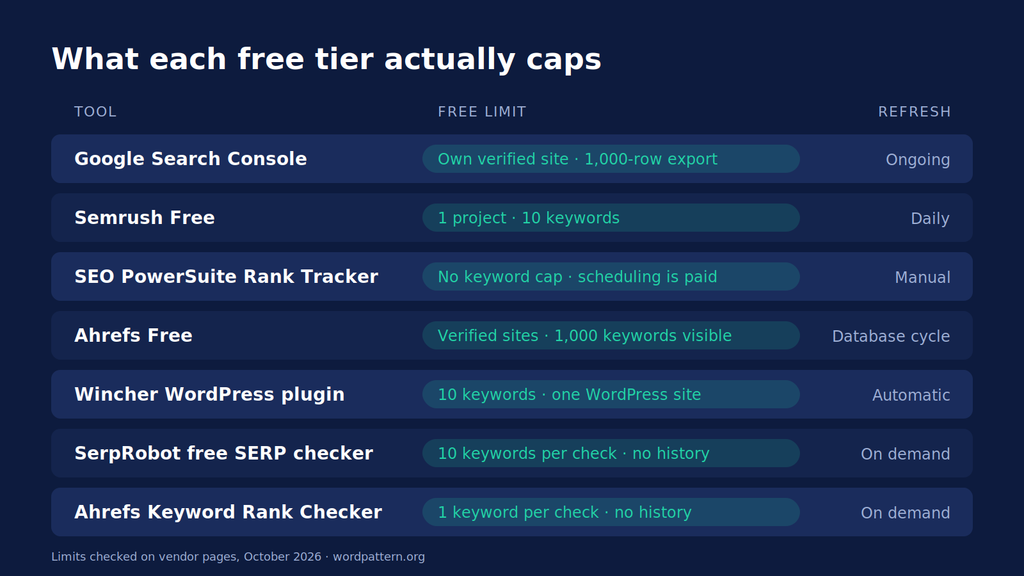
We checked every limit on the vendor’s own pages in October 2026. Free plans change, so treat this as a snapshot.
| Tool | Free tier type | What the free tier actually limits | Refresh | Best for |
|---|---|---|---|---|
| Google Search Console | Free forever | Your own verified site only. Average position, not a fixed rank. 1,000-row export from the interface. 16 months of history. | Ongoing, with a recent-data view | Every site, as the baseline |
| Semrush Free | Free forever | 1 project, 10 tracked keywords | Daily | Watching your 10 money keywords |
| SEO PowerSuite Rank Tracker | Free forever (desktop) | No keyword cap, but checks run from your computer; scheduling is paid | Only when you click “check” | Big keyword lists, manual checks |
| Ahrefs Free | Free forever | Verified sites only; up to 1,000 keywords visible at once; you can’t add your own keyword list | Ahrefs’ database refresh cycle | Seeing what you already rank for |
| Wincher (WordPress plugin) | Free forever | Up to 10 keywords, only for the WordPress site it’s installed on | Automatic (cadence not published) | WordPress bloggers |
| SerpRobot free SERP checker | Free, no login | Up to 10 keywords per check; no saved history | On demand | Quick batch spot checks |
| Ahrefs Keyword Rank Checker | Free, no login | One keyword and one domain per check; no history | On demand | One-off checks in other countries |
Notice the split. Three tools give you history. Four give you a snapshot and forget it.
How we picked these
Three rules decided what counts as a real Google rank tracker free option.
First, the tool had to be free forever. A 7-day or 14-day trial is a sales demo, not a free tier. That knocked out a lot of names you’ll see on other lists.
Second, we had to confirm the limit on the vendor’s own site. If two sources disagreed and the vendor didn’t settle it, the tool didn’t make the cut.
Third, it had to track Google. Most do, but a couple of “free rank trackers” in this SERP are really AI-visibility tools with a ranking feature bolted on.
The 7 free rank trackers
1. Google Search Console
Free limit: your own verified site, average position only, 1,000 rows per export from the interface.
Search Console is the only first-party option here. The data comes from Google itself, it keeps 16 months of it, and there’s no keyword cap.
The catch is how it defines position. It averages your ranking across every impression. If a page shows at position 3 for one search and 7 for another, Search Console reports 5. That’s a trend line, not a rank check.
Exports are the other wall. The interface tops out at 1,000 rows. Google’s API goes to 50,000 rows a day per site and search type, so anyone comfortable with Looker Studio or a Sheets add-on can get around it.
Google also added a view built around your most recent data in late 2024. Handy when you suspect a drop and don’t want to wait.
Best for: every site owner. Run it even if you pay for something else.
2. Semrush Free
Free limit: 1 project, 10 keywords, updated daily.
Honestly, this is the closest thing to a “real” rank tracker you’ll get for nothing. You pick the keywords. Semrush checks them every day and keeps the history.
Ten keywords sounds tiny. It is. But for a small SaaS site, ten is often the honest number of terms that bring in signups. Pick those, ignore the rest.
The free account also caps you at 10 analytics reports a day across Semrush’s research tools, so don’t burn them all poking around before lunch.
Best for: tracking a short list of high-intent keywords with daily history.
3. SEO PowerSuite Rank Tracker
Free limit: no keyword cap, but it’s desktop software and automation costs money.
Rank Tracker lets you check rankings for unlimited keywords on the free edition. That’s rare.
Here’s the trade. It runs on your machine (Windows, Mac or Linux), and the checks happen when you press the button. Scheduled tasks and captcha-free query processing sit on the paid plans. On a big list, you may hit captchas or leave your laptop running for a while.
So it’s unlimited, yes. Automatic, no.
Best for: someone with hundreds of keywords who’s fine running checks by hand once a week.
4. Ahrefs Free
Free limit: verified sites only; you see up to 1,000 keywords at once; there’s no custom keyword list.
Ahrefs Free (it used to be Ahrefs Webmaster Tools) gives you Site Explorer and Site Audit for as many verified sites as you want. In Site Explorer you’ll see the keywords your site ranks for, with positions.
But this isn’t tracking in the usual sense. You don’t type in keywords and watch them. You see what Ahrefs’ keyword database has found for your site. Ahrefs says that database covers about 500 million keywords and is updated monthly (more on its free checker below). Their dedicated Rank Tracker is a paid tool.
Still useful. Just a different job.
Best for: discovering keywords you didn’t know you ranked for.
5. Wincher WordPress plugin
Free limit: up to 10 keywords, for the one WordPress site it’s installed on.
If your blog runs on WordPress, Wincher’s free plugin puts rank tracking inside your dashboard. You get a position history graph per keyword and an overview of average position.
One heads-up. Wincher’s integration inside Yoast lists the free tier at 5 keyphrases, not 10. So the number you get may depend on how you install it.
Best for: WordPress bloggers who never want to leave wp-admin.
6. SerpRobot free SERP checker
Free limit: up to 10 keywords per check, no account, no saved history.
SerpRobot is a solid free SERP checker for batch spot checks. Pick a Google region, desktop or mobile, add your domain and up to 10 keywords. It returns positions and optionally your competitors’ too.
Nothing is saved, though. Automatic checks and history graphs need an account, and that starts as a 14-day trial. Busy times can also stretch a check to a few minutes.
Best for: checking ten keywords in a specific country before a client call.
7. Ahrefs Keyword Rank Checker
Free limit: one keyword and one domain per check, no history.
This is the keyword rank checker free tool most people find first. No login, and you can switch between hundreds of locations.
One at a time, though. Fine for “where do we rank in Canada for X?” Painful for anything more. If spot checks are your main need, our guide to checking rankings accurately with a keyword rank checker covers how to avoid personalised results.
Best for: single checks in markets you can’t search from.
Why free checkers disagree with each other
Run the same keyword through three tools and you’ll often get three numbers. That isn’t always a bug.
Google results shift by location, device and search history. SerpRobot’s own help text notes that results can be personalised, and its checks strip that out. Your browser doesn’t.
Search Console adds a second layer. It reports an average across all impressions, while a SERP checker reports one snapshot from one location.
How big is the gap? JaySearch compared free checkers against Search Console data for its own site. SerpRobot scored 86% and SEOmator 50% on its accuracy measure. JaySearch sells a Search Console-based tracker, so read that with some salt. The direction still matches what you’ll see yourself.
The practical fix? Use Search Console for trend, and one checker for snapshots. Don’t mix numbers between tools.
Tools we left off (and why)
A few popular names didn’t make it.
Ubersuggest. Sources disagree on its free tracking limit. We found claims of 3 checks a day, 25 tracked keywords, and no free rank tracking at all. Until Neil Patel’s team publishes one number, we can’t list it honestly.
ProRankTracker. Some listings still show a 20-keyword free plan. A reviewer on Capterra says free accounts were removed. Check before you count on it.
Trials dressed as free tools. Moz Pro, SE Ranking, Nightwatch and Mangools SERPWatcher show up on plenty of “free” lists. They’re trials. Great for testing, not for free tracking.
When free stops being enough
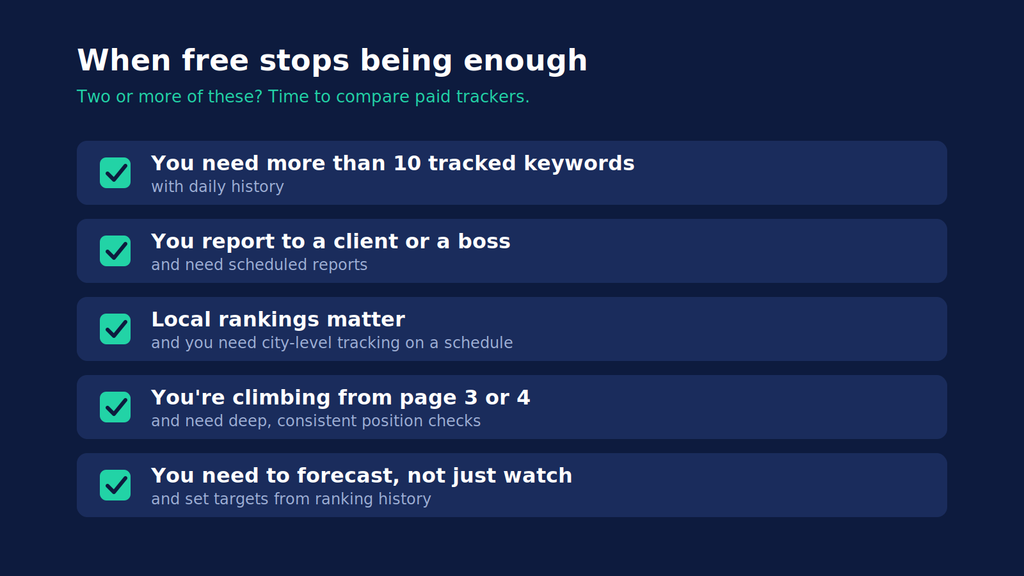
Free tools cover a surprising amount. But a few signals mean you’ve outgrown them.
You need more than 10 tracked keywords with daily history. That’s the ceiling on both Semrush Free and the Wincher plugin. Past it, you’re stitching tools together.
You report to a client or a boss. Hand-run checks and 1,000-row exports don’t make a clean monthly report. Scheduled reports are almost always a paid feature.
Local rankings matter. None of the free tools above give you scheduled, city-level tracking. If you sell in specific cities, that’s a paid job.
You’re climbing from page 3 or 4. Since Google dropped the num=100 parameter in September 2025, pulling deep results takes more requests. One analysis found 87.7% of 319 sites lost Search Console impressions after the change. Paid trackers vary on how deep they still check, so ask.
You need to forecast, not just watch. Rank history becomes valuable when you use it to set targets. Our guide to SEO forecasting shows how to turn ranking and traffic history into a realistic projection.
When you hit two or more of these, compare paid tools on price per 1,000 keywords. We broke that down in our rank tracking tools comparison, with refresh rates and local tracking side by side.
One more thing a tracker won’t do. It tells you a page slipped from 4 to 9. It won’t tell you why. WordPattern watches Search Console for pages in steady decline and points to the outdated sections inside them.
Pick the free tracker that matches your list
Start with Search Console. Always.
Then match your second tool to your keyword count. Ten keywords with daily history? Semrush Free. Hundreds of keywords and some patience? SEO PowerSuite. Quick checks in another country? SerpRobot or Ahrefs’ checker.
And when the free limit starts shaping your SEO decisions, instead of the other way around, that’s your sign to pay.
FAQs
Yes, Google Search Console. It’s free, has no keyword cap and uses Google’s own data. It reports average position across impressions rather than a daily rank for a fixed keyword list, and it only covers sites you’ve verified.
Semrush Free updates its 10 tracked keywords daily and saves the history. Wincher’s WordPress plugin also tracks automatically, but only on the site it’s installed on.
Partly. SerpRobot’s free checker can include competitor domains in each check, and Ahrefs’ free checker works on any domain. Neither saves history. For ongoing competitor tracking, you’ll need a paid plan or a trial.
They’re accurate as snapshots from one location and device. Differences between tools usually come from location, device and personalisation. Use one checker consistently and compare it against Search Console trends.