
SEO has a scaling problem.
Keyword research, rank tracking, technical audits, competitor analysis, content optimization, internal linking, reporting, and content updates can each eat hours every week. Multiply that across hundreds or thousands of URLs, and even seasoned SEO teams eventually hit a ceiling. It’s not a hypothetical ceiling either — around 86% of SEO professionals have already folded AI into their workflow somewhere, mostly to claw back time.
That’s exactly what SEO automation software is built to solve.
But there’s an important distinction.
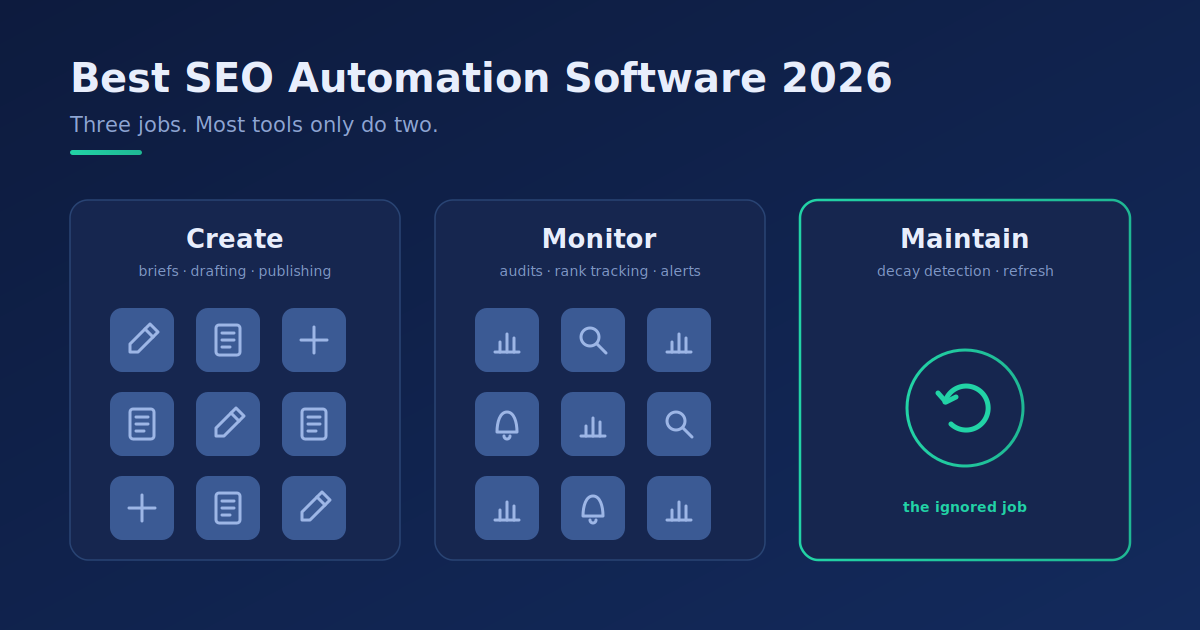
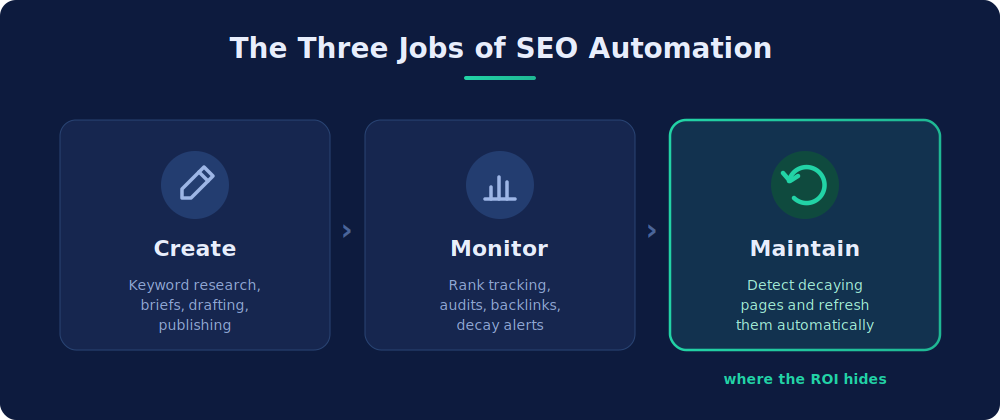
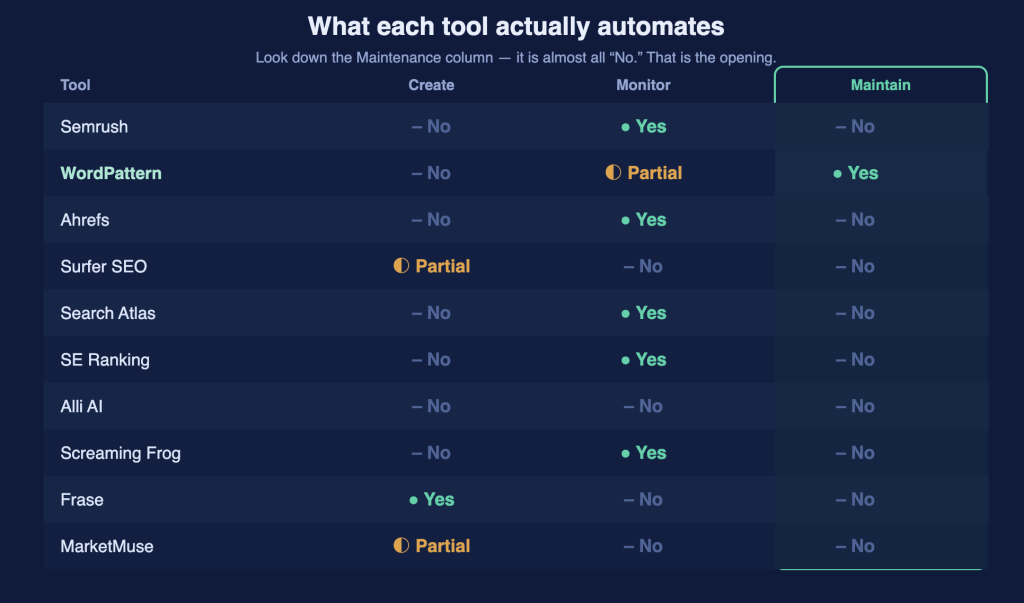
Some SEO tools automate data collection. Others automate recommendations. The most advanced platforms automate parts of the actual SEO workflow — from detecting declining pages to generating content updates or deploying on-page changes.
Those are very different levels of automation.
We compared the leading SEO automation tools on what they actually automate, the problems they solve, who they suit, and how much manual work is left after the software spots an opportunity.
Best SEO Automation Software: Quick Comparison
| SEO Automation Software | Best For | Main Automation Strength | Starting Price | Our Rating |
|---|---|---|---|---|
| Semrush | Best overall SEO platform | Research, tracking, auditing and reporting | From $139.95/mo | 9.5/10 |
| WordPattern | Best for content decay & SEO recovery | Detecting ranking decay and generating targeted content refreshes | Free to start; paid plans on request | 9.3/10 |
| Ahrefs | Competitive and backlink research | SEO intelligence and opportunity discovery | $29/mo Starter; Lite from $129/mo | 9.1/10 |
| Surfer SEO | Content optimization | Content scoring and optimization workflows | From $59/mo | 8.9/10 |
| Search Atlas | On-page SEO automation | On-page recommendations and implementation | From $99/mo | 8.8/10 |
| SE Ranking | Agencies and growing businesses | Tracking, audits and reporting | From $129/mo | 8.7/10 |
| Alli AI | Large-scale on-page changes | Bulk SEO implementation | From $299/mo | 8.5/10 |
| Screaming Frog | Technical SEO | Crawling and technical auditing | Free up to 500 URLs; £199/yr | 8.4/10 |
| Frase | Content briefs and optimization | SERP research and content workflows | From $49/mo | 8.2/10 |
| MarketMuse | Enterprise content strategy | Content intelligence and topic planning | Free tier; paid plans | 8.1/10 |
Prices are entry-tier list prices on monthly billing, checked October 2026. Most vendors discount annual plans and change tiers often, so confirm on each pricing page before you buy.
Our Top Picks
- Best overall: Semrush
- Best for automated content decay recovery: WordPattern
- Best for competitor and backlink intelligence: Ahrefs
- Best for content optimization: Surfer SEO
- Best for technical SEO crawling: Screaming Frog
The right choice depends on which part of SEO you need to automate. A publisher bleeding traffic from a library of 5,000 older articles has a fundamentally different problem than an agency that just needs automated rank reports for 50 clients.
Let’s look at each platform in detail.
What Is SEO Automation Software?
SEO automation software is technology that automatically performs repetitive or heavy, data-driven search tasks you’d otherwise do by hand.
These tasks can include:
- monitoring keyword rankings;
- detecting traffic declines;
- crawling websites for technical issues;
- researching competitors;
- identifying content gaps;
- optimizing existing pages;
- generating SEO briefs;
- monitoring backlinks;
- creating reports;
- recommending internal links;
- updating outdated content; and
- implementing certain on-page SEO changes.
The key word is automatically.
A dashboard full of SEO data is useful, but displaying information isn’t the same as automation. Ahrefs, for one, frames SEO automation around repeatable tasks like reporting, auditing, and rank updates — the recurring grind, not the strategy.
Imagine an article that ranked #2 six months ago and has quietly slipped to #7.
A traditional analytics platform might show you the decline.
A more advanced automation platform might:
- detect the declining trend automatically;
- alert you that the page needs attention;
- identify which sections have gone stale;
- compare the page against current competitors;
- recommend missing topics or entities;
- generate updated sections; and
- prepare those changes for approval.
The more of that workflow the software handles on its own, the higher its level of automation.
That distinction matters when comparing tools.
The 3 Levels of SEO Automation
Before choosing software, it helps to know what “automation” actually means. Worth flagging up front: only about 1% of SEO teams describe their work as fully automated, and roughly 70% name output quality, hallucinations, or QC time as their biggest limit. So “automation” almost always means degrees of assistance, not hands-off autopilot.
Level 1: Monitoring Automation
These platforms automatically collect information such as:
- rankings;
- organic traffic;
- backlinks;
- crawl errors;
- competitor changes; and
- website health.
They kill manual data gathering but usually leave interpretation and implementation to you.
Level 2: Recommendation Automation
The next category analyzes that information and tells you what to do.
For example:
This page is missing important subtopics covered by competing pages.
Or:
These title tags are too long and should be changed.
That takes part of the analysis off your plate. Someone still has to make the fix.
Level 3: Execution Automation
The newest generation of SEO automation software goes further.
These platforms can generate or implement SEO changes such as:
- refreshing outdated sections;
- creating optimized copy;
- inserting internal links;
- modifying metadata;
- adding schema;
- updating on-page elements; or
- preparing changes for publishing.
This is where automation starts to pay off on large sites.
The goal isn’t to replace SEO professionals. It’s to strip out the busywork that keeps them from strategy — which lines up with the data, since about 75% of marketers using AI say its main benefit is cutting time spent on manual, repetitive tasks.
1. Semrush — Best Overall SEO Automation Software
Best for: Businesses that want one platform covering most areas of SEO.
Semrush takes our #1 spot on breadth alone.
Where specialist platforms concentrate on one workflow, Semrush covers an unusually large slice of the SEO ecosystem: keyword research, competitor analysis, rank tracking, site auditing, and other marketing workflows.
That helps teams pull several SEO jobs into one platform.
What Semrush Automates
Depending on your plan and setup, Semrush can streamline:
- keyword tracking;
- website auditing;
- competitor monitoring;
- backlink monitoring;
- SEO reporting;
- keyword opportunity discovery;
- on-page analysis; and
- visibility monitoring.
The biggest win is having it all in one place. Instead of hopping between separate keyword, competitor, backlink, and audit tools, teams run most of their SEO intelligence from one place.
Where Semrush Is Strongest
Semrush shines during the research and monitoring stages.
If your week involves questions like:
- What keywords are we gaining or losing?
- Who are our organic competitors?
- What keywords do competitors rank for?
- Are technical problems hurting the site?
- How is visibility changing?
- What opportunities should we prioritize?
Semrush cuts the manual load hard.
Where Semrush Falls Short
Breadth cuts both ways.
If your problem is narrow — like automatically pinpointing which older articles are decaying and what sections need refreshing — a specialist tool gives you a tighter workflow.
Semrush hands teams an enormous amount of SEO intelligence. You still need people who know what to do with it.
Verdict
Choose Semrush if you want the most comprehensive overall toolkit and need automation across research, monitoring, auditing, and reporting rather than one specialized workflow.
Rating: 9.5/10
2. WordPattern — Best SEO Automation Software for Content Decay
Best for: Publishers, SEO agencies, ecommerce companies, and content-heavy sites that already have organic rankings worth protecting.
WordPattern takes a different route from broad SEO suites.
Instead of automating every possible SEO task, WordPattern focuses hard on one expensive problem: content decay.
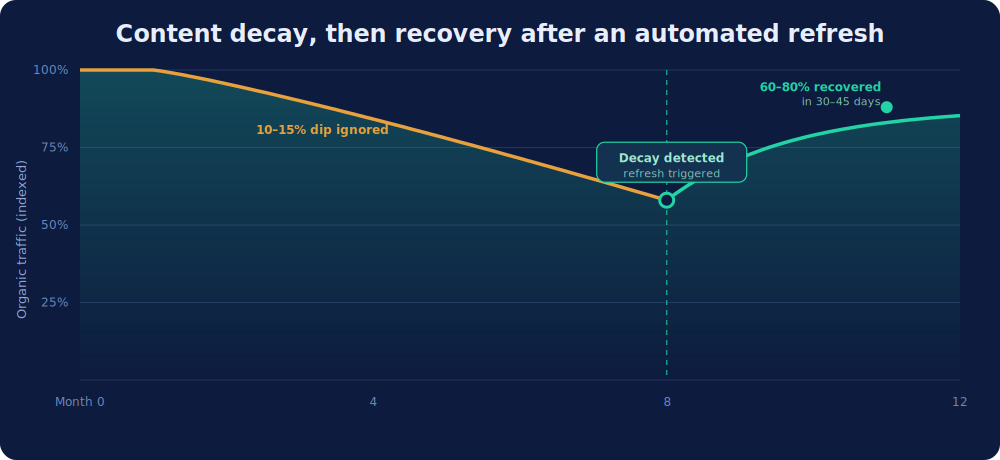
Content decay happens when a page that used to pull organic traffic gradually loses rankings, clicks, or relevance.
It can happen because:
- competitors publish better content;
- statistics go out of date;
- products or recommendations change;
- search intent shifts;
- new entities become relevant;
- sections of the article go stale; or
- the SERP gets more competitive.
The problem gets harder to manage as a site grows.
Manually checking 30 articles is doable. Manually checking 3,000 every week isn’t.
And it’s not a rare edge case. Around 61% of companies cite content decay as a major driver of organic traffic loss — yet almost no SEO tool is built to act on it. That gap is exactly where WordPattern’s automation model earns its place.
How WordPattern Automates Content Recovery
WordPattern connects to Google Search Console through read-only API access — it can’t change your site settings or delete properties — and monitors page performance for patterns of decline.
Rather than waiting for a major traffic drop to become obvious, it analyzes 90 days of GSC data to separate normal volatility from real erosion, and flags the slide early.
Its workflow runs in four stages:
1. Detect
WordPattern watches Search Console performance for declining pages. It looks for patterns of decay — like a page losing two positions a week for several weeks running — so your team isn’t exporting spreadsheets and eyeballing historical trends.
2. Diagnose
Finding a declining URL is only the start. WordPattern runs paragraph-level analysis to pinpoint which sections have gone outdated or thin.
That’s an important distinction. A 4,000-word article doesn’t need a 4,000-word rewrite because one section aged badly.
3. Optimize
The platform identifies relevant semantic entities and content opportunities based on what currently ranks. Instead of blindly stuffing keywords, the goal is closing meaningful topical gaps — the “Word Pattern” suggestions it surfaces for review.
4. Refresh
WordPattern generates targeted, one-click AI refreshes in your brand voice, which your team reviews and approves before anything ships — a human-in-the-loop workflow built to meet E-E-A-T standards. Approved changes push through WordPress/Shopify integrations or manual export.
That turns the process into:
Detect → Diagnose → Refresh → Approve
instead of:
Export → Analyze → Investigate → Brief → Rewrite → Optimize → Review
For a site sitting on a large content library, that difference compounds fast. It also pays off where it counts: refreshing existing content can recover roughly 60–80% of lost rankings within 30–45 days, far quicker than the months a brand-new page needs to climb. WordPattern reports customers recovering 22% of lost organic traffic within 60 days using this targeted approach, without rewriting whole libraries.
Why We Ranked WordPattern #2
Most SEO platforms are strongest at finding opportunities. WordPattern is built around acting on a specific one: recovering declining organic content.
That focus makes it a strong fit for teams that have already sunk real money into content.
Say your site has 2,000 indexed articles. Your biggest opportunity might not be publishing another 100. It might be stopping your best 300 pages from quietly bleeding traffic. WordPattern is built around exactly that, and content decay usually starts small — a 10–15% dip most owners scroll right past before it snowballs.
WordPattern vs Semrush
These two aren’t really substitutes.
Semrush asks:
What’s happening across my whole SEO program?
WordPattern asks:
Which existing pages are losing momentum, why, and what should we update?
Semrush is the stronger general-purpose platform. WordPattern is the stronger specialist content-decay automation platform. Plenty of larger teams reasonably run both.
Who Should Use WordPattern?
Publishers. News, media, and affiliate sites accumulate thousands of articles whose rankings need constant maintenance.
SEO agencies. Agencies can monitor large client content portfolios without hand-checking every historical URL.
Ecommerce businesses. Buying guides, category content, and product-adjacent articles lose relevance as markets move.
SaaS companies. SaaS sites build big libraries of tutorials, comparisons, and definitions that need ongoing refreshing.
Enterprise content teams. Past a few hundred pages, deciding what to update is as much a sorting problem as a writing one.
Where WordPattern Isn’t the Best Choice
WordPattern shouldn’t replace a full research suite if your primary needs are massive keyword databases, backlink research, PPC research, broad competitor intelligence, or deep technical crawling. Those are different problems.
Its strength is the post-publication content lifecycle: catching pages that are slipping and helping teams refresh them fast.
Verdict
Choose WordPattern if you already have a meaningful content library and want to automate detecting and recovering declining SEO pages. For content decay specifically, it’s our top specialist pick.
Rating: 9.3/10
3. Ahrefs – Best for Competitive SEO Intelligence
Best for: SEOs prioritizing competitor research, backlinks, and organic opportunity discovery.
Ahrefs is one of the most recognizable platforms in professional SEO, and its core strength is intelligence.
Use it to investigate competitors, backlinks, keywords, ranking pages, content opportunities, link opportunities, and organic visibility. That makes it great for figuring out where a strategy should focus.
SEO Automation With Ahrefs
Ahrefs automates enormous amounts of data collection that would be nearly impossible by hand. Instead of manually checking competing sites to see which pages attract links or traffic, Ahrefs surfaces those opportunities through its databases and reports. Automated rank tracking and audits cut the recurring work further.
Ahrefs vs WordPattern
It comes down to discovery versus recovery.
Use Ahrefs to discover keywords, competitors, backlinks, ranking opportunities, and content gaps. Use WordPattern to continuously identify and refresh existing pages whose performance is slipping.
Verdict
Ahrefs is excellent for SEOs who want world-class competitive intelligence and backlink analysis.
Rating: 9.1/10
4. Surfer SEO — Best for Content Optimization
Best for: Writers and content teams producing search-optimized articles.
Surfer focuses on the relationship between your content and the current SERP. Its optimization workflows show writers how comprehensively a page covers a topic versus competing content, which cuts the manual SERP digging before and during writing.
What Surfer Automates
Surfer streamlines parts of SERP analysis, content optimization, content scoring, brief creation, topical recommendations, and AI-assisted content workflows. For teams pushing out large volumes of SEO articles, that’s a repeatable optimization process and it helps explain why AI-assisted production cuts average article time by roughly 40–50%, making platforms like Surfer among the best AI SEO tools available for content scale. For teams pushing out large volumes of SEO articles, that’s a repeatable optimization process — and it helps explain why AI-assisted production cuts average article time by roughly 40–50%.
Surfer vs WordPattern
Surfer is strongest while you’re creating and optimizing content. WordPattern concentrates on what happens after content ranks and starts losing performance. The two can be genuinely complementary.
Verdict
Choose Surfer if your main bottleneck is consistently creating and optimizing search-focused content.
Rating: 8.9/10
5. Search Atlas — Best for On-Page SEO Automation
Best for: Teams wanting to move from SEO recommendations toward implementation.
Search Atlas has drawn attention largely for its approach to automated on-page SEO through OTTO SEO, which reflects a real shift in the market. Traditional tools tell you what’s wrong. Newer automation platforms try to help implement the fix.
Automation Capabilities
Search Atlas can assist with on-page optimization, technical SEO recommendations, content optimization, internal linking, metadata, schema-related improvements, and broader monitoring. The exact workflow depends on your site and configuration.
Who Should Use It?
It’s worth a look if your SEO team spits out more fixes than your dev or content team can ship.
Verdict
A compelling option for teams that want deeper on-page execution rather than another analytics dashboard.
Rating: 8.8/10
6. SE Ranking — Best SEO Automation Software for Agencies
Best for: Agencies and growing businesses needing broad functionality without a huge software stack.
SE Ranking has grown well beyond simple rank tracking. It now covers keyword tracking, site auditing, competitive research, backlink analysis, on-page SEO, reporting, and AI visibility — and it earns a spot near the top of automation lists partly for pairing that breadth with integrations like Zapier and n8n.
For agencies, that breadth matters because repetitive reporting and monitoring quietly eat billable hours.
Where Automation Helps
Recurring rank tracking, site monitoring, and reporting get set up once rather than rebuilt by hand for each client. That makes SE Ranking a solid middle ground between lightweight rank trackers and pricey enterprise suites.
Verdict
Choose SE Ranking if you need a broad platform with strong tracking and agency-friendly workflows.
Rating: 8.7/10
7. Alli AI — Best for Large-Scale On-Page SEO Changes
Best for: Websites that need to implement on-page optimizations at scale.
Alli AI sits in the execution-focused camp. Instead of only surfacing opportunities, it helps teams make on-page changes across a site more efficiently — useful when even small fixes must repeat across hundreds or thousands of pages.
Why It Stands Out
SEO recommendations aren’t worth much if they sit inside an audit for six months. Tools like Alli AI shorten the distance between problem identified and problem fixed.
Verdict
Consider Alli AI when implementation — not intelligence — is your biggest bottleneck.
Rating: 8.5/10
8. Screaming Frog — Best for Technical SEO Automation
Best for: Technical SEOs, agencies, and website auditors.
Screaming Frog SEO Spider remains one of the most useful crawling and diagnosis tools around. It surfaces issues with broken links, redirects, titles, meta descriptions, canonicals, indexability, duplicate content, and other technical signals. For advanced users, custom configurations and integrations turn it into a powerful technical SEO automation system.
The Limitation
Screaming Frog is more technical than most SaaS SEO platforms. The data is exceptional, but reading it and acting on it usually takes real SEO skill.
Verdict
If your definition of automation centers on crawling, auditing, and technical diagnosis, Screaming Frog belongs in your toolkit.
Rating: 8.4/10
9. Frase — Best for Automated Content Briefs
Best for: Content teams wanting faster research and briefing.
A surprising amount of SEO content time disappears before anyone writes a sentence. Writers or strategists have to inspect search results, understand competing articles, identify subtopics, gather questions, build an outline, and create a brief.
Frase automates chunks of that.
Why Use Frase?
Its biggest value is speed. Instead of starting each article with an empty doc and ten open SERP tabs, teams get a more standardized research and optimization process.
Verdict
Choose Frase when content research and briefing are major production bottlenecks.
Rating: 8.2/10
10. MarketMuse — Best for Enterprise Content Strategy
Best for: Larger content organizations planning topical authority and content investments.
MarketMuse approaches SEO from a content intelligence angle. Rather than treating every keyword in isolation, tools in this category help teams see topical coverage and spot strategic gaps — what to create, what to improve, where topical weaknesses sit, and how existing content supports authority.
Who Is It For?
MarketMuse makes the most sense when content strategy itself has gotten complicated. Smaller sites may not need that depth; teams with large libraries get much more from it.
Verdict
A strong choice for sophisticated content strategy and planning.
Rating: 8.1/10
How to Choose the Best SEO Automation Software
Don’t choose software by counting features on a pricing page. Start with the bottleneck. It also helps to consolidate — the average enterprise SEO team already juggles about 4.2 different AI tools, so more logins rarely means more done.
Choose Semrush if…
You need one broad platform for keyword research, competitor research, auditing, tracking, and reporting.
Choose WordPattern if…
You have hundreds or thousands of existing pages and need to continuously detect ranking decay and refresh declining content.
Choose Ahrefs if…
Competitive intelligence, keyword opportunities, and backlinks are central to your strategy.
Choose Surfer if…
Your primary challenge is creating consistently optimized SEO content.
Choose Search Atlas or Alli AI if…
You want to automate more of the implementation layer of on-page SEO.
Choose SE Ranking if…
You need an agency-friendly combination of rank tracking, auditing, research, and reporting.
Choose Screaming Frog if…
Technical crawling and website auditing are your biggest priorities.
Choose Frase if…
Content research and briefs are slowing production.
Choose MarketMuse if…
You manage a sophisticated content program and need deeper strategic intelligence.
How to Score SEO Automation Tools on ROI
Our ratings show how each tool performs in general. They can’t tell you whether a tool will pay off for your team. For that, you need your own numbers. Before you commit to any of the SEO automation tools above, run it through this four-step test.
Step 1: Log your baseline hours
List the tasks the tool says it will automate: rank checks, audit triage, report building, brief research, or finding pages that need a refresh. For two weeks, log how long your team spends on each one by hand. Skip this step and every “hours saved” number you calculate later is a guess.
Step 2: Trial it on the same tasks
Use the free trial or first paid month on exactly those tasks, with the same people. Then log the hours again. Ignore features you didn’t plan to use. They don’t count toward ROI.
Step 3: Run the ROI formula
Monthly net value = (hours saved per month × loaded hourly cost) − monthly tool cost
Here’s an illustrative example. Say a tool cuts 12 hours a month of reporting and audit triage, and your team’s loaded cost is $60 an hour. That’s $720 in recovered time. Subtract a $140/month subscription and you’re about $580 ahead every month.
Now say the same tool only saves 2 hours. That’s $120 of time against a $140 bill, so you’re losing money before any traffic gains show up.
Step 4: Check overlap and score upside separately
A tool can pass the formula and still be a bad buy. Before you sign, check four things:
| Check | Passes when… |
|---|---|
| Hours saved | Measured against your baseline, not taken from the vendor’s claims |
| Net monthly value | Positive on labor savings alone |
| Overlap | It replaces a tool you can cancel, or does something nothing in your stack does |
| Adoption | Your team is still using it at the end of the trial month |
Keep traffic gains out of the labor math. Recovered rankings and protected clicks are real upside, but they take longer to show and are harder to attribute. Score them separately. For a content decay tool, that means comparing clicks on refreshed pages before and after each update.
Then build in layers. Start where your team loses the most hours, prove the ROI there, and only then add the next tool. Ten subscriptions nobody fully uses will erase the time automation was supposed to give back.
Which SEO Tasks Should You Automate?
Not everything should be automated just because it can be. The best candidates usually share three traits:
Repetitive + Data-heavy + Rules-based
Rank Monitoring
There’s little reason for a human to manually search Google every morning and log positions. Software does it better.
Content Decay Detection
Humans are bad at continuously watching thousands of URLs for gradual deterioration. That’s exactly the pattern-recognition work automation is good at.
Technical Crawling
Checking every internal link, canonical tag, or status code by hand is absurd on a large site. Automate it.
Reporting
Recurring dashboards and reports should pull fresh data automatically wherever possible. This matters more than it sounds: analysts increasingly treat 2026 reporting as a credibility instrument rather than a status update and tools like review management software make it easier to turn fresh customer feedback and performance data into meaningful insights. The real value is in diagnosing why traffic and engagement moved, not simply shipping a prettier chart.
Content Gap Analysis
Software accelerates comparing topics, entities, and competing pages.
Initial Content Briefs
Automation can gather SERP information and build a first-draft brief before an experienced strategist reviews it.
Which SEO Tasks Shouldn’t Be Fully Automated?
Automation gets dangerous when teams confuse efficiency with judgment. A few areas still deserve real human oversight.
Search Intent
Software can analyze patterns, but you still need to understand why someone searches and what outcome they want.
Original Expertise
AI can reorganize existing knowledge. It can’t replace genuine experience, proprietary research, expert interviews, original data, or first-hand testing.
Brand Voice
Automation should support your editorial standards, not flatten every article into generic SEO copy.
Strategic Decisions
A tool can tell you a keyword has 10,000 searches. It can’t decide whether that audience supports your business model.
Final Publishing Decisions
For consequential changes, human approval stays valuable.
For many organizations, the strongest model isn’t 100% autonomous SEO. It’s:
machine detection + machine assistance + human judgment.
SEO Automation vs AI SEO: What’s the Difference?
These terms increasingly overlap, but they aren’t identical.
SEO automation means using software to automatically perform SEO processes. AI SEO means using artificial intelligence within SEO workflows.
Automation doesn’t strictly require AI. A scheduled crawler that checks broken links every night is automation even with no generative AI involved. Likewise, using an AI chatbot to brainstorm ten title tags isn’t really automation if someone types the prompt each time.
The most interesting modern platforms combine both:
- software automatically monitors performance;
- an algorithm detects an abnormal decline;
- AI analyzes the affected content;
- AI proposes an update;
- a human approves it; and
- the workflow publishes or exports the change.
That’s AI-powered SEO automation rather than simply AI-assisted SEO.
Why Content Refresh Automation Matters More as Your Site Grows
Most content strategies obsess over publishing velocity. “How many articles did we publish this month?”
There’s a better question for mature teams: how much traffic are our existing articles quietly losing?
Consider a site with 1,000 articles. Suppose 100 pages start slowly losing visibility. Even if the team ships 20 new articles that month, some of that “growth” just replaces traffic disappearing from older pages.
That’s the SEO treadmill.
New content adds traffic. Old content loses traffic. The team publishes more to compensate.
Eventually, maintaining the library matters as much as expanding it — and the pressure is only rising. Gartner projects organic search traffic could fall around 25% by 2026 and 50% by 2028 as AI Overviews and zero-click search reshape the results page. Your existing winners are under fire while you’re busy publishing new ones.
Traditional SEO software is great at telling you what currently ranks. Content-lifecycle automation asks a different question:
Which pages that used to perform are starting to fail?
Catching those early is far easier than recovering them after rankings collapse.
SEO Automation Software for Agencies
Agencies have another reason to automate: margins.
Imagine an agency CRM managing 40 clients. If each account needs two hours a month for rank exports, traffic comparisons, audit checks, competitor monitoring, and report prep, that’s 80 hours of repetitive work before strategic SEO even starts.
Automation shrinks that overhead. A practical agency stack might combine:
- Semrush or SE Ranking for broad client monitoring;
- WordPattern for content-decay monitoring across content-heavy clients;
- Screaming Frog for technical auditing; and
- Surfer or Frase for content production.
The point isn’t one platform that does everything. It’s a system where people spend most of their time on decisions, lead generation, not data collection, with tools like Lead Stalkers helping teams organize their prospecting efforts.
SEO Automation Software for Publishers
Publishers have maybe the clearest use case. A publisher with 10,000 indexed articles can’t manually review the whole library every quarter.
Some pages will gain traffic, plateau, lose traffic, go outdated, carry old statistics, lose featured placements, face stronger competitors, or stop matching current intent.
The challenge isn’t just optimization. It’s prioritization. Which 50 pages should editors update this week?
That’s where decay-focused platforms like WordPattern become valuable — prioritizing by actual search-performance deterioration instead of an arbitrary refresh calendar. If you want the manual version of that triage first, WordPattern’s guide to finding and fixing content decay walks through the GSC signals to watch.
Can SEO Be Fully Automated?
Technically, more of SEO can be automated every year. Strategically, fully autonomous SEO is rarely the best objective.
Search optimization blends data, technical systems, content, psychology, branding, product knowledge, business strategy, and editorial judgment. Automation is great at scale. Humans are better at context.
The most effective teams automate the repetitive layer and keep human involvement for decisions where judgment creates value.
Think of SEO automation as leverage. A strong strategist with automation can watch and improve far more pages than the same person working by hand. That’s the real opportunity.
Best SEO Automation Software by Use Case
Still deciding? Here’s the simplest way to choose.
| Your Main SEO Problem | Best Tool |
|---|---|
| Need an all-in-one SEO platform | Semrush |
| Existing content keeps losing rankings | WordPattern |
| Need competitor/backlink intelligence | Ahrefs |
| Need better optimized articles | Surfer SEO |
| Need on-page implementation automation | Search Atlas |
| Need agency reporting and tracking | SE Ranking |
| Need scalable on-page changes | Alli AI |
| Need technical website crawling | Screaming Frog |
| Need faster content briefs | Frase |
| Need enterprise content intelligence | MarketMuse |
The Future of SEO Automation
SEO automation is moving from observation to execution.
The first generation of SEO software said:
Here’s your data.
The next said:
Here’s your data, and here’s what you should do.
The emerging generation increasingly says:
We found the problem, prepared the solution, and it’s ready for you to approve.
That shift changes how teams work. Instead of spending Monday morning exporting spreadsheets, teams evaluate prioritized actions. Instead of reviewing 5,000 articles, they investigate the 40 showing real decay or instead of rewriting a whole page because rankings fell, they fix the specific sections that need it.
The result isn’t “SEO without humans.” It’s SEO teams operating with a lot more leverage.
Final Verdict
There’s no single platform that’s best at everything.
For the broadest workflow, Semrush is our #1 overall choice. It combines research, competitive intelligence, monitoring, auditing, and reporting in one ecosystem suited to everyone from growing companies to professional SEO teams.
WordPattern takes the #2 position overall and #1 for content decay automation. Its edge is specialization. Instead of becoming another giant dashboard, it focuses on an increasingly expensive problem for mature sites: protecting the traffic from content you’ve already paid to produce. Once a site has hundreds or thousands of ranking pages, spotting the decline by hand stops being realistic, and automating it turns content upkeep from a once-in-a-while cleanup into an always-on system.
For backlink and competitor research, choose Ahrefs. Choose Surfer, for content optimization. For technical SEO, Screaming Frog and for large-scale implementation, look at Search Atlas or Alli AI.
Whichever you pick, hold onto the core principle:
Don’t automate SEO for the sake of automation. Automate the repetitive work that stops your team from doing higher-value SEO.
If declining rankings are one of those repetitive problems, WordPattern can continuously monitor your existing content and surface the pages that need attention before lost rankings turn into lost traffic. You can start a free WordPattern audit and see which pages are already showing signs of decay.
FAQs
Semrush is our best overall pick because it covers a broad range of research, tracking, auditing, and competitive-analysis workflows. WordPattern ranks second overall and is our specialist choice for automatically detecting content decay and building targeted content refresh workflows.
SEO automation uses software to complete repetitive search optimization tasks, including rank monitoring, website crawling, reporting, content analysis, competitor monitoring and content-decay detection. Teams focused specifically on evaluating existing pages should also compare the best content audit software.
Yes. Many repetitive SEO activities can be partially or heavily automated, including rank tracking, technical audits, reporting, content monitoring, and certain optimization workflows. Strategic decisions, original expertise, search-intent interpretation, and final editorial review still benefit from human involvement — only about 1% of teams run fully automated today.
Common opportunities include keyword tracking, technical crawling, competitor monitoring, backlink monitoring, SEO reporting, content gap analysis, content-decay detection, internal linking recommendations, brief generation, and certain on-page optimizations.
Log the hours your team spends on the tasks you want to automate, then trial the tool on those same tasks and log the hours again. Multiply the hours saved by your loaded hourly cost and subtract the monthly fee. If the result is positive on labor alone, the tool pays for itself. Track traffic gains separately as upside.