
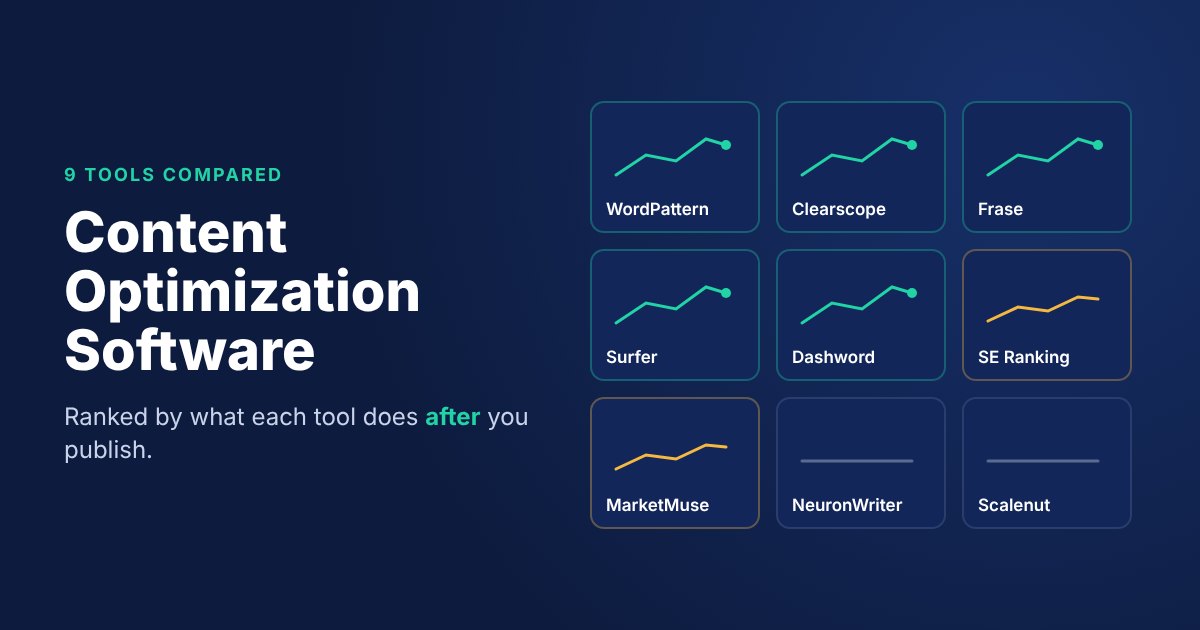
Content optimization software is a tool that helps a page rank and stay ranked. Most products work on the writing side: they compare your draft with the pages already ranking and show which terms, questions and headings you’re missing. The better ones keep going after you publish, watching the live page and flagging when its clicks or rankings slip.
That second half is the part almost every comparison skips.
Go read the top results for this keyword. They score tools on editors, term lists, AI writers and how many briefs you get a month. Useful, sure. But a page you optimized in March can lose half its clicks by October, and a content editor won’t say a word about it. It only knows the draft in front of it.
So this list ranks the nine tools differently. The first question isn’t “how good is the editor?” It’s “will this tool tell me when a page I already published starts to decay?” We checked each vendor’s own pricing page and product docs on 11 November 2026. Where a vendor doesn’t document something, the table says so instead of guessing.
The comparison table
| Monitors live pages? | Tool | How it watches published pages (per vendor docs) | Starting price (as listed) | Best for |
|---|---|---|---|---|
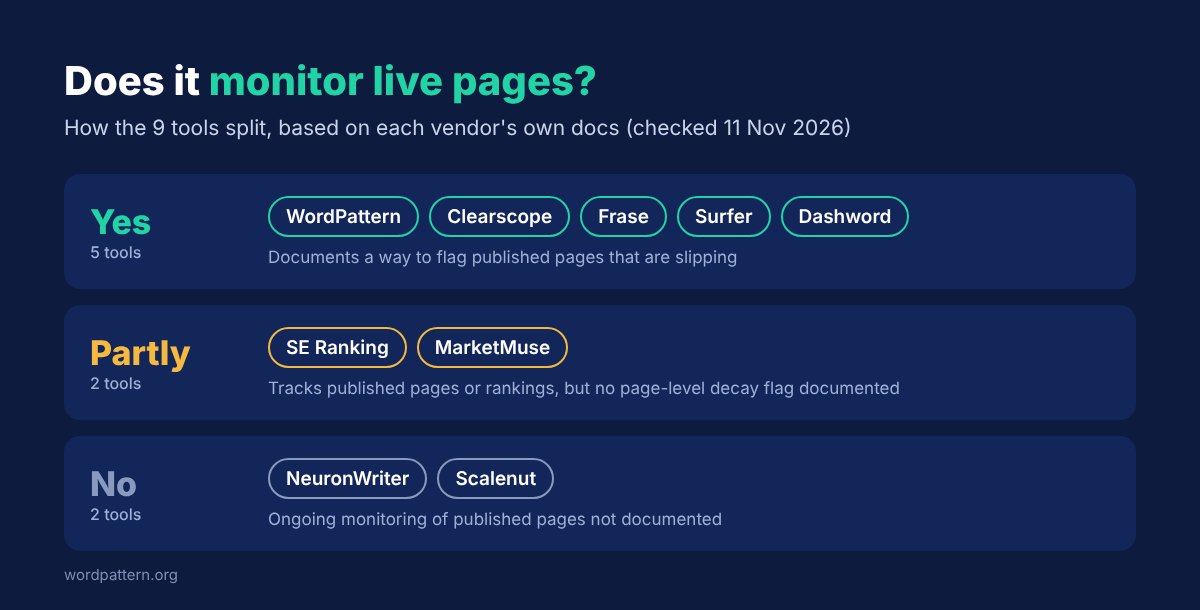
| Yes | WordPattern | Connects to Search Console and flags pages that are declining | Free to try; paid plans not publicly listed | Teams whose traffic is in old posts |
| Yes | Clearscope | “Monitor” tracks pages with Search Console data; a Content Decay view flags slowdowns | $129/mo (Essentials) | Editorial teams that want one premium tool |
| Yes | Frase | Content Monitoring scores page health from Search Console; Content Guard proposes fixes | $39/mo billed yearly (Starter) | Small teams that want monitoring cheaply |
| Yes | Surfer | Content Audit plus Rank Drop Alerts and a tracked-page quota | $49/mo billed yearly (Discovery) | Writers already living in Surfer’s editor |
| Yes | Dashword | Content Monitoring tracks traffic trends and alerts on losing pages | $99/mo (Startup) | Lean teams that want alerts without a suite |
| Partly | SE Ranking | Rank tracking and a Search Console integration; “Page changes monitoring” on Growth | $103.20/mo (Core, discounted rate shown) | Teams that want an all-in-one SEO platform |
| Partly | MarketMuse | Site inventory of published pages, updated regularly; no decay alerts documented | Not publicly listed (demo) | Content strategists planning by topic |
| No | NeuronWriter | Not documented | $23/mo, or $19/mo paid annually (Bronze) | Freelancers optimizing drafts on a budget |
| No | Scalenut | One-off “Audit & Optimize” pages; ongoing monitoring not documented | $39/mo (Essential, per its help center) | Teams that mostly need AI drafting |
“Partly” means the tool watches something about your published pages, but its docs don’t describe flagging a specific page as it decays.
One disclosure before we go on: WordPattern is our product. It’s on the list because it’s built for exactly the column this article ranks by. Weigh that however you like, and check every claim against the vendor pages linked in each section.
Why “after publish” is the column that matters
Optimizing a draft is a one-time job. Keeping a page ranking is the job that never ends.
Here’s how it usually goes. You publish a post, it climbs, and everyone moves on to the next brief. Months later a competitor ships something fresher, or the intent behind the query drifts, and your page slides from position three to position nine. Nothing breaks, so nobody gets an alert. You only find out when someone asks why traffic is flat.
A writing-only tool can’t catch that, because it isn’t looking. It needs you to bring it the URL. And you’d only bring it the URL if you already knew there was a problem.
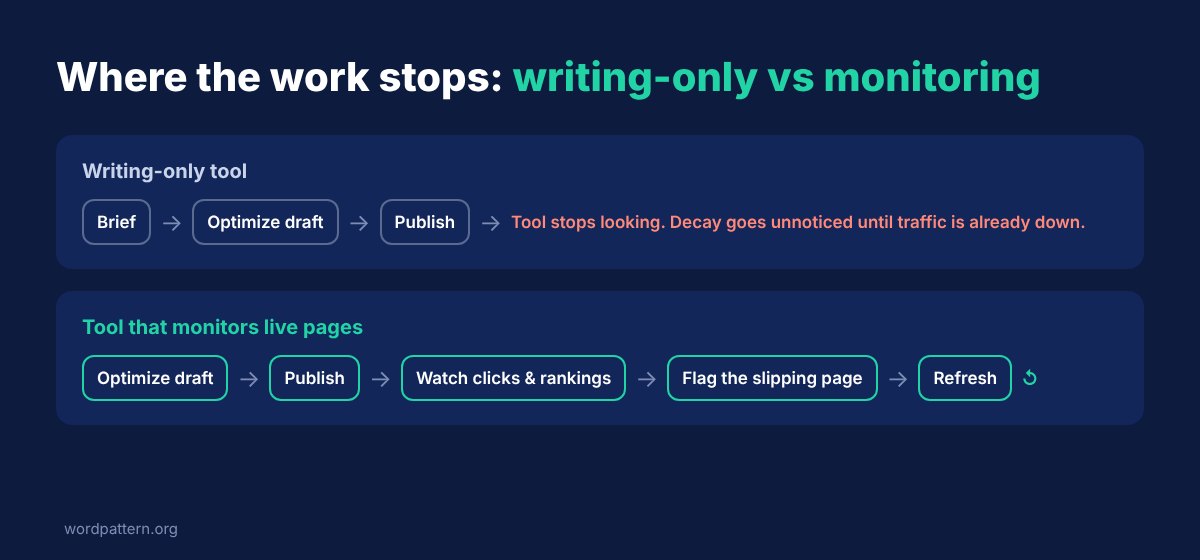
A tool that watches live pages flips that order. It finds the slipping page first and hands it to you. That’s also the difference between refreshing the right posts and refreshing random ones. If you’re deciding between a refresh, a merge or a cut, our guide to content pruning for SEO covers how to make that call once a page is flagged.
None of this makes the editor side useless. You still need it to write the page well. But if two tools have similar editors and only one watches the page afterwards, the choice gets a lot easier.
The 9 best content optimization tools, ranked by what they do after you publish
1. WordPattern
Monitors live pages: Yes.
WordPattern starts from your Search Console data, not from a blank draft. Its homepage pitch is “Find Declining Content Before It Loses More Traffic”, and setup starts with connecting Search Console. From there it looks for patterns of decline across your published pages, so a post sliding a couple of spots at a time shows up before it turns into a real loss.
The writing side is about refreshing what you already have. It flags the decaying page and works out what the refresh needs, instead of starting a new article from scratch.
Pricing: The site offers a free start (“Try It Free. Scale When You’re Ready.”). Paid plan prices aren’t published, so ask before you budget.
Best for: Content teams with a big back catalog, where most of the traffic sits in posts that are already a year or more old. If you need to audit a large library first, our enterprise content audit page shows how that works at scale.
2. Clearscope
Monitors live pages: Yes.
Clearscope’s Monitor product tracks published pages using Search Console data, showing each page’s grade, clicks, impressions, position and SEO value. Saved views flag what’s slipping, and Google updates are marked on the charts. There’s also a Content Decay view that compares a page’s last 90 days of clicks with the same window a year earlier and adds a 12-month sparkline. Clearscope’s own line for it: the view makes it simple to “monitor traffic slowdowns across your published pages.”
Worth knowing: Clearscope describes these as in-app flags and views, not email alerts. Someone still has to open it.
Its plans also include query tracking across ChatGPT and Gemini, plus brand visibility tracking, if AI search is on your radar.
Pricing: Essentials $129/month, Business $399/month, Enterprise custom. Extra pages cost $25/month on Essentials and $15/month on Business. No annual prices are listed.
Best for: Editorial teams that want monitoring and optimization in one premium tool and can justify the price. If it’s too expensive, we compared the field in our Clearscope and Frase alternatives roundup.
3. Frase
Monitors live pages: Yes.
Frase goes the furthest of any editor-first tool. Connect Search Console and Content Monitoring folds click, impression and position changes into a health score for every page. Pages are sorted so the slipping ones rise to the top, each labelled healthy, monitor, refresh or urgent.
Then there’s Content Guard. It watches rank and traffic decay, proposes a fix and republishes only after you approve it. Frase is clear that monitoring itself changes nothing: “Nothing on your site changes from this view.”
The catch is the page limits. Content Guard covers 10 pages on Starter, 75 on Professional and 300 on Scale. Historical data also scales by plan, from current-only on Starter up to 24 months on Enterprise.
Pricing: Starter $39/month ($468 billed yearly), Professional $103/month ($1,236 yearly), Scale $239/month ($2,868 yearly), Enterprise custom. The page also shows higher struck-through prices ($49, $129, $299) without saying which billing cycle they belong to.
Best for: Small teams that want real decay monitoring without paying for a premium tool.
4. Surfer
Monitors live pages: Yes.
Surfer’s monitoring sits inside Content Audit and its Sites setup. Surfer’s help docs describe “rank drop notifications to spot content that’s falling behind live,” which rely on a Search Console connection, plus weekly refresh recommendations. The pricing page lists Rank Drop Alerts and Content Audit in its plan comparison. You also get a tracked-page quota: 10 pages on Discovery, then 50, 200 and 500 on the higher tiers.
Two caveats. The docs don’t explain how often rankings are checked or what triggers an alert. And the Discovery plan card doesn’t mention Rank Drop Alerts, even though the comparison table does, so confirm with Surfer before you buy the cheapest tier for this.
Pricing (billed yearly): Discovery $49/month, Standard $99/month, Pro $182/month, Peace of Mind $299/month, Enterprise custom. There’s also an AI Search Analytics plan at $82/month. Monthly-billing prices aren’t shown, and Surfer says yearly billing saves “up to 17%”. New accounts get a 7-day Pro trial.
Best for: Writers and agencies already using Surfer’s editor who want drop alerts without adding another tool. For other editor-first options, see our Surfer SEO alternatives list.
5. Dashword
Monitors live pages: Yes.
Dashword is the quiet one on this list, and its monitoring is more direct than you’d expect at the price. A web crawler imports your pages automatically, rankings are tracked, and you get weekly keyword reports. In Dashword’s words: “We track traffic trends and alert you if a page is losing traffic or not receiving any.”
That last part matters. A page getting zero traffic is a problem too, and most tools only flag pages that used to perform.
On the writing side, plans are counted in content reports: 30 on Startup, 100 on Business, with bulk report creation on Business.
Pricing: Startup $99/month, Business from $349/month.
Best for: Lean teams that want straightforward “this page is losing traffic” alerts without buying a whole SEO suite.
6. SE Ranking
Monitors live pages: Partly.
SE Ranking is a full SEO platform, so it watches a lot. Rank tracking across major search engines is in every core plan, Search Console integrates on Core, and the Growth plan adds “Page changes monitoring.” Content creation comes as article allowances: 25 on Core, 50 on Growth, extra articles from $39.20.
So why only “partly”? Rank tracking follows the keywords you choose to track, and page changes monitoring watches what changed on a page. Neither, as documented, flags a specific URL as it starts to decay. You can get there by building your own views, but you’ll be doing the joining up yourself.
Pricing: Core $103.20/month (shown as discounted from $129), Growth $223.20/month (from $279), Enterprise custom. The page mentions 20% annual savings, which suggests the lower figures are annual rates.
Best for: Teams that want one platform for tracking, audits and content, and are happy to set up their own decay views. If automation across the whole stack is the real goal, our roundup of SEO automation tools goes wider than content.
7. MarketMuse
Monitors live pages: Partly.
MarketMuse thinks in topics. Paid plans include a site inventory, which MarketMuse describes as “a list of all of the published pages, topics, and page/topic combinations on your site,” updated on a regular basis. Tracked topic limits run from 100 to 10,000 depending on plan. Its Personalized Difficulty metric considers how a page performs “both currently and historically.”
That’s a real view of your published content. But the pricing page doesn’t mention content decay or alerts for declining pages, so it’s a planning tool first and a watchdog second.
Pricing: Not publicly listed. Every plan (Free, Optimize, Research, Strategy) shows a “Book a demo” button.
Best for: Content strategists planning coverage and topical gaps across a large site.
8. NeuronWriter
Monitors live pages: No (not documented).
NeuronWriter is a draft-optimization tool, and a well-priced one. Plans are counted in projects, content writer analyses and AI credits, and Gold and above add integrations, a plagiarism checker, Content Designer and AutoInsert. It also lists AI Visibility for tracking your brand across AI platforms.
What its pricing page doesn’t mention is anything that watches published pages or connects to Search Console. If it does, it isn’t documented there.
Pricing: Bronze $23/month ($19 paid annually), Silver $45 ($37), Gold $69 ($57), Platinum $93 ($77), Diamond $117 ($97).
Best for: Freelancers and small sites optimizing new drafts on a budget, paired with something else for monitoring.
9. Scalenut
Monitors live pages: No (not documented).
Scalenut leans into AI content creation. The closest it gets to existing pages is “Audit & Optimize”: 30 pages on Growth, 75 on Pro. That gives you feedback and suggestions on a page you choose, but its help center doesn’t describe ongoing monitoring, traffic tracking or Search Console data.
Pricing: Its help center lists Essential $39/month, Growth $79/month and Pro $149/month in the plan sections. The same page’s summary also says Essential “starts at USD 17/month,” Growth at $47 and Pro at $89, without saying which billing cycle those are. Check the live checkout before you budget.
Best for: Teams whose main need is producing AI-assisted drafts quickly, not maintaining a library.
How to choose content optimization software
Start with the job, not the feature list.
If most of your traffic sits in older posts, monitoring comes first. Shortlist the five “Yes” tools and compare how many pages each one watches at your budget. Frase’s Content Guard limits and Surfer’s tracked-page quotas look very different once you have 500 posts.
If you publish a lot of new content, the editor matters more. Pick the one your writers will actually open, then make sure something else is watching the pages they’ve already shipped.
If you want one tool for everything, Clearscope and SE Ranking cover the most ground, at very different prices. Clearscope does more page-level decay flagging out of the box. SE Ranking gives you more general SEO tracking.
If your budget is tight, NeuronWriter is the cheapest editor on this list and Frase is the cheapest documented monitoring. Pairing a cheap editor with a monitoring tool often costs less than one premium suite.
Whichever you pick, run one test before you commit. Take a post you know has lost traffic over the past year, connect it, and see whether the tool flags it without you pointing at it. That tells you more than any feature grid.
FAQs
What is the difference between content optimization software and an SEO tool?
An SEO tool covers your whole site: keywords, backlinks, technical issues, rankings. Content optimization software focuses on individual pages, mostly on how well the copy covers a topic compared with what’s ranking. The overlap is growing, and some tools now do both. SE Ranking is a platform with content features. Frase is an editor with monitoring.
Is there free content optimization software?
Some tools have free tiers or trials. MarketMuse lists a Free plan (with no site inventory), Surfer gives new accounts a 7-day Pro trial, and WordPattern lets you start free by connecting Search Console. Free tiers are usually capped hard, so treat them as a way to test the workflow, not as a long-term plan.
Do AI content optimization tools write the article for you?
Many can draft, but drafting isn’t optimizing. An AI content optimization tool is only as good as what it compares your page against, and as the table shows, most of them stop comparing the moment you publish. Use AI drafts as a starting point, then edit for accuracy and voice.
How often should published pages be checked for decay?
Often enough to catch a slide before it becomes a drop. That’s why automated monitoring beats a quarterly manual audit: the tool checks every page on its own schedule, and you only look at the ones it flags. Then confirm any flagged drop against Search Console before you rewrite anything.
The short version
Every tool on this list can help you write a better page. Only about half will tell you when that page starts losing ground, and that’s the part that decides whether your best posts are still earning traffic next year.
So pick your editor on feel and your monitoring on evidence. Then test both against a page you already know is slipping.