
In September 2025, Google quietly stopped honoring the &num=100 search parameter. Rank trackers had used it for years to pull the top 100 results in one request. Afterward, 87.7% of sites in a 319-property analysis saw their Search Console impressions drop, and 77.6% lost unique ranking queries.
Nothing about those sites changed. The measurement did.
That’s the part most “best rank tracker” roundups skip. They list fifteen tools, paste a feature grid, and call it a day. But when an SEO team actually shortlists rank tracking tools, the conversation comes down to three questions: How fresh is the data? Does it split local and mobile? And what do 1,000 tracked keywords really cost?
So that’s what we tabulated.
The comparison table: refresh rate, local/mobile, and cost per 1,000 keywords
Every number below comes from each rank tracker’s own pricing or help pages, checked on September 25, 2026. Cost per 1,000 keywords is the month-to-month list price divided by the plan’s tracked-keyword allowance, times 1,000. Euro-priced tools stay in euros (no conversion guesswork).
| Tool | Entry plan (monthly) | Cost per 1,000 keywords (entry) | Cost per 1,000 (largest self-serve plan) | Refresh frequency | Local / mobile tracking | Free access |
|---|---|---|---|---|---|---|
| SE Ranking | $129 / 2,000 kw | $64.50 | $55.80 (Growth, 5,000 kw) | Daily | Desktop + mobile; separate Local & Map tracker (1,500 kw, 3 locations) | 14-day trial |
| AccuRanker | $224 / 2,000 kw | $112.00 | $76.40 (Expert, 10,000 kw) | Daily + on-demand (every 2 hours) | Desktop and mobile each count as a keyword; country to street address | Trial |
| Semrush Position Tracking | $139 / 500 kw | $278.00 | $109.80 (Advanced, 5,000 kw) | Daily | Mobile data on all plans; multi-location/device from Pro+ | Free plan (1 demo project) + 7-day trial |
| Nightwatch | €99 / 500 kw | €198.00 | €66.53 (Agency, 7,500 kw) | Daily + on-demand | Any device; 107,000+ locations incl. Google Maps | 14-day trial |
| Wincher | €49 / 500 kw | €98.00 | €63.80 (Professional, 5,000 kw) | Daily (on-demand from Standard) | Device + geo tracking; Maps tracker updates weekly | Trial |
| Ahrefs Rank Tracker | $129 / 750 kw | $172.00 | $89.80 (Advanced, 5,000 kw) | Weekly | Desktop + mobile; country, city, ZIP (each location = 1 keyword) | No free rank tracker |
| Google Search Console (free tier) | $0 / no keyword cap | $0 | $0 | Near real time (24-hour view) | Country and device only; no city level | Free |
A few notes on reading it. Nightwatch publishes €79, €159, and €399 as yearly-billed rates. The month-to-month figures above come from the savings it lists on the same page. Wincher’s tiers come from Capterra’s August 2026 listing because its own pricing page renders prices client-side. And the “entry” column punishes tools with small starter plans, which is exactly the point. If you only need 500 keywords, you pay the entry rate.
Why these three numbers beat a feature list
Every paid rank tracking tool here tracks SERP features. Most track competitors and export reports. Features converge. These three things don’t.
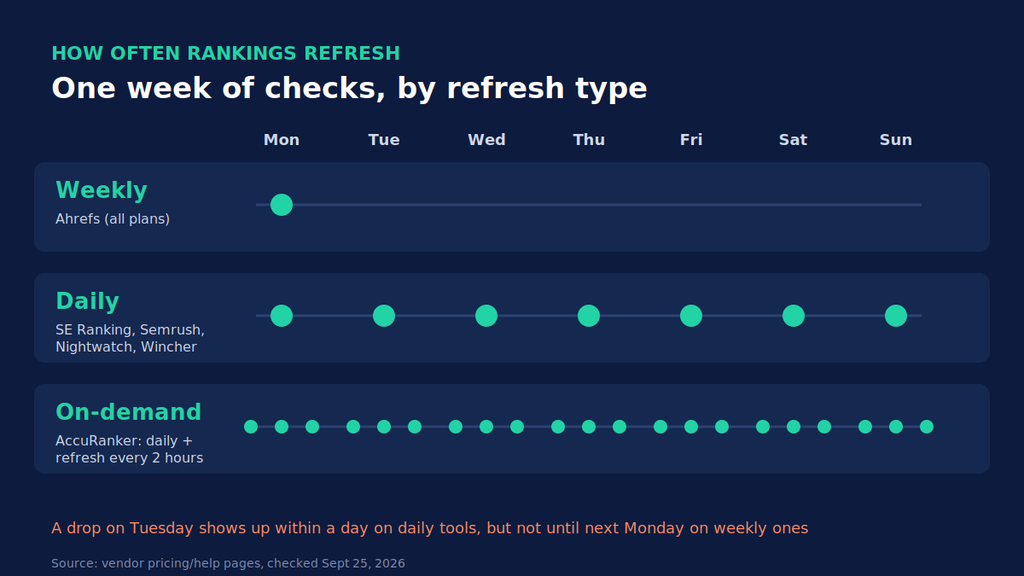
Refresh frequency decides whether you catch a drop this week or next
A weekly tracker tells you where you were. Daily tells you where you are. On-demand lets you check mid-update without waiting for the next crawl.
That gap matters most during core updates. If your seo ranking monitor refreshes weekly, a Tuesday drop can sit unseen until the following Monday. Ahrefs’ help center confirms its Rank Tracker defaults to weekly on every plan. That’s not a flaw for monthly reporting. It is a flaw for incident response.
Local and mobile tracking, and the multiplier nobody prices in
Mobile and desktop results differ, and so do city-level results. Most trackers handle both. The catch is how they count them.
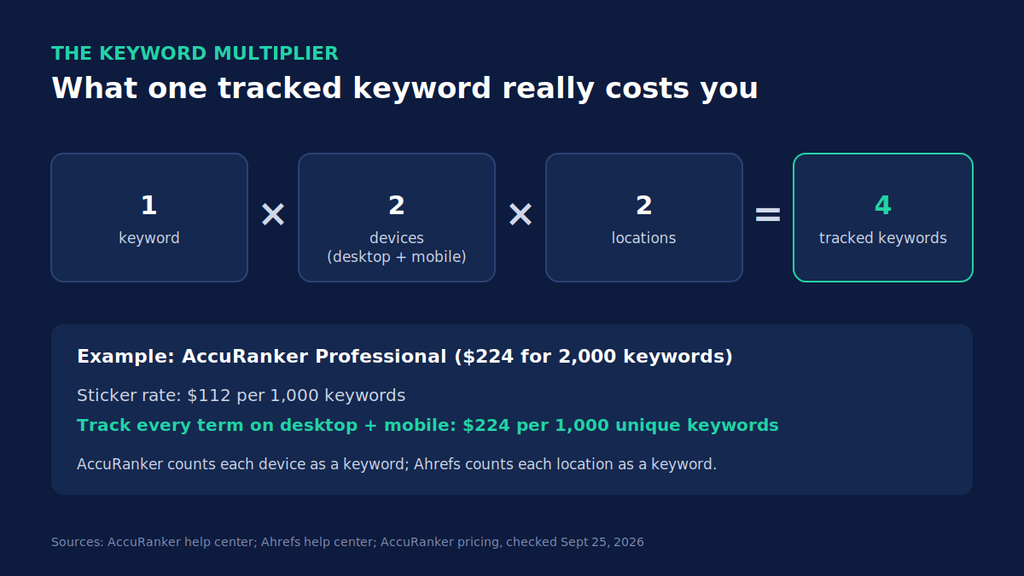
AccuRanker’s help docs spell it out: a keyword tracked on Google and Bing, desktop and mobile, counts as four keywords. Ahrefs does the same with locations; 3 keywords in 2 locations uses 6 of your allowance. Wincher users report the same desktop/mobile double count in reviews.
So the real formula is: keywords × devices × locations.
Accuracy after num=100: check the depth, not the claim
Every vendor of rank tracking tools says its data is accurate. Since Google disabled the num=100 parameter, a more useful question is how deep each tool still checks. Pulling the top 100 now takes multiple requests instead of one, which raises the cost of tracking positions past page two.
So ask vendors directly. Do you still track to position 100? For every keyword, or only some? How often? If most of your keywords sit on page one, it barely matters. If you’re climbing from page four, it matters a lot.
Cost per 1,000 keywords is the only fair price comparison
Plan names are marketing. “Pro” at one vendor buys 500 keywords; “Professional” at another buys 2,000. Dividing price by allowance strips that away.
Run the multiplier on it, too. AccuRanker’s entry plan is $112 per 1,000 keywords. Track every keyword on desktop and mobile and your effective rate for 1,000 unique terms is $224. Pretty different number, right?
The 7 rank tracking tools, one by one
1. SE Ranking: lowest cost per 1,000 for daily tracking
SE Ranking restructured its plans, and third-party roundups haven’t caught up. Many still quote the retired Essential/Pro/Business tiers. The current Core plan is $129 month-to-month ($103.20 billed annually) for 2,000 keywords tracked daily. That’s $64.50 per 1,000, the lowest daily-refresh rate in our table.
Growth ($279, 5,000 keywords) drops it to $55.80.
It tracks Google, Bing, and YouTube on desktop and mobile across the top 100. Local map-pack tracking is a separate module: 1,500 keywords and 3 locations are included, with extra locations sold on top.
Best for: agencies and in-house teams tracking 2,000–5,000 keywords daily on a budget. The catch: white-label reporting is a $69/month add-on (annual billing only).
2. AccuRanker: fastest refresh
If you watch rankings during algorithm updates, AccuRanker is built for you. Daily updates are standard, and you can refresh a single keyword or an entire domain every two hours on demand.
Professional costs $224 for 2,000 keywords ($112 per 1,000). Expert jumps to $764 for 10,000 ($76.40 per 1,000). Location precision goes down to a street address.
Best for: teams that react to volatility in real time, or report daily to clients who notice. The catch: the device multiplier. Desktop plus mobile doubles your keyword burn, so budget from the effective rate, not the sticker.
3. Semrush Position Tracking: best if you already live in Semrush
Position Tracking comes bundled into Semrush’s platform plans, which is why the entry math looks harsh: the SEO plan is $139 a month for 500 daily-tracked keywords, or $278 per 1,000.
That number falls fast. Advanced ($549, 5,000 keywords) lands at $109.80. Mobile data is included on every plan, but multi-location and multi-device tracking starts at Pro+ ($299, 1,500 keywords).
Best for: teams already paying for Semrush’s research tools. The tracker is effectively free on top. The catch: extra users start at $45/month each, which adds up for larger teams.
4. Nightwatch: local depth with unlimited seats
Nightwatch prices on keywords, not headcount. There are no per-seat fees, and unlimited user seats are listed from the Professional plan up. For an agency with ten people touching reports, that changes the math more than the per-keyword rate does.
It covers 107,000+ locations and tracks Google, Bing, YouTube, Yahoo, DuckDuckGo, and Google Maps. Updates run daily with on-demand checks.
At €99 month-to-month for 500 keywords, the entry rate is steep (€198 per 1,000). The Agency plan’s 7,500 keywords bring it to €66.53.
Best for: local SEO agencies and multi-location brands. The catch: the Starter plan is poor value per keyword. Nightwatch makes sense from Professional up.
5. Wincher: budget daily tracking
Wincher is the “just tell me my rankings” option. Daily updates on every plan, device and geo tracking, and a clean interface. Basic runs €49 for 500 keywords. Professional hits €63.80 per 1,000.
On-demand updates, white-label reports, Looker Studio, and API access all start at Standard. Its pricing page also shows the Google Maps tracker refreshes weekly, not daily.
Best for: freelancers and small in-house teams under 1,000 keywords. The catch: reviewers flag the desktop/mobile double count, which hurts most on small plans.
6. Ahrefs Rank Tracker: solid data, weekly cadence
Ahrefs’ Rank Tracker covers desktop and mobile across 190+ locations, down to ZIP code, and tracks 19 SERP features including AI Overviews. The data is good. The cadence is the issue: weekly, on every plan, per Ahrefs’ pricing page.
Lite ($129, 750 keywords) works out to $172 per 1,000. Advanced ($449, 5,000) gets you to $89.80.
Best for: teams already on Ahrefs who report monthly and don’t need day-to-day movement. The catch: you’re buying a platform, not a tracker. Only worth it if you use the rest of Ahrefs.
7. Google Search Console: the free tier everyone should run
Search Console isn’t a rank tracker in the classic sense. It reports impression-weighted average position, not a daily snapshot of a keyword list. But it’s first-party data, it costs nothing, and it has no keyword cap.
Google added a 24-hour view with hourly data in late 2024 and says it cut average data delay by almost half. You can break performance down by query, page, country, and device.
Best for: everyone, as a sanity check against paid trackers. The catch: no city-level data, and average position blends every impression. It won’t tell you where you rank in Denver on mobile at 9 a.m.
Which tracker fits which team
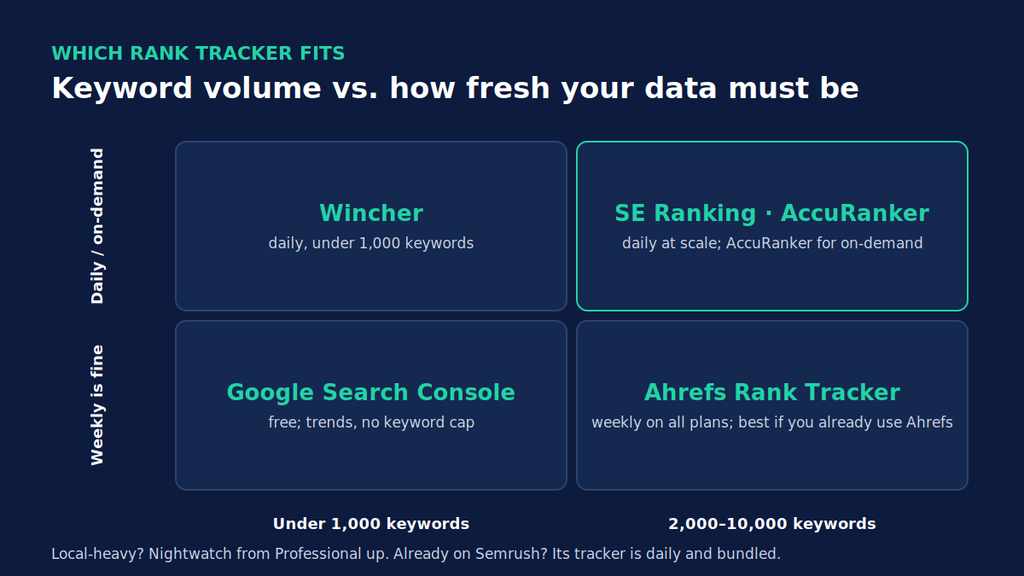
Picking the best rank tracker is mostly a volume question, with refresh needs as the tiebreaker. Count the keywords you actually need, multiply by devices and locations, then find your row:
- Under 1,000 keywords, daily checks: Wincher, or SE Ranking if you’ll grow past 1,000 soon.
- 2,000–5,000 keywords, daily: SE Ranking has the lowest per-1k rate in this range.
- Volatility-sensitive, client-facing: AccuRanker, but budget for the device multiplier.
- Multi-location or local-heavy: Nightwatch from the Professional plan up.
- Already paying for a suite: use the Semrush or Ahrefs tracker you have before buying another.
- No budget: Search Console, plus a spreadsheet. Export your top queries weekly and you have a rough, free seo ranking monitor.
Agencies should also check how rankings flow into client reports. White-label output, scheduled delivery, and Looker Studio connectors vary a lot by plan, and they’re often gated to the second tier. We compared that layer separately in our guide to SEO reporting tools for agencies.
How to cut your rank tracking bill without losing signal
Most teams overpay for rank tracking tools because they track too much, not because they picked the wrong vendor.
Start by pruning. Pull your queries from Search Console, sort by impressions, and drop tracked keywords that haven’t earned an impression in 90 days. They’re not telling you anything a quarterly check wouldn’t.
Next, be deliberate about devices. Say a client gets most of its organic clicks from mobile (Search Console shows the split): tracking desktop for every term doubles the bill on some tools for very little insight. Track a desktop sample instead.
Locations work the same way. A national brand rarely needs ZIP-level tracking for informational keywords. Save city-level tracking for the terms that trigger a local pack.
Finally, match cadence to the keyword’s job. Money pages and volatile terms deserve daily checks. Long-tail blog keywords can live on a weekly tool, or just in Search Console.
Do all four and a 5,000-keyword project often shrinks to something that fits a cheaper tier.
What a rank tracker won’t tell you
Here’s the uncomfortable bit. A rank tracker tells you a keyword slipped from 4 to 9. It doesn’t tell you why.
Was it a competitor’s fresher page? A stale statistic? Intent drift? Rankings are a symptom. For a large content library, the useful question is which pages are decaying and what inside them is out of date.
That’s the job WordPattern is built for. It connects to Search Console, flags pages showing consistent decline, and points to the paragraphs that need updating. Pair it with your tracker, and use SEO forecasting to set realistic targets for what a refresh should recover.
Choosing your rank tracker
Don’t pick rank tracking tools from a feature list. Pick from three numbers: refresh cadence, how local and mobile are counted, and the effective cost per 1,000 keywords once you apply the device and location multiplier.
Run your real keyword count through the table. Multiply by devices and locations. The right tool usually becomes obvious in about five minutes.
And whatever you buy, keep Search Console open next to it.
FAQs
For trends, yes. Google Search Console uses first-party data, so its numbers aren’t estimates. But it reports average position across all impressions, not a fixed keyword list checked at one location and device. For client reporting or local SEO, you’ll still want a paid tracker that snapshots specific keywords.
Daily is the practical baseline for active SEO work. Weekly is fine for monthly reporting on stable sites. On-demand refresh matters mainly during core updates or launches, when you need to see movement within hours rather than waiting for the next scheduled crawl.
If your traffic splits across devices, yes. Positions can differ between the two. Just check how your tool counts devices first. AccuRanker, for instance, counts each device as a separate keyword, which doubles your effective cost per tracked term.
It changed how they collect data. Since September 2025, tools can’t pull 100 results in a single request, so checking deep positions takes more requests and costs vendors more. It also cleared out scraper-driven impressions from Search Console, which is why many sites saw impressions drop without any real ranking loss.