
Month-end arrives, and someone on your team is pulling keyword rankings out of Ahrefs, clicks out of Search Console, and sessions out of GA4, then dropping it all into a report. At an agency, that report goes to the ninth client in a row with the same “traffic is up 8% this month” paragraph. In-house, it goes to a VP who wants to know one thing: is organic search driving revenue?
The right SEO reporting software takes most of that work off your plate. This roundup covers the ten best SEO reporting tools for 2026, ranked by what each one is actually good at, with a free tier column so you can see what you can test before you pay. There’s guidance for agencies and for in-house teams, because the right pick changes depending on who reads the report.
But there’s a catch none of the review lists mention, and it’s the reason a polished monthly report can quietly mislead the people reading it. We’ll get to that.
What to look for in SEO reporting software?
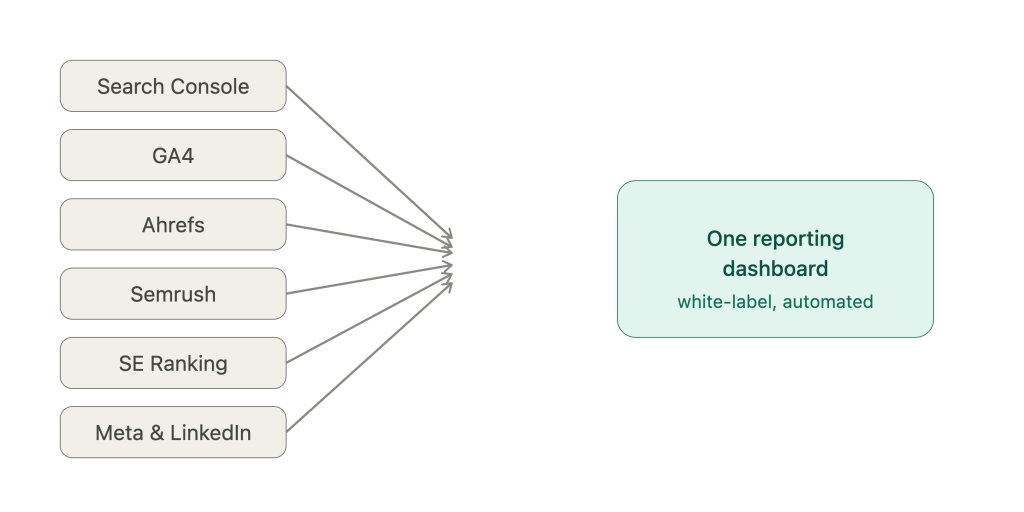
The core problem isn’t that reporting is hard. It’s that the data is scattered everywhere. The average agency client runs 4 to 6 marketing platforms at once (keep existing link), and in-house teams deal with the same sprawl across search, analytics, CRM and ad accounts.
So the job of a reporting tool is to end that scavenger hunt. When you’re comparing options, six things actually matter:
- Integrations that cover your stack. Not “500+ connectors” as a vanity number. The specific ones you use, Search Console, GA4, Ahrefs, Semrush, SE Ranking, pulled without manual exports.
- Automation that runs without you. Scheduled delivery, templates, alerts when a data source breaks. Reporting should happen in the background, not eat someone’s Friday.
- White-label SEO reports (agencies). Your logo and colors, on your own domain, across every client-facing report. A report that looks like it came off a generic dashboard undercuts the work behind it. In-house teams can skip this one and spend the budget on integrations instead.
- AI-written narrative. The better tools now draft the “here’s what changed and why” summary for you, so your team edits instead of writing from scratch fifteen times a month.
- MCP support. This is newer. Model Context Protocol lets you connect Claude or ChatGPT straight to a client’s data layer, so you can ask “which keywords slipped this week?” in plain language and get an answer grounded in the actual numbers.
- Cross-channel blending. SEO doesn’t live in a vacuum. Being able to show search next to paid and social in one view saves you from stitching spreadsheets.
Notice what’s missing from that list? Every criterion is about presenting last month faster and prettier. As one agency SEO lead put it, most clients don’t care about impressions or a bump in average position, they care whether the work is driving traffic and revenue. Hold that thought. It matters for the part everyone skips, and it’s why a reporting stack often needs pairing with dedicated content auditing and refresh tools.
The 10 best SEO reporting tools in 2026
These are ranked by what they’re actually best at, not by a single “winner.” Pricing shifts constantly, so treat the numbers below as a starting point and check the vendor’s page before you commit. The Free tier column shows what you can use before paying. A “trial” expires; a “free plan” doesn’t.
| Tool | Best for | Standout feature | Starting price | AI / MCP |
|---|---|---|---|---|
| AgencyAnalytics | Per-client white-label reporting | Built-in rank tracking + audits | ~$20/client/mo | Yes (MCP + AI) |
| Whatagraph | Cross-channel multi-client reporting | Governed data + linked templates | Mid-market | Yes (IQ + MCP) |
| Semrush | Reporting inside a full SEO suite | My Reports builder | ~$139.95/mo | AI add-on |
| SE Ranking | White-label on a mid budget | Agency Pack | ~$129/mo + pack | Add-on |
| AgencyDashboard | Flat-rate unlimited clients | Unlimited client portals | Flat-rate | Limited |
| DashThis | Small agencies wanting simple | Dashboard-based pricing | ~$44/mo | AI Insights |
| Databox | Real-time internal dashboards | Genie AI + free MCP | ~$79/mo | Yes (MCP) |
| Swydo | PPC-focused budget agencies | Per-source pricing | ~$69/mo | Limited |
| GSC + Looker Studio | Free source-of-truth stack | Direct Google data | Free | No |
| WorkDuo | AI-search / GEO visibility | Multi-engine AI tracking | ~$33/project/mo | Native |
1. AgencyAnalytics
If your model is “one report per client, every month, on our brand,” this is the default pick. AgencyAnalytics was built for agencies from the start, with white-label dashboards, client logins, 80+ integrations, and its own built-in rank tracking and site audits, so you’re not paying for a separate Ahrefs seat just to get ranking data into a report. MCP access and AI insights come on the core plan.
The trade-offs are real, though. There are no master templates, so every layout change gets made one dashboard at a time. That’s fine at five clients and painful at forty. The built-in rank tracker is an add-on on top of the per-client fee, and the per-client model means costs climb in a straight line as you grow.
Pricing sits around $20 per client per month on the annual Core plan by one account, though other roundups list a higher flat entry point, so verify current pricing directly before you budget.
What it won’t tell you: it shows this month’s keyword rankings clearly. It won’t flag the page that’s slipped one position a month for half a year.
2. Whatagraph
Whatagraph’s pitch is a single governed data layer, meaning the same numbers feed your client reports, your internal dashboards, and your AI assistant, so “organic traffic” means the same thing everywhere. Linked master templates are the standout: edit one template and the change cascades to every client report at once. Add AI narrative summaries in 18 languages, an MCP server, and 60+ connectors covering Search Console, GA4, Ahrefs and Semrush, and you’ve got a serious multi-channel agency dashboard.
The catch is price and fit. It’s built for mid-size agencies and up, so a two-person shop will find it heavy. Some data-blending has API limits depending on the source.
If you report on SEO alongside paid and social for a roster of clients, few tools package it as cleanly. It’s still, at heart, a very good rear-view mirror.
3. Semrush
Sometimes you don’t want a separate reporting tool. You want reporting bolted onto the platform where your team already does keyword research, audits, and daily rank tracking anyway. That’s Semrush. Its My Reports builder mixes Semrush data with 20+ integrations into white-label reports, and everything sits next to the research tools you’re using anyway.
Two things to know. The AI Visibility Toolkit that tracks how you show up in AI answers is a paid add-on, not baked in. And Semrush has a learning curve, plus costs that climb as you add projects and keywords. The Pro plan starts around $139.95/mo.
4. SE Ranking
SE Ranking is the middle ground between a bare reporting layer and a full suite. Its white-label tools let you brand the whole platform, custom domain, logo, client login page, and the Agency Pack adds unlimited automated reports plus dedicated client seats. Rank tracking and audits are built in.
Reviews on the reporting UI are mixed, with some users wanting more intuitive, easy-to-read layouts, and a few of the stronger AI features are gated behind add-ons or higher tiers. Core runs about $129/mo, with the Agency Pack around $69/mo on top.
5. AgencyDashboard
Per-client pricing has a nasty habit of scaling with your client count. AgencyDashboard flips that with a flat-rate model, unlimited client portals, and full white-label at every tier, covering SEO, PPC, local and social in one place. For agencies running twenty-plus clients where per-seat math gets ugly, that predictability is the whole appeal. It’s less of a household name than the tools above, so check that its integrations reach every source in your stack before you switch.
6. DashThis
DashThis wins on speed and simplicity. Setup is fast, the templates are clean, and AI Insights come on every plan with no upsell. Pricing is dashboard-based, so if your client count is stable, costs stay predictable.
The ceiling shows up quickly. There are no master templates, data blending is basic, and white-label with a custom domain needs the Professional tier at around $139/mo (the entry plan starts near $44/mo). For a small team sending a handful of clean reports, that’s often enough.
7. Databox
Databox is dashboard-first rather than report-first, which makes it excellent for watching performance in real time and less ideal for polished client deliverables. Its Genie conversational AI analyst lets you ask plain-language questions, and MCP access is available on all plans, including the free one, which is unusually generous.
The gotchas: most plans include only three data sources, white-label is a $200/mo add-on on the lower tiers, and cross-client filtering gets limited below premium. Agency Starter is around $79/mo. Think internal command center more than client-facing report.
8. Swydo
Swydo prices per data source instead of per client, which is genuinely cost-effective if your clients all run the same tight channel setup. Clean output, automated scheduling, solid white-label on PDFs. The base plan is about $69/mo for ten sources.
Where it strains: there’s a 50-source cap per report, no MCP, no export to BigQuery or Looker Studio, and the widget builder is clunky. Great for focused PPC shops, frustrating for sprawling multi-location clients.
9. Google Search Console + Looker Studio
Not a product you buy, but the foundation the others sit on. Search Console gives you the cleanest possible Google data, clicks, impressions, CTR, average position, plus bulk export to BigQuery and API access. Looker Studio turns that (and other sources) into shareable dashboards for free. Search Console is the source-of-truth dataset every agency should feed into reporting regardless of what paid tool sits on top.
The limits are obvious. No white-label, no client portal, manual setup, and it’s Google-only, so it says nothing about how you show up in ChatGPT or Gemini. But at $0, it’s the backbone.
10. WorkDuo
Here’s the panel almost none of the traditional tools have. WorkDuo tracks how a brand and its competitors show up across ChatGPT, Gemini, Google AI and other engines, reporting visibility score, average position and share of voice. It plugs into Looker Studio, offers API access and white-label. This matters more every quarter, about 65% of AI bot hits target content published in the past year, per Seer Interactive’s study of 5,000+ cited URLs.
It’s not a full SEO suite, though. No backlink index, no technical crawler, no keyword research. It’s a specialist layer, from around $33 per project per month, that you add to a traditional stack rather than a replacement for one.
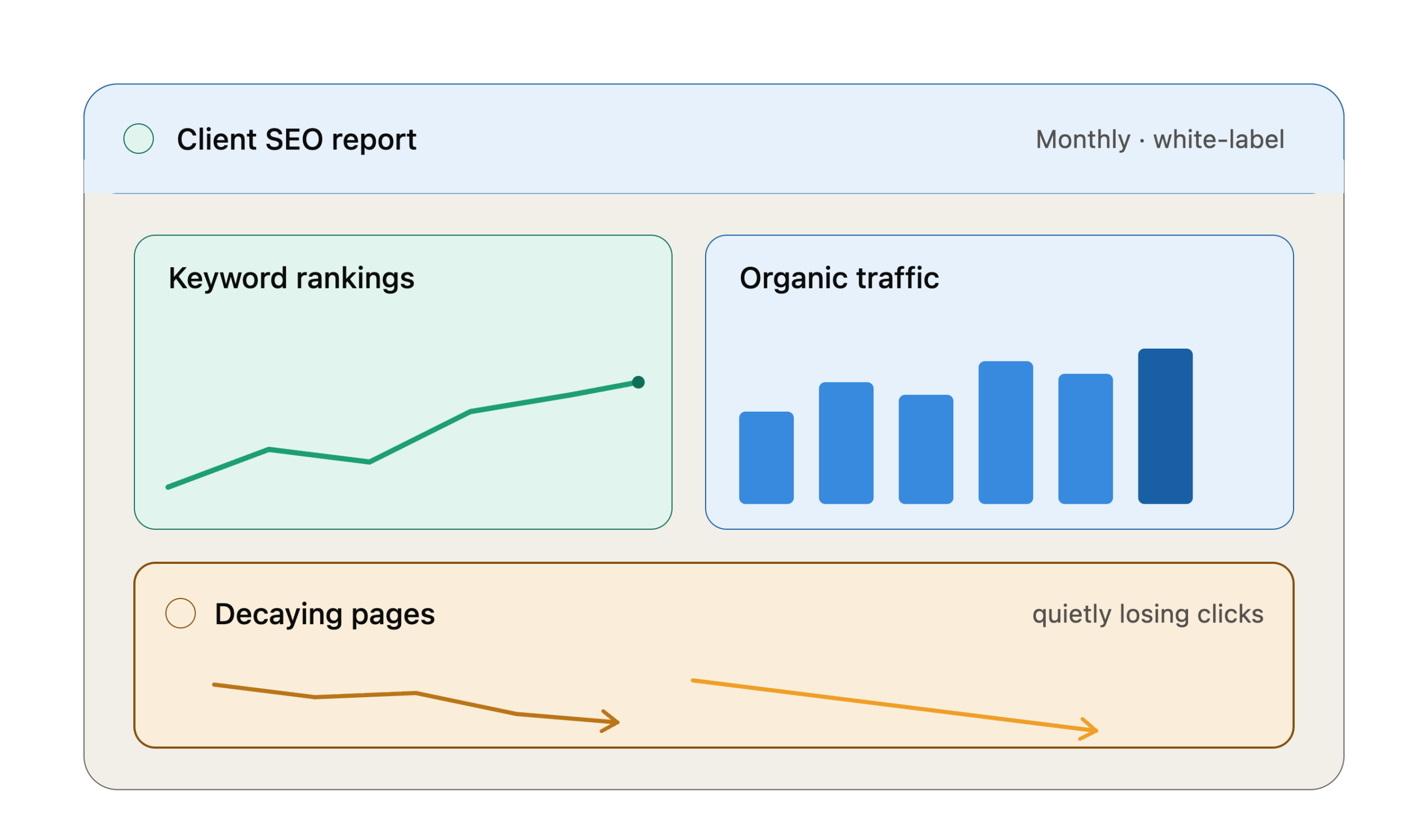
Read the ten reviews back and you’ll spot the pattern. Every tool is measured on how fast and how prettily it can show you what already happened. Rankings this month. Traffic this month. A neat arrow, up or down.
None of them answer the question that actually keeps clients: which pages are quietly dying right now?
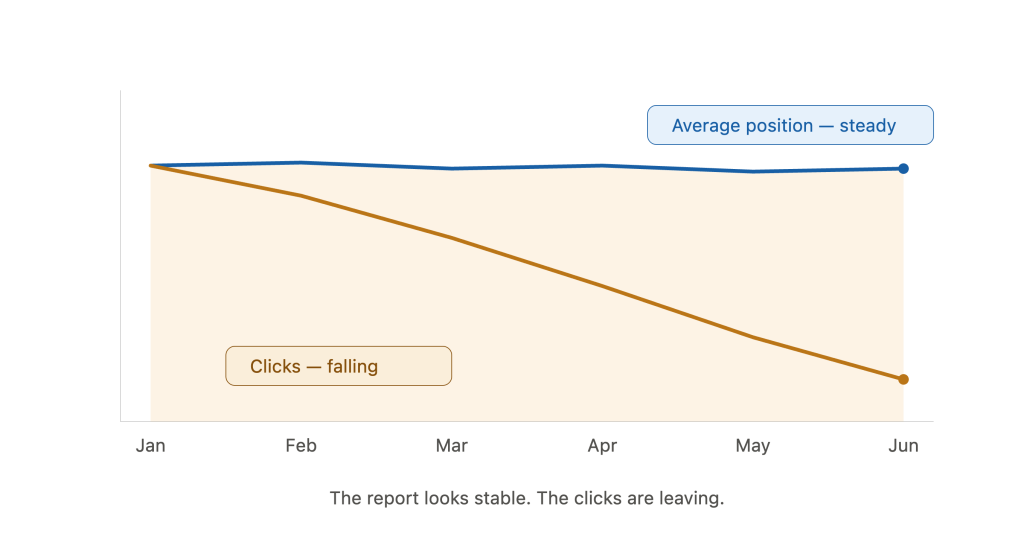
That’s content decay. It’s not a Google penalty and it’s not an algorithm hit. It’s the slow slide that happens when a page ages, competitors publish something fresher, and search intent drifts. Most teams don’t catch it until it’s cost them 30 to 40% of their organic traffic, because the pages don’t vanish from search. They just slip down the results, lose a few clicks a week, and hide under the noise of everything else.
Here’s why your monthly report misses it. Ranking reports love averages. “Average position: 4.2, holding steady” reads fine on a dashboard. But the click-through gap between positions is brutal: Ahrefs data reported by OuterBox shows position two taking a ~50% CTR hit versus position one, and clicks keep collapsing as you slide toward the bottom of page one. A “steady” average can hide a page in free fall while a couple of others prop up the number. Your client sees green. The bleed is happening one URL down.
The money side is brutal in both directions. Neglected aging content can lose up to 20% of its organic traffic every year, while sites that regularly refresh old content see an average traffic increase of around 106%. Recovering visitors from a page you already ranked is far cheaper than winning new ones from scratch, which is the whole case for updating your top posts instead of publishing more.
And it’s not just Google anymore. A page can hold its ranking and still lose its AI citations, because answer engines strongly favor recently updated content. Two curves, decaying independently, neither one visible on a standard rankings widget.
This is the gap WordPattern fills. Instead of showing you where rankings landed this month, it flags the pages that are decaying or cannibalizing each other before the traffic loss reaches your client’s report, so you can decide what to refresh, consolidate, redirect, or prune. It sits alongside your reporting stack, not instead of it. Your reporting tool tells the client what happened. The decay layer tells you what’s about to.
One rule if you go down this road: prioritize by absolute click loss, not percentage drop. A page that lost 5,000 clicks matters more than one that lost 80, even if the second one dropped by a bigger percentage. And when two of your own pages fight over the same query, merging them into one resource yields an average organic lift of nearly 78%. At a big content library, spotting all that by hand isn’t realistic, which is why teams lean on content decay automation patterns to catch it at scale.
How to choose the right SEO reporting tool for your agency
Skip the feature-count arms race. Four questions get you to the right tool faster.
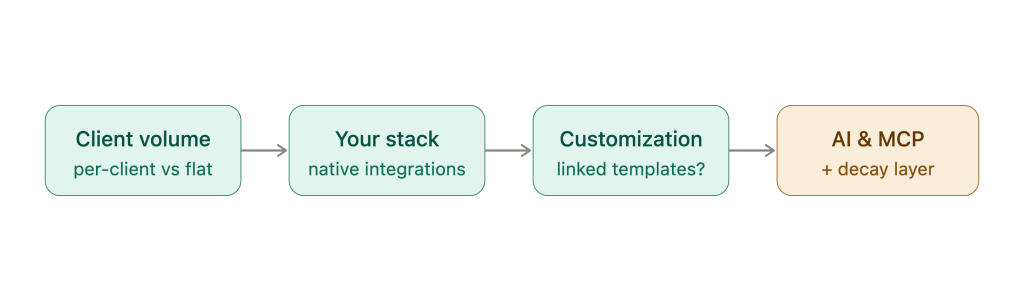
What’s your client volume? Per-client pricing (AgencyAnalytics) is clean at low volumes and expensive at high ones. Flat-rate (AgencyDashboard) or template-based platforms (Whatagraph) scale better once you’re past twenty clients. For ecommerce clients, you may also need to factor in Shopify pricing in India when planning the overall cost of their SEO and marketing stack.
Skip the feature-count arms race. The right questions depend on whether you report to clients or to your own leadership.
If you’re an agency
What’s your client volume? Per-client pricing (AgencyAnalytics) is clean at low volumes and expensive at high ones. Flat-rate (AgencyDashboard) or template-based platforms (Whatagraph) scale better once you’re past twenty clients.
What’s already in your stack? A native integration with the exact rank tracker and analytics tools you use beats a bigger connector count you’ll never touch. Check the specific ones.
How custom does each client report need to be? If every client gets a bespoke layout, you want linked master templates so one edit cascades. If a standard format works, a simpler tool is fine.
Do you need AI visibility or MCP? If clients are asking how they show up in ChatGPT, a specialist like WorkDuo earns its place. If your team lives in Claude, an MCP-connected tool means it queries real client data instead of stale exports.
There’s a bigger shift underneath all four. Client reporting is moving from dashboards that dump charts on people toward narrative that explains what changed, why, and what’s next (keep existing digitalapplied link). That’s the work a retainer actually pays for.
If you’re an in-house team
In-house reporting has a different reader. You’re not proving value to a client who can leave. You’re showing leadership whether organic search is pulling its weight next to paid, product and sales. That changes what matters.
Who reads the report? If it’s your CMO or finance team, they want organic tied to pipeline and revenue, not average position. Pick a tool that pulls in GA4 conversions or CRM data, and put search beside the channels leadership already watches.
How many sites or brands do you run? One site rarely justifies agency pricing. Tools billed per client or per white-label seat carry costs you won’t use. Dashboard-first tools like Databox, or Looker Studio on top of Search Console, fit a single property better.
Do you already pay for a suite? If your team does keyword research and rank tracking in Semrush every day, its My Reports builder covers most internal reporting without another login.
How many people need access? In-house dashboards get shared across content, product and leadership, so watch per-user limits. Databox’s free plan, for example, covers one user.
The short version: start with Search Console and Looker Studio as your free source of truth. Add Databox if you want live dashboards, or Semrush if you want reporting next to research. Skip white-label features entirely.
Either way, the decision rule is the same. Pick the reporting tool that fits your volume and stack. Then add a decay layer so the report catches decline while there’s still time to act on it.
Conclusion
There’s no universal best SEO reporting tool. For an agency, it’s the one that fits your client count and stack. For an in-house team, it’s the one that puts search data in front of leadership next to revenue. Any of the ten above can be that tool for the right team. What none of them do is tell you which pages are slipping before the slip shows up in a client’s inbox or a leadership review.
FAQs
There isn’t a single winner. For agencies, AgencyAnalytics is the strongest per-client white-label pick, and Whatagraph leads on cross-channel multi-client reporting. For in-house teams, a free Google Search Console plus Looker Studio stack is the usual backbone, with Databox or Semrush on top depending on whether you need live dashboards or a full research suite. Match the tool to who reads the report and what’s already in your stack.
At minimum: native integrations with your actual stack, automated scheduled delivery, white-label branding with a custom domain, and AI-written performance summaries. Newer must-haves include MCP support for connecting AI assistants to client data and cross-channel blending so search sits next to paid and social.
Some now can, but most traditional tools don’t yet. Specialist platforms like WorkDuo track visibility across ChatGPT, Gemini and Google AI, while suites like Semrush offer it as a paid add-on. If clients are asking how they appear in AI answers, you’ll likely need a dedicated layer for now.
Generally, no. They show current rankings and traffic as a snapshot, which is why a page sliding one position a month can stay invisible until it’s lost serious traffic. Detecting decay needs a tool built for it, like WordPattern, that flags declining and cannibalizing pages before the loss reaches your report.
Anywhere from free to enterprise. Google Search Console and Looker Studio cost nothing. Entry-level paid tools like DashThis and Swydo start around $44 to $69/mo, per-client tools like AgencyAnalytics run about $20 per client, and mid-market platforms scale up from there. Always check current pricing, since plans change often.
Yes, a few. Google Search Console and Looker Studio are free with no time limit. Databox has a free plan for one user and three data sources, and Semrush has a free account capped at 10 reports a day. Most agency-focused tools are trial-only: AgencyAnalytics and Swydo offer 14 days, and DashThis offers 15. Free tiers change often, so check the vendor’s pricing page before you plan around one.