

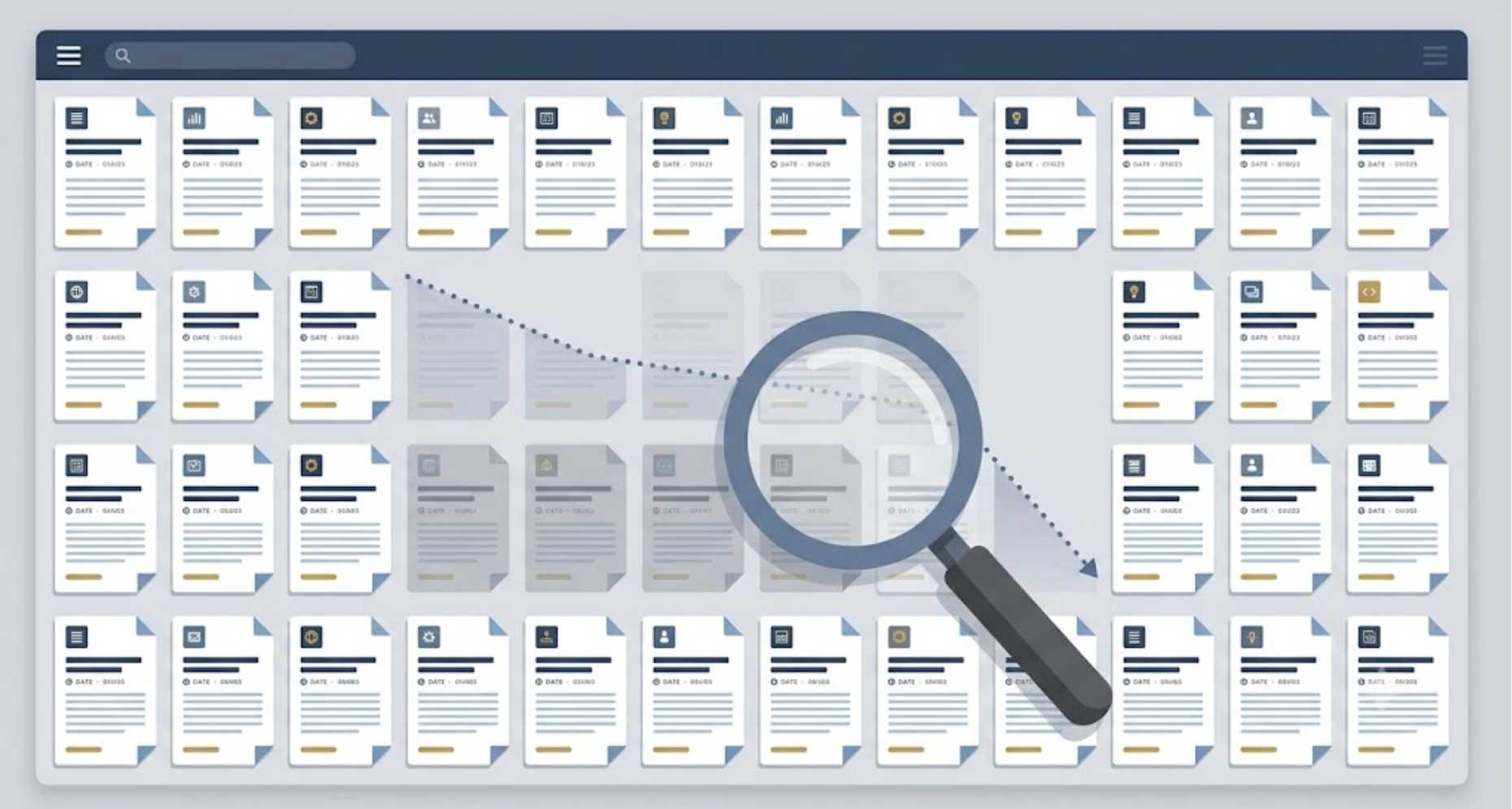
The pages bleeding the most traffic on your site aren’t the ones that never ranked. They’re the ones that used to.
That’s the uncomfortable part. A post that pulled 4,000 clicks a month two years ago drifts down to 2,800. Nobody touched it. Its position barely moved. But the clicks quietly leaked away, and you only notice when you pull the year-over-year numbers and wonder where a third of your organic traffic went. That quiet erosion has a name: content decay.
Most people respond to that with a content audit. Good instinct. The problem is that most audits stop at “this page is down, so keep it, kill it, or combine it” without ever asking the one question that decides which fix works: why is it down? Get that wrong and you’ll rewrite a page that only needed a freshness update, or delete one that was three tweaks from recovery.
So let’s do this properly.
SEO Content Audit in 8 Steps: The Diagnose-First Framework
Here’s the whole process on one screen. Each step is broken down below, and there’s a copyable audit template in Step 1.
- Inventory every URL. Pull your pages from Google Search Console, your XML sitemap, or a crawl, and flag the ones that don’t exist for search.
- Pull 12 months of performance data. Clicks, impressions, average position, and CTR from Search Console, plus backlinks and internal links.
- Compare year over year. Pull the same 12-month window from the year before. Decay shows up in the slope, not in a single month.
- Diagnose the cause. Label each declining page as content decay, a search intent shift, or cannibalization.
- Assign one action. Keep, refresh, rewrite, consolidate, or prune, based on the diagnosis rather than a hunch.
- Score recoverable traffic. Take the gap between past and current clicks, then weight it by how fixable the cause is and how much the page matters to the business.
- Fix in priority order and log every change. Start with quick refreshes on high-recovery pages, and note the date of each update so you can measure it later.
- Set a tiered re-audit cadence. Check fast-moving pages monthly or quarterly and evergreen pages every six to twelve months.
What an SEO Content Audit Actually Is (and What Most People Get Wrong)
An SEO content audit is a systematic review of everything you’ve published, where you score each page on how it’s actually performing in search and then decide what to do with it: keep, refresh, merge, or remove. Not based on how you feel about the page. Based on data.
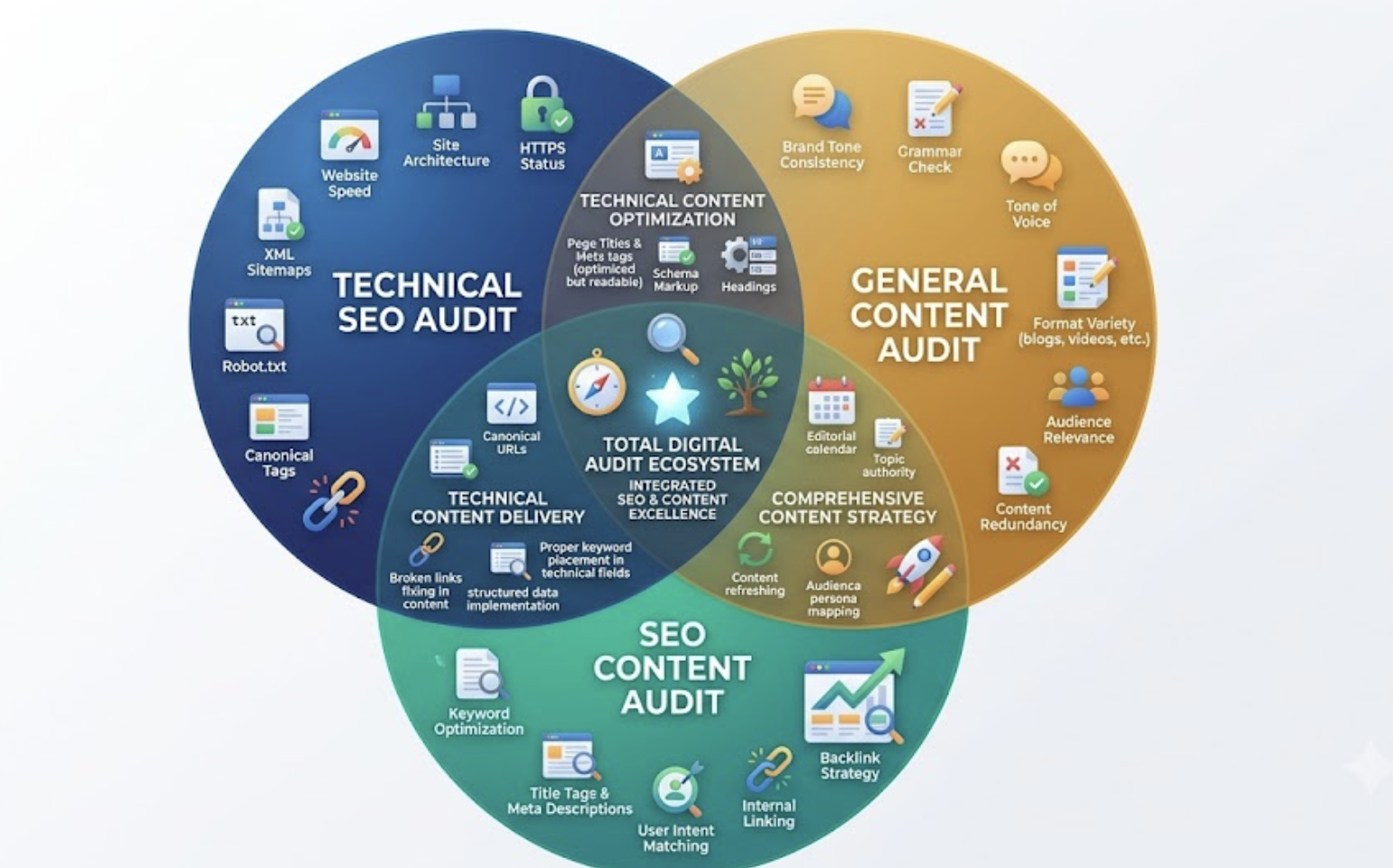
Three different things all get called “audits,” and it’s worth keeping them straight.
A technical SEO audit looks at crawlability, site speed, indexation, broken links. The plumbing. A general content audit judges brand voice, quality, and whether the writing is any good. An SEO content audit sits in between. It’s a performance analysis of your content inventory using search and user-behavior metrics, aimed at fixing what search engines and readers actually respond to.
If you need help collecting and prioritizing this data, compare these content audit tools for different website sizes and SEO workflows.
Here’s the mistake almost everyone makes. They pull a traffic report, see a page sliding, and jump straight to the keep/kill/combine decision. But “traffic is down” isn’t a diagnosis. It’s a symptom, and at least three completely different problems produce it. Skip the diagnosis and you’re just guessing with extra steps.
Diagnose first. Decide second. That’s the whole game.
Why Content Audits Matter More in 2026
Start with a number that should worry you. Ahrefs studied around 14 billion pages and found that 96.55% of them get no traffic from Google. Most sites are carrying a lot of dead weight and don’t know it.
Now, the doom-mongering about search “collapsing” is overblown. A study of 40,000 large U.S. sites found organic traffic dropped only about 2.5% year over year, and most of that hit mid-sized publishers rather than everyone equally. Search isn’t dying. It’s fragmenting. More SERP features, more AI Overviews, more competition for fewer clicks on informational queries.
That fragmentation is exactly why decay bites harder than it used to. Freshness carries real ranking weight now, and AI answer systems lean toward recently updated pages. Google’s February 2026 core update leaned hard on topical authority and cracked down on thin, low-value content, and later 2026 updates kept rewarding depth over big, unmonitored archives. Translation: a backlog of stale pages isn’t neutral anymore. It’s a liability.
The flip side is the good news. That same backlog is usually your cheapest growth lever. You don’t need new content. You need to stop the bleeding on content you already own.
Step 1: Build Your Content Inventory
You can’t audit what you can’t see, so first you need every URL in one place.
There are three ways to get them. Pull the Pages report in Google Search Console, which is free and only shows pages Google actually knows about. Grab your XML sitemap. Or crawl the site with something like Screaming Frog if you want the full picture, orphaned pages included. GSC-first works for most teams and costs nothing.
Got a huge library? Don’t audit all 800 pages in one sitting. Use the 80/20 rule and start with the top 20% by traffic or backlinks. That’s where most of your recoverable value lives, and you’ll get the bulk of the results without losing a month to it.
Dump it all into one spreadsheet, one row per URL, using the template below. Leave the metric columns empty for now; you’ll fill them in Step 2. And flag the pages that exist for reasons other than search: your privacy policy, terms of service, paid-ad landing pages. Those don’t need organic traffic to justify themselves, so keep them out of the ranking judgments.
SEO Content Audit Template (Copy This)
Set up one column for each row below. Every column maps to a step in the framework, so by the time the sheet is full, each URL has a diagnosis, an action, and a place in the queue.
| Column | What goes in it | Where it comes from |
|---|---|---|
| URL | The full page URL, one per row | GSC Pages report, sitemap, or crawl |
| Search page? | Yes or No. Mark legal pages and paid landing pages No and leave them out of ranking decisions | Your call |
| Clicks (last 12 months) | Total clicks | GSC Performance report |
| Clicks (prior 12 months) | Same window, one year earlier | GSC Performance report, Compare dates |
| Click change (YoY) | Percentage change. With the column order here: =(C2-D2)/D2 | Spreadsheet formula |
| Impressions (last vs prior) | Both 12-month totals | GSC Performance report |
| Avg. position (last vs prior) | Both 12-month averages | GSC Performance report |
| CTR (last 12 months) | Click-through rate | GSC Performance report |
| Referring domains | Count of linking sites | Ahrefs, Semrush, or GSC Links report |
| Internal links in | Count of internal links pointing at the page | Site crawler |
| Diagnosis | Healthy, Decay, Intent shift, or Cannibalization | Step 3 |
| Action | Keep, Refresh, Rewrite, Consolidate, or Prune | Step 4 |
| Recoverable clicks | Prior-period clicks minus current clicks (or historical peak, if you have it) | Step 5 |
| Priority | 1 = fix now, 2 = next sprint, 3 = long-term queue | Step 5 |
| Re-audit tier | Monthly, Quarterly, Semi-annual, or Annual | Step 6 |
| Last updated | Date of the most recent substantive change | Your CMS |
Step 2: Pull the Metrics That Actually Diagnose a Page
This is where most audits get lazy. They record current clicks and call it done.
The columns you want come mostly from Google Search Console: clicks, impressions, average position, and CTR. Add backlinks and internal links from whatever tool you have. Pull the last 12 months, then (and here’s the move competitors skip) pull the same window from the year before, so you have a year-over-year comparison for every page.
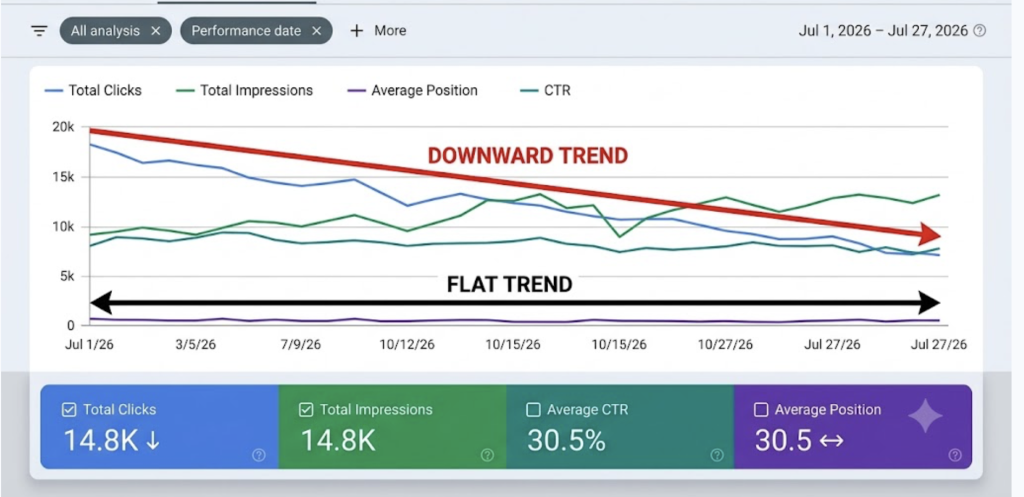
Why does that matter so much? Because decay only shows up in the slope. A page can lose 20 to 35% of its clicks while its ranking position barely twitches. Look at a single month and everything seems fine. Look at the trend and you see the leak.
Each metric tells you something specific once you’ve got the year-over-year view:
- Position steady but clicks falling → a click-through problem, not a ranking problem.
- Impressions falling → you’re losing the ranking race for terms you used to win.
- High impressions but low CTR → your title, snippet, or intent match is off, or a SERP feature is eating your clicks.
Running this per-URL slope check across a whole library by hand is tedious, which is exactly why it usually doesn’t happen. That’s the job WordPattern automates, flagging the pages whose trend has quietly turned down before the yearly total makes it obvious.
Step 3: Diagnose WHY Each Page Is Declining
Here’s the part almost every guide skips. It’s also the part that actually determines whether your audit recovers traffic or just eats a weekend.
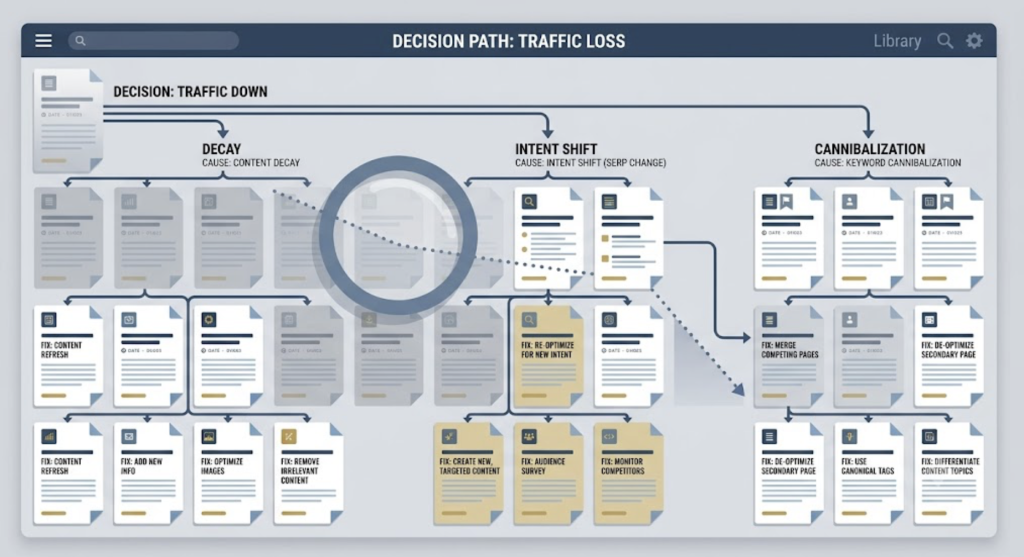
“Traffic is down” has at least three different causes. They look identical on a dashboard. They need completely different fixes.
Content decay:
The slow one. Your page got stale. The stats aged, the screenshots show an old interface, a competitor published something meatier. Position holds roughly steady while clicks and impressions erode over months. The fix is a refresh: update the numbers, the dates, the examples, add the depth that’s now missing.
Search intent shift:
The SERP changed what it rewards. Maybe Google now wants a comparison table where you wrote an essay. Maybe an AI Overview appeared and swallowed the top of the page. Your position might not have dropped at all, yet clicks fall off a cliff, or you’re suddenly ranking for a query that no longer means what it used to. The fix isn’t more freshness. It’s restructuring to match what the SERP now wants, often with a direct answer near the top plus schema. (This is a different animal from decay, and worth learning to spot early.)
Cannibalization:
You have two pages fighting over the same query, and Google can’t decide, so neither ranks well. The fix is consolidation: merge them into one strong page and redirect the loser, or differentiate them so they stop competing.
A real example makes the difference obvious. A B2B SaaS company had a guide on setting up lead scoring in HubSpot. In 2023 it pulled about 6,200 monthly organic clicks. By late 2025 it was down to 3,400. If you’d only checked the ranking, you’d have shrugged, because position slipped just 2 to 3. So you might have “refreshed” it and seen nothing change.
The real culprit wasn’t decay. Google had started showing an AI Overview for that query, and it was pulling from a HubSpot Academy article, not from this page. Position 3 in a SERP where an AI Overview eats the top of the page is worth far less than it used to be. That’s an intent-and-SERP-feature problem, not a staleness problem.
The fix reflected the actual diagnosis. They added a roughly 90-word direct answer at the top wrapped in schema, expanded the post from 1,800 to 2,900 words with current screenshots, and updated the modified date. Within 30 days the AI Overview started citing the page. Same symptom as ordinary decay. Totally different cause, totally different repair.
Diagnose before you decide. Every time.
Step 4: Decide: Keep, Refresh, Consolidate, or Prune
Now the decision framework everyone loves, keep/kill/combine, except this time it’s driven by the diagnosis instead of a hunch. Map the cause to the action:
- Keep and monitor. Strong, current, still matching intent. Leave it alone and watch the trend.
- Refresh. Decaying but fundamentally sound. This is your highest-ROI, lowest-effort bucket. Update stats, examples, screenshots, and add the depth that’s gone missing. A handful of low-effort refreshes on your top earners often moves the needle fastest.
- Rewrite or restructure. Right topic, wrong intent match. Rebuild the format to fit what the SERP now rewards.
- Consolidate. Cannibalizing or thin. Merge into one authoritative asset and redirect the rest.
- Prune. Zero traffic, off-topic, no backlinks, not worth saving. Delete or redirect. If it has backlinks, always redirect. Don’t throw away link equity.
One warning: resist the urge to delete. Deletion is the only irreversible option here, and the pages that used to rank are usually the ones most worth recovering. When in doubt, refresh before you reach for the trash.
How big is the upside on a refresh? It varies wildly, so be honest with yourself. HubSpot’s much-quoted internal result was roughly a 106% median lift across updated posts. Backlinko relaunched one post and saw about 260% more traffic in two weeks. A more everyday Ahrefs example landed closer to a 36% uplift. Chase the median, not the headline. A realistic refresh that recovers a page from position 8 to position 4 is a very good day’s work.
Step 5: Prioritize by Recoverable Traffic, Not Gut Feel
You’ve got a spreadsheet full of decisions. You can’t do them all this week. So what goes first?
Not the page that annoys you most. The page with the most recoverable traffic and the cheapest fix.
Think of it as a rough formula. Recoverable traffic is the gap between a page’s historical peak clicks and its current clicks, weighted by how fixable the cause is and how strategic the page is to your business. A decaying page-one or page-two post with an obvious cause and a quick refresh? Top of the list. Fast payback, low effort.
Save the heavy lifts for the long-term queue: full rewrites, complex consolidations, pages that genuinely need new backlinks. They’re worth doing. Just not first.
For a sense of the payoff, one aggregate of published studies found republished pages gained an average of about 4.6 SERP positions within six months. That’s the kind of movement that turns a page-two ghost into a page-one earner.
Step 6: Set a Re-Audit Cadence That Matches Decay Speed
Almost every guide tells you to audit quarterly and moves on. That’s lazy advice, because decay doesn’t run on a single clock.
A stats roundup, a pricing page, a “best tools” list: those rot fast, sometimes in a few months. A genuinely evergreen how-to might hold up for a year or more. Audit both on the same schedule and you’re either chasing your tail on the slow stuff or letting the fast stuff decay unwatched.
So tier it. Volatile, fast-moving pages get a monthly or quarterly check. Stable evergreen content can wait for a semi-annual or annual review. Start by clearing the backlog (by some estimates around half of pre-2025 content has never been refreshed even once), then settle into maintenance.
This is the part where a once-a-year manual sweep falls apart. By the time you sit down to audit, some pages have been leaking for ten months. Continuous monitoring, which is what WordPattern is built for, catches the slope turning down while the fix is still cheap, instead of after the damage lands in your annual report.
Common Content Audit Mistakes
A few ways people torch their own results.
Deleting too eagerly. That “underperforming” page might have backlinks and a recoverable ranking. Gone forever once you hit delete.
Treating every decline as decay. If you refresh a page that actually has an intent-match problem, nothing happens, and you conclude “refreshing doesn’t work.” It does. You just fixed the wrong thing.
Obsessing over word count. Ahrefs makes this point well: don’t sweat hitting some magic length. Look for the subtopics you’re missing, not the words.
Auditing once and forgetting. Decay resumes the day you stop watching. An audit isn’t an event. It’s a habit.
Changing the date and nothing else. Google isn’t fooled by a fresh timestamp on stale content. Update the substance or don’t bother.
Recovering Traffic Beats Chasing It
An SEO content audit isn’t spring cleaning. Framing it that way is why so many audits end with a tidy spreadsheet and zero traffic gains. It’s traffic recovery, and your best growth lever is almost always sitting in pages you already published.
The whole thing comes down to two habits. Diagnose why a page is declining before you decide what to do with it. And prioritize by what’s actually recoverable, not by what catches your eye.
Do that, and the pages that used to rank can rank again, which is a lot faster than starting from a blank page. The only real question is whether you catch the decline while it’s cheap to fix, or after it’s already cost you a year.
FAQs
It depends on the content. Fast-moving pages like stats roundups, tool lists, and pricing deserve a monthly or quarterly look, while stable evergreen posts can wait six months to a year. Starting from scratch? Clear the backlog of never-updated pages first, then move to a tiered schedule based on how quickly each type decays.
A technical SEO audit checks the plumbing: crawlability, indexation, site speed, broken links. An SEO content audit checks how your published content performs in search using clicks, impressions, rankings, and links, then decides what to keep, refresh, merge, or remove. You want both, but they answer different questions.
Look at position versus clicks over time. If clicks and impressions slide while position holds roughly steady over months, that’s usually decay, and a refresh fixes it. If clicks drop sharply while position is stable, or the SERP now shows an AI Overview or a different content format, that’s an intent or SERP-feature shift, which needs restructuring rather than just fresh stats.
Update first, most of the time. Deletion is irreversible, and pages that once ranked are often recoverable with a refresh. Only prune when a page has zero traffic, no backlinks, and no strategic value. If it has backlinks, redirect it instead of deleting so you keep the link equity.
At minimum, Google Search Console (free) for clicks, impressions, position, and CTR, plus a spreadsheet. Add Google Analytics for behavior data and a backlink tool like Ahrefs or Semrush if you have one. For automating decay detection across a large library, a dedicated tool like WordPattern flags declining pages so you’re not eyeballing GSC one URL at a time.