

When it comes to managing content decay for high-traffic websites, the stakes are high. Content decay prevention tools are crucial for sites with over 1 million monthly visits. The compounding impact of ranking drops at scale can significantly affect revenue streams.
Manual audits, though effective for smaller websites, often fail to address the sheer volume of content on larger sites, especially beyond 5,000+ URLs. This is where automated tools excel in identifying decaying content and prioritizing updates for maximum impact.
Content decay not only impacts traffic but also conversions and AI search visibility. As outdated content loses relevance, it can lead to a “slow bleed” in ROI, which is often hidden from immediate detection.
By investing in the right content decay prevention tools, 1M+ monthly visit sites can mitigate revenue threats, maintain search rankings, and safeguard against the hidden losses associated with decaying content.
How We Ranked These Content Decay Tools
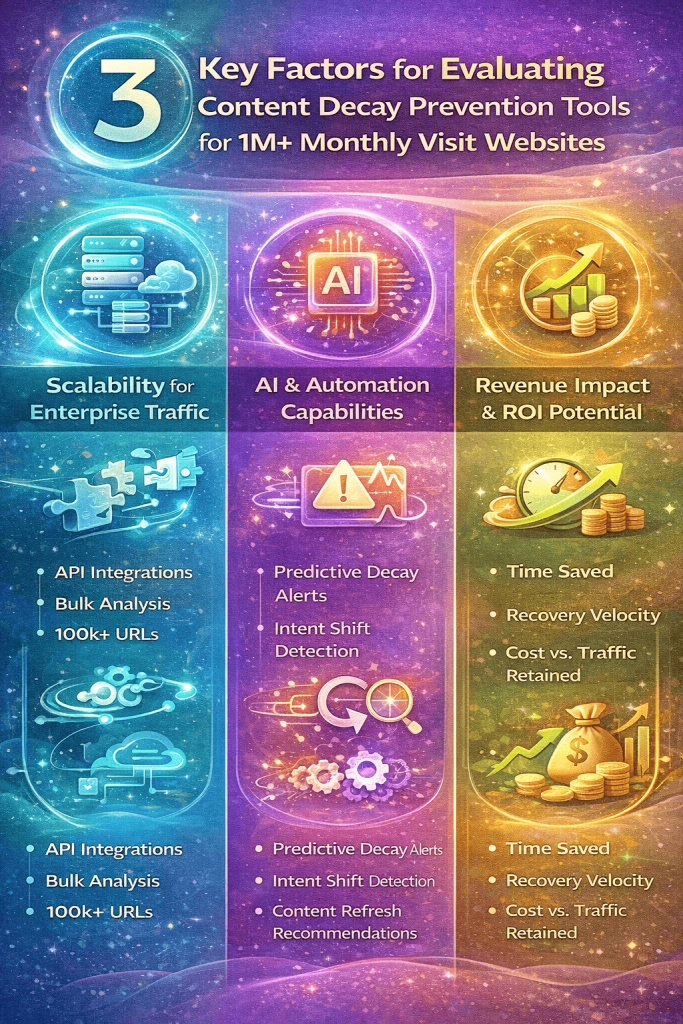
To rank the best content decay prevention tools for sites with over 1M monthly visits, we primarily considered three key factors.
1. Scalability for Enterprise Traffic:
Firstly, scalability for enterprise traffic is crucial. Tools offering API access & integrations, bulk analysis capability, and the ability to handle large datasets of 100k+ URLs were given priority as these features are essential for large websites and any SEO agency managing enterprise-level clients. This ensures seamless integration and analysis for high-traffic websites, optimizing efficiency and performance.
2. AI & Automation Capabilities:
Secondly, AI & automation capabilities play a significant role. Features like predictive decay alerts, intent shift detection, and content refresh recommendations are essential for staying ahead of content decay trends. These tools help in proactively addressing content issues, ensuring continuous relevance and engagement.
3. Revenue Impact & ROI Potential:
Lastly, we evaluated the revenue impact & ROI potential of each tool. We weighed how much manual work each tool removes at scale, how quickly it surfaces pages worth refreshing, and what it costs relative to the traffic it helps protect. Maximizing ROI while effectively preventing content decay is the ultimate goal for high-traffic websites.
By employing a comprehensive ROI framework that considers scalability, AI capabilities, and revenue impact, we ranked the top content decay prevention tools tailored for sites with 1M+ monthly visits. These tools not only address the immediate content decay challenges but also offer long-term sustainability and growth opportunities for enterprise-level websites.
How to Recognize Content Decay in Google Search Console?
Before investing in a content decay tool, confirm what is actually causing the decline. Google Search Console can reveal several important patterns:
- Gradual position decline: The page moves from position 3 to 6 and then to 9 over several months. Small weekly changes may look harmless, but the longer trend can reveal a meaningful loss of visibility.
- CTR decline with stable rankings: Impressions and rankings remain relatively stable, but fewer searchers click the result. This may indicate a weaker title, an outdated description or additional SERP features appearing above the listing.
- Falling impressions: The page appears for fewer searches than before. Possible causes include changing search demand, incomplete topic coverage or a competitor satisfying the search intent more effectively.
- Possible keyword cannibalization: Two or more pages repeatedly appear for the same queries, and the ranking URL changes frequently. Review whether those pages address the same intent and should be consolidated.
- A sudden performance drop: A sharp decline is not always content decay. Check for indexing problems, canonical changes, lost internal links, website migrations and major search updates before rewriting the page.
In Google Search Console, open Performance → Search results → Pages and compare the last three months with the previous three months. For seasonal content, also compare performance year over year. Prioritize pages that previously generated meaningful traffic and are now losing clicks, rankings or query coverage.
The Top 5 Content Decay Tools (Ranked by ROI)
Every content decay tool below can tell you a page is losing ground. What separates them is what each one actually counts as decay, and where its data comes from. seoClarity and Conductor work from your own Search Console and analytics data. Semrush and Ahrefs report modelled traffic estimates from their keyword databases unless you connect your own data, so their numbers won’t match GSC. Screaming Frog doesn’t measure traffic at all unless you plug it in. The last column matters most: it decides which pages end up on your refresh list.
| Tool | Price | Detects what | Integrates with | Free tier | How it defines decay |
|---|---|---|---|---|---|
| seoClarity | Research & Content from $2,500/mo; Rankings tier custom-quoted | Page-level traffic and rank changes at enterprise keyword volume, plus content and technical issues | Google Search Console, web analytics, enterprise data warehouses, CMS integrations, API | No free plan; trial on request | A page’s traffic change over a period, read from GSC and analytics data. Its own refresh guidance targets pages that slipped from top rankings to positions 11–40. |
| Semrush | Pro from $139.95/mo | Position drops on tracked keywords, estimated organic traffic shifts, competitor visibility gains, site audit issues | GA4, Google Search Console, Looker Studio; API on Business plan | Free account with daily request limits | No dedicated decay report since the Content Audit tool was retired. Decay is inferred from falling tracked positions or falling estimated traffic. |
| Ahrefs | Lite from $129/mo | Declining estimated organic traffic per page, lost keywords, lost backlinks, on-page content changes over time | Google Search Console; Looker Studio on Advanced; API on Enterprise | Ahrefs Free (formerly Webmaster Tools) for sites you verify | A page with declining estimated traffic in Top Pages. Traffic falling with no preceding content change counts as classic decay; SERP-feature and link-authority losses are treated as separate problems. |
| Conductor | Custom quote (not published) | Ranking and performance shifts, matched against automatically detected content, metadata and industry changes; 24/7 site monitoring alerts | Google Search Console, Google Analytics, Adobe Analytics | No free plan; free trial | A performance drop read against what changed before it: an edit, a metadata change or an industry update. Decay is the drop that has no change to explain it. |
| Screaming Frog | £199/year per user | Technical decay: broken links, redirects, metadata, indexability, near-duplicate content | GA4, Google Search Console, PageSpeed Insights, link metrics APIs, Looker Studio crawl report | Free version up to 500 URLs per crawl | Doesn’t define traffic decay. It finds structural decay between crawls, and only shows traffic when you pull GSC or GA4 data into the crawl. |
1. seoClarity – Best Overall ROI for Enterprise Sites
When it comes to content decay prevention tools, SEOClarity stands out as the best overall ROI choice for enterprise sites with over 1 million monthly visits. This tool offers a range of features that cater to the specific needs of publishers and SaaS brands in need of automation.
Why it works:
seoClarity surfaces decay through page-level traffic-change reporting in Site Analytics, built on your own Search Console and analytics data rather than modelled estimates. That makes it easier to spot which pages are slipping and by how much, across a very large URL set. Additionally, the platform boasts an enterprise-grade data warehouse, providing users with robust data storage and management capabilities.
Cut, unless you can source the feature. Start the paragraph at “Moreover, the tool offers advanced API integrations…” and drop “Moreover”. This ensures that content updates are prioritized based on their importance, saving time and effort for large SEO teams managing vast amounts of content. Moreover, the tool offers advanced API integrations, allowing for seamless connectivity with other essential tools and platforms including marketing systems like social media scheduling tools used to maintain consistent content promotion.
Ideal For:
SEOClarity is ideal for publishers and SaaS brands with 10 million or more sessions, as well as large SEO teams requiring automation to streamline their processes. The tool’s true enterprise scalability ensures that it can handle the demands of high-traffic websites effectively.
Pros:
In terms of benefits, SEOClarity excels in deep SERP tracking, providing users with valuable insights into their search engine performance. Its strong forecasting features enable users to plan their content strategies with confidence, helping them stay ahead of the competition.
Cons:
However, it’s essential to consider the cons of using SEOClarity. The tool comes with premium pricing, which may be a barrier for some users, especially those with budget constraints. Additionally, there is a learning curve associated with mastering all the features and functionalities of the platform.
ROI Outlook:
Despite the high upfront cost, SEOClarity offers a strong ROI for large publishers looking to protect their 7–8 figure organic revenue streams. For sites with over 1 million monthly visits, investing in a robust tool like SEOClarity can yield significant long-term benefits in terms of search engine visibility and user engagement.
2. Semrush – Best All-in-One Platform for Decay Monitoring
When it comes to content decay prevention tools for high-traffic websites with 1M+ monthly visits, Semrush is recognized as the best all-in-one platform for monitoring decay.
Why It Stands Out:
It stands out for position tracking alerts, Site Audit, topic gap analysis and competitor visibility tracking. Note that Semrush retired its standalone Content Audit tool, so decay has to be read from ranking and traffic trends rather than a dedicated report.
Ideal For:
Ideal for multi-channel marketing teams and sites with significant monthly traffic.
Pros:
Semrush provides strong competitive insights and is known for being user-friendly. Moreover, it offers affordable pricing compared to other enterprise-only tools in the market.
Cons:
Despite its strengths, Semrush is not exclusively built for decay monitoring, and it lacks some automation capabilities when compared to the top tool in this category.
ROI Outlook:
However, for growing high-traffic brands looking for a balance between cost and capability, Semrush offers a strong mid-tier ROI outlook.
In conclusion, for sites with 1M+ monthly visits seeking effective content decay prevention tools, Semrush emerges as a top choice due to its user-friendly interface, competitive insights, and cost-effective pricing structure.
3. Ahrefs – Best for Detecting Traffic Drops & Keyword Rot
When it comes to detecting traffic drops and keyword rot, Ahrefs stands out as one of the best tools available.
Key Features:
Its key features include historical ranking analysis, traffic decline reports, content gap detection, and backlink decay tracking.
Ideal For:
For editorial-heavy websites and SEO teams prioritizing keyword intelligence, Ahrefs proves to be an ideal choice.
Pros:
Pros of Ahrefs include excellent historical data, strong backlink monitoring capabilities, and clear decline detection mechanisms.
Cons:
However, it does have its limitations, such as the lack of automated refresh workflows and additional costs for enterprise API access.
ROI Outlook:
In terms of ROI outlook, Ahrefs offers excellent returns for diagnosing content decay but requires manual workflow execution.
For sites with over 1M monthly visits, investing in content decay prevention tools like Ahrefs can be crucial to maintaining and improving organic traffic performance. By leveraging its features effectively, website owners and SEO professionals can proactively address issues related to declining traffic and keyword performance.
In conclusion, Ahrefs emerges as a valuable asset for identifying and addressing content decay issues, making it a worthwhile investment for websites with high traffic volumes.
4. Conductor – Best for Enterprise Content Teams
Conductor is a top choice for enterprise content teams seeking robust solutions for managing high volumes of content efficiently.
Key Features:
It offers a range of key features tailored to meet the needs of large marketing teams and brands requiring cross-department visibility.
The platform’s enterprise reporting dashboards provide in-depth insights into content performance, enabling teams to track metrics effectively. Moreover, Conductor’s workflow integrations streamline processes, enhancing collaboration and productivity within the organization.
Ideal For:
One of the standout features of Conductor is its stakeholder-friendly reporting, which simplifies data interpretation for non-technical users. This accessibility to executive-level reporting makes it an ideal tool for organizations looking to communicate content strategies effectively across different levels of management.
Pros & Cons:
While Conductor excels in providing enterprise-level support and strong collaboration features, it is important to note that it falls under a higher pricing tier compared to other tools in the market. Additionally, users may find that it offers less technical flexibility than custom stacks, limiting customization options.
ROI Outlook:
In terms of ROI outlook, Conductor offers a strong return on investment for enterprises requiring comprehensive reporting and coordination at scale. Its ability to deliver actionable insights and facilitate seamless collaboration makes it a valuable asset for content teams managing 1M+ monthly visit sites.
Overall, Conductor’s robust feature set, tailored for large marketing teams and brands seeking cross-department visibility, positions it as a leading choice for content decay prevention tools in the enterprise space.
5. Screaming Frog – Best Technical Decay Detection Tool (Budget Pick)
Screaming Frog emerges as the best budget pick among content decay prevention tools, offering a range of powerful features tailored for technical SEO teams and sites struggling with legacy content debt.
Key Features:
- Crawl Comparison: Compares crawls over time to show what changed, broke or disappeared between audits.
- Broken Internal Link Detection: Identifies and rectifies broken internal links that may harm your site’s SEO performance.
- Metadata & Indexation Auditing: Helps maintain accurate metadata and ensures proper indexation of content.
- Custom Extraction for Decay Signals: Allows for a personalized approach to detecting content decay specific to your site.
Ideal For:
Screaming Frog is ideal for technical SEO teams looking to streamline their content maintenance process and for sites burdened with legacy content debt that needs efficient decay detection tools.
Pros:
- Extremely Cost-Effective: Offers significant value for its price point, making it accessible for a wide range of users.
- Powerful Technical Insights: Provides in-depth technical analysis to address content decay effectively.
- Customizable: Allows users to tailor the tool to their specific content decay prevention needs.
Cons:
- No Built-in Traffic Decay Detection: Lacks a feature for directly detecting traffic decay, requiring additional manual analysis.
- Requires Manual Analysis: Users need to invest time and effort in manual analysis alongside the tool’s automated features.
ROI Outlook:
Screaming Frog promises a very high ROI for technical audits, particularly beneficial for 1M+ monthly visit sites grappling with content decay. However, it’s essential to complement its insights with data from Google Search Console or dedicated rank tracking tools for comprehensive decay prevention strategies.
A Free Content Decay Monitoring Baseline
Before purchasing an enterprise platform, teams can create a basic monitoring system using Google Search Console and Looker Studio.
Google Search Console provides first-party information about the queries and pages generating impressions, clicks and organic visibility. Looker Studio can turn that information into a recurring dashboard that highlights:
- Pages losing organic clicks
- Queries with declining positions
- Pages experiencing CTR deterioration
- Month-over-month and year-over-year performance changes
- URLs that should be investigated for possible content decay
This combination is useful for teams that already have the resources to interpret the data and manage refreshes manually. However, it does not automatically diagnose why a page declined, prioritize updates by business value or create a complete content-refresh workflow.
For smaller teams, it can serve as a free starting point. For websites managing thousands of URLs, a dedicated platform may reduce the time required to find, prioritize and monitor declining content.
Which Content Decay Tool Should You Choose?
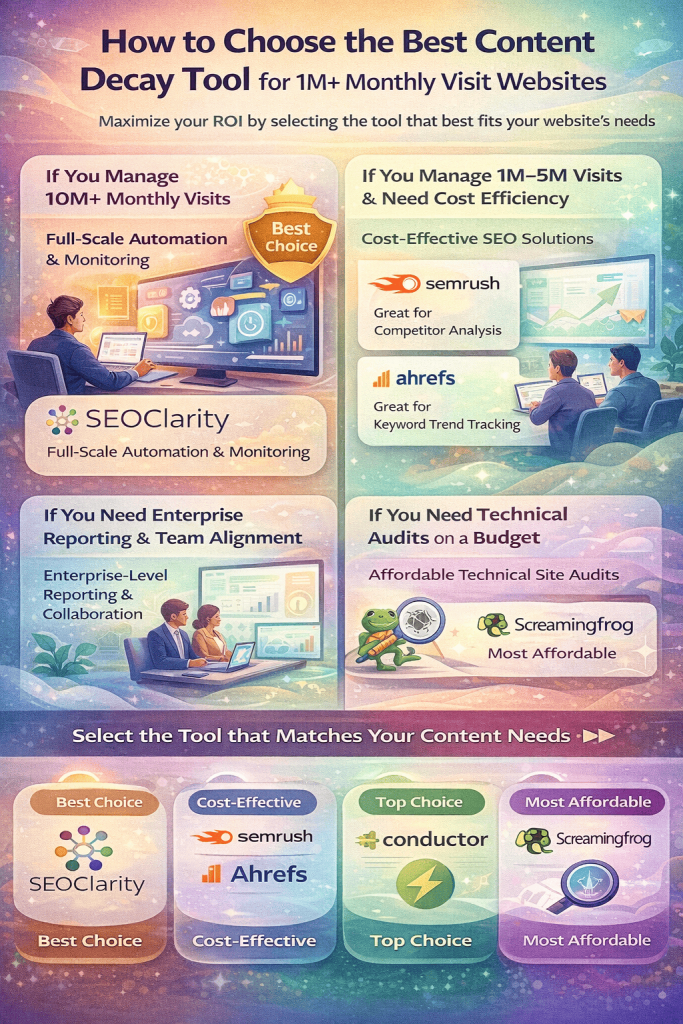
When it comes to choosing the right content decay tool for your website with over 1M monthly visits, it’s essential to consider your specific needs and priorities to maximize your return on investment. Here’s a breakdown of the top tools tailored to different requirements:
If You Manage 10M+ Monthly Visits
For websites managing 10M+ monthly visits, SEOClarity stands out as the ideal choice due to its automation capabilities and full-scale monitoring. This tool is designed to handle large volumes of traffic efficiently, ensuring that your content remains optimized and relevant even at scale.
If You Manage 1M–5M Visits & Need Cost Efficiency
If you manage between 1M to 5M monthly visits and are looking for cost-effective solutions, Semrush or Ahrefs are excellent options. Semrush excels in competitor research, providing valuable insights to stay ahead in the game, while Ahrefs focuses on tracking keyword decline trends, helping you adapt your content strategy accordingly. Based on whether you prioritize competitor analysis or keyword tracking, you can select the tool that best fits your needs.
If You Need Enterprise Reporting & Team Alignment
For those seeking comprehensive enterprise reporting and team alignment, Conductor emerges as the top choice. This tool streamlines reporting processes, fosters collaboration among team members, and ensures that everyone is on the same page when it comes to content strategies and goals.
If You Need Technical Audits on a Budget
If you require thorough technical audits but are operating on a budget, Screaming Frog is the tool for you. This cost-effective option offers in-depth website analysis, highlighting areas for improvement to enhance your content performance without breaking the bank.
In conclusion, selecting the right content decay prevention tools for your website is crucial in maintaining your online presence and driving sustainable growth. By choosing a tool that aligns with your specific needs and budget, you can effectively combat content decay and ensure that your content remains valuable and impactful to your audience.
Five Mistakes That Make Content Refreshes Fail
1. Choosing pages based on instinct
Do not refresh an article simply because it looks old. Start with pages that have measurable declines and previously contributed meaningful traffic, conversions or backlinks.
2. Treating every traffic drop as content decay
A decline may be caused by seasonality, reduced search demand, indexing problems, technical changes or a search update. Diagnose the cause before changing the content.
3. Rewriting the entire page unnecessarily
A complete rewrite can remove passages, headings or answers that already rank. Preserve the sections that continue to perform and update only the information that is outdated, incomplete or misaligned with search intent.
4. Ignoring technical and internal-linking problems
New copy will not solve an incorrect canonical tag, indexing restriction, broken internal link or orphaned page. Check the page’s technical health and internal-link support as part of every refresh.
5. Failing to measure the result
Record the refresh date and the changes made. Monitor clicks, impressions, rankings and conversions for at least several weeks, while accounting for seasonality and site-wide changes. This makes it easier to determine whether the update produced a genuine improvement.
Final Verdict: The Real ROI Driver
When managing a website with over 1 million monthly visits, staying ahead of content decay is crucial for maintaining high ROI. The best content decay prevention tools go beyond just monitoring traffic drops. They offer features like detecting intent shifts early, automating refresh prioritization, protecting revenue at scale, and reducing manual SEO workload.
1. Detecting Intent Shifts Early: One key feature to look for in content decay prevention tools is the ability to detect changes in user intent promptly. By identifying these shifts early on, you can adapt your content strategy to meet evolving user needs and preferences.
2. Automating Refresh Prioritization: Tools that automate the prioritization of content refresh can save valuable time and effort. They can analyze performance data and user engagement metrics to determine which pieces of content need updates or optimization.
3. Protecting Revenue at Scale: For high-traffic websites, protecting revenue streams is paramount. Content decay can lead to decreased traffic, lower conversions, and ultimately, revenue loss. The right tools offer solutions to mitigate these risks and ensure consistent revenue generation.
4. Reducing Manual SEO Workload: Content decay prevention tools that help streamline SEO tasks can significantly boost efficiency. From keyword research to on-page optimizations, automation features can reduce the manual workload for your SEO team and enhance overall performance.
Choosing the right tool for your website depends on factors such as traffic size, automation requirements, and team expertise. While there are various tools available, investing in a reliable platform is more cost-effective than ignoring the impact of content decay on large-scale websites. By prioritizing content maintenance and optimization, you can maximize ROI and sustain long-term success in the competitive digital landscape.
Frequently Asked Questions
Content decay prevention tools are software or platforms designed to analyze and monitor the performance of website content over time. These tools help identify pages that are losing traffic or engagement, allowing website owners to take proactive measures to refresh or update the content.
For high-traffic websites, maintaining a fresh and engaging content is paramount to sustain audience interest and search engine rankings. Content decay prevention tools offer insights into content performance, helping site owners prioritize updates based on ROI metrics like traffic, conversions, and engagement.
By using content decay prevention tools, website owners can strategically allocate resources to optimize high-impact pages, leading to increased traffic, conversions, and revenue. These tools enable data-driven decision-making, ensuring that every content update contributes to the site’s overall ROI.
Integrating content decay prevention tools into your website management workflow requires a strategic approach. Start by setting clear goals, establishing KPIs, and regularly monitoring performance metrics to ensure that your content remains fresh, relevant, and engaging for your audience.