

ClickFlow is gone. The content optimization tool that let you A/B test title tags and meta descriptions is now listed as permanently closed, and a lot of teams are scrambling for a replacement.
Here’s the thing, though. Most people typing “ClickFlow alternatives” into Google want another A/B title tester. That’s the wrong target. The real problem in 2026 isn’t your title tags. It’s content decay, the slow bleed of clicks from pages that used to rank just fine. And it’s getting worse fast: roughly 25% of Google searches now show an AI Overview that answers the question before anyone clicks through.
So this isn’t a flat directory of every SEO tool on the market. It’s a shortlist of ClickFlow competitors, grouped by the job each one actually does.
What ClickFlow did (and why it’s gone)
ClickFlow was narrow on purpose. You’d plug in a page, test a few title and meta variants, and watch which version pulled a better click-through rate in search. Useful. Limited.
It never helped you research a topic, build a brief, or run a proper content audit. It optimized pages you’d already published, and that was pretty much the whole pitch.
The company started in 2019, ran out of Arcadia, California, and raised about $385K before winding down. Now its profile just reads “permanently closed.”
So the smart question isn’t “what’s identical to ClickFlow?” It’s “what job was I hiring ClickFlow for?” For most people the honest answer is simple: stop my good pages from quietly dying. And that’s a much bigger job than ClickFlow ever signed up for.
Content decay is the real problem in 2026
Content decay is when a page that ranked well slowly loses traffic. Not a penalty. Not a crash. A page drifts from 2,000 monthly visits to 1,400, then 900, and on any single day nothing looks broken. By the time it shows up in a quarterly report, you’ve already lost months.
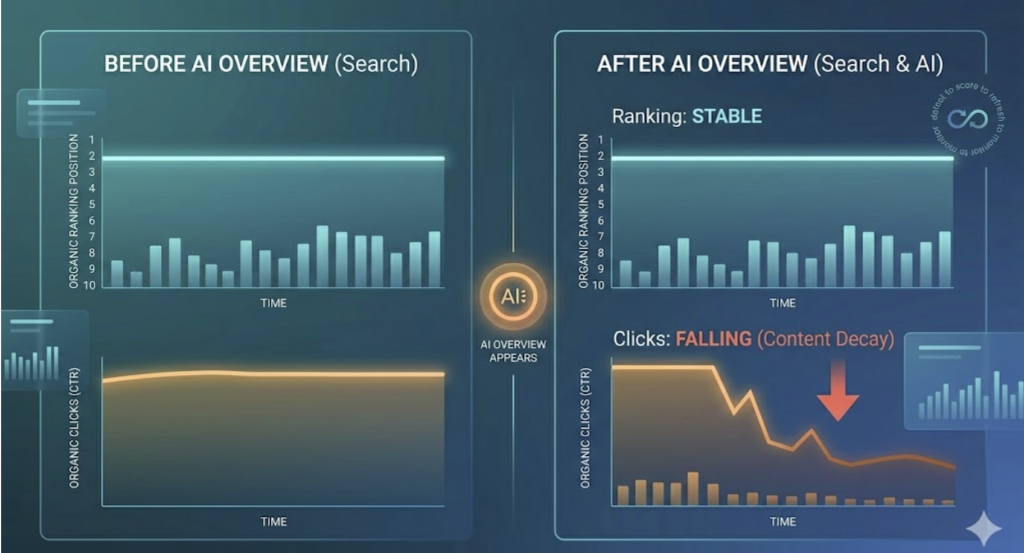
What’s driving it this year? AI Overviews, mostly. When Google drops a generated answer above the organic results, click-through rate on the number-one spot falls about 34.5%. Your ranking didn’t move. Your clicks did.
Up close, the numbers get rough. In Seer Interactive’s study of 5.47 million queries, organic CTR on AI-Overview searches dropped from a 1.76% baseline to 0.61% by mid-2025. That’s a 61% fall. And roughly 60% of those Google searches now end with no click at all (same Velacore data).
Ranking doesn’t even guarantee visibility anymore. The overlap between top-10 organic results and the pages AI Overviews actually cite collapsed from about 75% in mid-2025 to between 17% and 38% by early 2026. You can sit at position three and still get skipped entirely.
A title tester can’t touch any of this. Fighting organic traffic decay needs two things ClickFlow never offered. One, a way to spot the slide early. Two, a way to refresh the page before it bleeds out.
The 4 jobs a ClickFlow replacement should cover
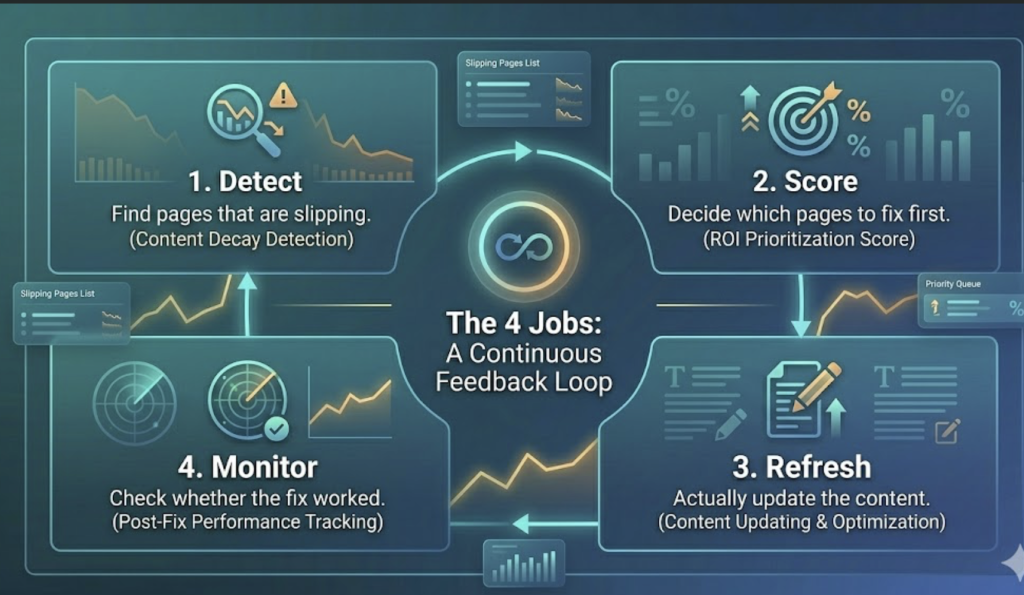
Forget feature checklists for a second. A good replacement covers one loop:
- Detect: find pages that are slipping.
- Score: decide which ones are worth fixing first.
- Refresh: actually update the content.
- Monitor: check whether the fix worked.
Most teams don’t need one magic tool. They need this loop covered, whether by a single platform or a small stack. And the payoff lands fast. Refreshed content recovers 60–80% of lost rankings within 30 to 45 days, which is cheaper and quicker than writing something brand new. (There’s a whole playbook of quick refreshes that recover lost traffic fast.)
So as you read the tools below, ask one question of each: which step of that loop does this fill for me?
Best ClickFlow alternatives by job
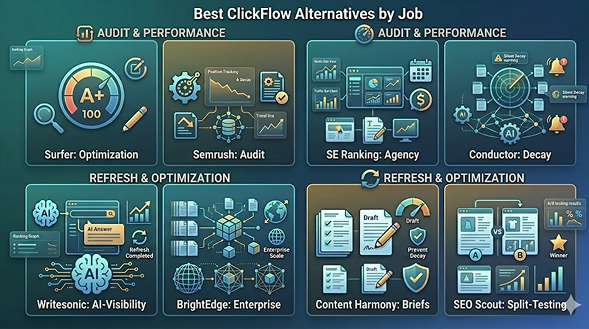
Eight tools, grouped by what they’re good at. None of them is “the ClickFlow replacement.” Each one owns a job.
1. Surfer: best for content optimization and rewriting
Surfer is the closest thing to ClickFlow’s “improve this page” job, plus the drafting ClickFlow never did. It scores your content live, suggests terms to add, builds outlines, and works across seven languages. If your bottleneck is the rewrite itself, start here. Best for solo marketers and small content teams who do the editing in-house.
2. Semrush: best for content audit at scale
Semrush bundles position tracking with content audit workflows that flag your decaying ranking pages automatically. If you already pay for the suite, you probably have decay detection sitting unused inside it right now. Run a content audit, sort by lost positions, and there’s your refresh backlog. Best for teams already living in Semrush.
3. SE Ranking: best for agencies tracking many sites
SE Ranking handles keyword research, rank tracking, automated reporting, and white-label dashboards, with generous user seats on most plans. For an agency juggling 20 client sites, the reporting automation alone earns its keep. Best for agencies and lean in-house teams keeping an eye on budget.
4. Conductor (and ContentKing): best for catching silent decay
Conductor’s website monitoring, built on the old ContentKing engine, watches your pages continuously and pings you when something changes unexpectedly. This is the tool for “silent decay,” the kind nobody notices until a quarter of traffic has already walked out the door. It also covers AEO and content-gap analysis. Best for sites big enough that manual checking just isn’t realistic.
5. Writesonic: best for AI-visibility and automated refresh
Writesonic leans hard into the 2026 problem. It tracks your brand’s visibility across AI search, spots where competitors get cited and you don’t, then executes the fix, refreshing existing pages included. Why bother? Brands cited in AI Overviews earn roughly 35% more organic clicks than the ones left out. Best for teams losing ground specifically to AI Overviews.
6. BrightEdge: best for enterprise content performance
BrightEdge is the enterprise pick. Its DataCube keyword data and content performance tracking are built for big libraries where freshness has to be managed across thousands of URLs at once. Overkill for a 40-post blog. Right at home on a 4,000-page site.
7. Content Harmony: best for briefs and grading before you publish
Content Harmony fights decay earlier, back at the creation stage. It builds research-backed briefs and grades drafts before they go live, so pages launch strong instead of needing a rescue later. It openly pitched itself as the full-stack answer to ClickFlow’s narrow optimizer. Best for teams that would rather prevent decay than chase it.
8. SEO Scout: best for the closest like-for-like A/B testing
If you just want ClickFlow’s split testing back, SEO Scout is the nearest match, and arguably the better one. Where ClickFlow tested a single page at a time, SEO Scout lets you test a pattern across a whole group of similar pages, like product or review templates, and find the variants that win across all of them. Best for ecommerce and programmatic pages.
How to build an automated refresh workflow?
Tools are only half of it. Here’s the loop they plug into:
- Detect: Start with Google Search Console. It added AI Mode and AI Overview tracking under Performance back in mid-2025, so you can see clicks and impressions for AI-influenced queries directly. Pair it with GA4 and compare trend windows instead of single snapshots: 28 days against the prior 28, 90 against the prior 90, and year over year. Decay shows up in the deltas, not the daily numbers.
- Score: Rank your slipping URLs by how much they’ve dropped: click loss, CTR loss, position loss. A page that fell from 5,000 visits to 2,000 beats one that lost 40 visits. Every time.
- Refresh: Now the real work. Swap old stats for 2026 numbers, re-match the page to current search intent, and front-load clear answers so AI engines can quote you. Tidy up the internal links while you’re in there.
- Set a cadence: Not every page needs the same rhythm. Volatile topics want a roughly 30-day check, high-traffic pages around 90 days, and stable evergreen content closer to 180.
- Monitor: Circle back 30 to 45 days after the refresh ships. If the page climbs, the loop worked. If it didn’t, your fix probably missed the real intent, so dig again.
Run that loop on repeat and you stop firefighting. As one team put it, the sites winning organic search right now aren’t publishing more, they’re maintaining better.
How to pick the right ClickFlow alternative?
Match the tool to the weakest link in your loop, not to the longest feature list.
- Solo or small team that mainly needs to rewrite pages: Surfer or Content Harmony.
- Agency tracking lots of sites: SE Ranking.
- Enterprise library: BrightEdge or Conductor.
- Losing clicks to AI Overviews: Writesonic.
- You actually want A/B page testing back: SEO Scout.
- Already in a big suite: Semrush.
Honestly, most teams land on a combination. Usually a detection layer (Search Console plus Semrush or Conductor) and an execution layer (Surfer or Writesonic). And that’s fine. ClickFlow tried to be one box; the better setup is a loop.
Wrapping it up
ClickFlow shutting down is a decent excuse to upgrade the whole approach, not just swap in a near-twin. The pages you published last year are slipping right now, quietly, while the rankings still look okay on the surface.
So pick one detection tool. Pick one refresh tool. Run the detect-score-refresh-monitor loop on a schedule and let your best content keep earning instead of fading out. That’s the durable win in 2026, and it’s a far bigger one than any title tester was ever going to hand you.
FAQs
Yes. ClickFlow, the SEO content optimization tool founded in 2019, is now listed as permanently closed on company databases like Crunchbase. Existing users have to move to another tool, which is why “ClickFlow alternatives” searches have climbed lately.
For detection, Google Search Console is free and now includes AI Overview tracking, which covers the most important job: spotting decay. Pair it with GA4. Paid tools like Surfer and Semrush offer trials, but no fully free tool replaces ClickFlow’s split testing one-for-one.
Partly. Tools like Writesonic and Semrush detect decay and can even draft refreshes for you, but a human should still check intent and accuracy before anything goes live. Hands-off refresh isn’t reliable yet, so treat the automation as a fast first draft, not the final word.
It depends on the page. Volatile, fast-moving topics do well with a roughly 30-day review, high-traffic pages with about 90 days, and stable evergreen content with around 180. The trick is a steady cadence, not a one-time spring cleaning.
They’re a big driver in 2026. When an AI Overview answers a query on the results page, click-through rate on the top result can drop around 34.5%, even though your ranking hasn’t moved an inch. Refreshing pages so AI engines cite them is now part of fighting decay.