
When an article starts losing traffic, attracting fewer clicks, or generating fewer conversions, rewriting it from scratch might seem like the obvious solution. But a complete rewrite isn’t always necessary.
Sometimes, the article already contains valuable information and performs reasonably well. It simply needs a few improvements to remain relevant, useful, and competitive.
A targeted content refresh allows you to preserve what’s working while addressing the elements that may be holding the article back. It can also require significantly less time and effort than producing an entirely new piece.
Taking a systematic approach through a content refresh strategy helps you focus on meaningful improvements rather than replacing content unnecessarily.
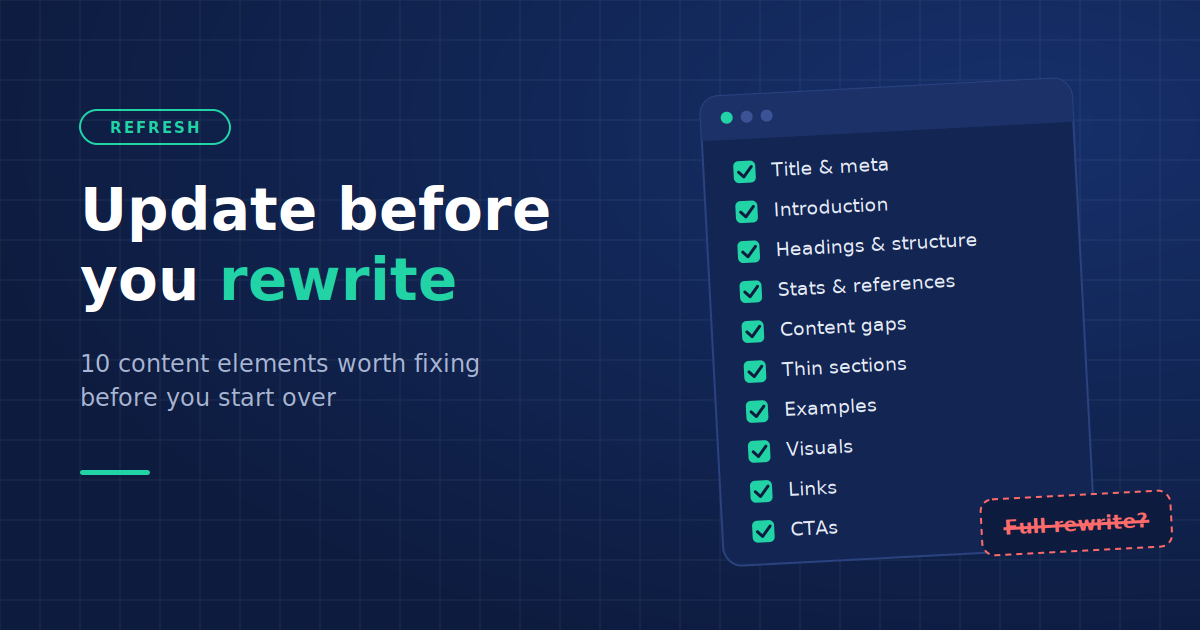
Before replacing an existing article, consider updating these ten content elements first.
1. Title Tags and Meta Descriptions
Your article’s title tag and meta description help communicate what readers can expect from the page before they visit it.
Even if the article itself is useful, an unclear or outdated title may not accurately reflect its value.
Start by reviewing whether your title still matches the article’s content and the search intent behind its target keywords.
For example, an article titled “Beginner’s Guide to Email Marketing” might benefit from a more specific title like “How to Start Email Marketing: A Step-by-Step Beginner’s Guide” if the article already provides actionable instructions.
When updating these elements:
- Make the title descriptive and relevant to the article’s primary topic.
- Include the main keyword naturally without forcing it.
- Highlight the article’s most useful angle or benefit.
- Write a unique meta description that accurately summarizes the page.
- Avoid adding dates or promises that the content doesn’t support.
Remember that Google may generate its own title links and search snippets, so changing your metadata doesn’t guarantee that your exact wording will appear in search results.
2. The Introduction
An article’s introduction sets expectations for the rest of the content.
If readers have to scroll through several paragraphs of general background information before finding anything useful, the introduction may need improvement.
Review whether your opening clearly identifies the topic, addresses the reader’s problem, and explains what the article will help them accomplish.
For instance, an article about reducing website loading times doesn’t necessarily need three paragraphs explaining why websites are important. Readers searching for that topic likely already understand the value of having a fast website.
A more effective introduction can acknowledge the problem and move directly toward practical solutions.
What to update:
- Remove unnecessary background information.
- Address the reader’s main question earlier.
- Replace vague statements with specific context.
- Clarify what readers will learn.
- Ensure the introduction matches the article’s current direction.
In many cases, rewriting just the first few paragraphs can make an existing article more approachable without changing the rest of the content.
3. Headings and Content Structure
An article may contain the right information but present it in an order that makes it difficult to follow.
Poorly organized sections, vague headings, and lengthy blocks of text can make useful content harder to navigate.
Before rewriting the entire article, examine how the information is arranged.
Do the headings accurately describe their sections? Are closely related ideas grouped together? Does the article follow a logical progression?
For example, a guide about choosing project management software might discuss pricing before explaining the features readers should evaluate.
Reorganizing these sections could create a more useful reading experience without requiring extensive changes to the actual information. You can also explore AI blog design techniques for additional ideas on structuring content, improving readability, and making information easier to navigate.
Consider making the following adjustments:
- Replace generic headings with descriptive alternatives.
- Break lengthy sections into smaller, focused subsections.
- Move important information closer to the beginning.
- Combine sections that cover similar topics.
- Remove headings that don’t contribute meaningful information.
The goal isn’t to add more headings for SEO. It’s to make the existing content easier for readers to understand and navigate.
4. Outdated Statistics, Facts, and References
One of the most important parts of refreshing an article is checking whether its information is still accurate.
Statistics, industry trends, software features, pricing details, and regulations can change over time. An article that was accurate when published may now contain information that misleads readers.
For instance, a comparison article about website builders might reference subscription prices, features, or limitations that have changed since publication.
Rather than rewriting the comparison from scratch, you could verify the existing information and update the affected sections.
Pay particular attention to:
- Statistics and research findings.
- Product features and pricing.
- Industry standards and regulations.
- Software interfaces and instructions.
- Company information and service availability.
- Time-sensitive recommendations.
Replace outdated references with current, credible sources whenever possible.
However, avoid changing an article’s publication date simply to make it appear recent. Meaningful content updates should come before any decision to display a new update date.
5. Missing Information and Content Gaps
Sometimes, an article performs poorly not because its existing content is incorrect, but because it doesn’t fully address what readers need.
Search behavior evolves, new questions emerge, and competing resources may begin addressing aspects of a topic that your article overlooks.
Review your article to identify important information that could make it more complete.
Google Search Console can be particularly useful here. Look for relevant queries that already generate impressions but aren’t adequately addressed by the page.
You can also review related searches and competing articles to understand which questions users commonly ask.
For example, an article about email automation might explain how to set up workflows but overlook how to measure their performance.
Adding a section about relevant metrics could improve the article’s usefulness without changing its existing explanations.
Focus on adding information that genuinely supports the article’s purpose. Not every related keyword or competitor subsection deserves a place in your content.
If a missing topic requires a substantial explanation of its own, consider creating a separate article and linking to it instead.
6. Thin, Repetitive, or Unnecessary Sections
Content updates don’t always mean adding more words.
Sometimes, removing information makes an article better.
Over time, articles can accumulate repetitive explanations, unnecessary examples, and sections that contribute little to the main topic.
These passages can make it harder for readers to find the information they need.
During your content audit, identify sections that:
- Repeat information already explained elsewhere.
- Provide broad statements without useful details.
- Wander away from the article’s main topic.
- Contain unnecessarily lengthy explanations.
- Exist primarily to accommodate keywords.
For example, if an article explains the benefits of cloud storage in the introduction, it may not need to repeat the same benefits in three additional sections.
Condensing those passages can improve clarity and make the article more focused.
When deciding whether to remove, consolidate, or update larger sections, a content pruning framework can help you evaluate which material is worth preserving.
Don’t remove content simply to reduce word count, though. A detailed explanation may be necessary when a topic is complex.
The objective is to eliminate unnecessary material while preserving information that helps readers.
7. Examples and Practical Applications
An article can explain a concept accurately and still leave readers wondering how to apply it.
This is particularly common in educational content that relies heavily on definitions and broad recommendations.
Adding specific examples, workflows, comparisons, or practical scenarios can make existing explanations easier to understand.
For instance, an article about improving customer retention might recommend personalized communication without demonstrating what that looks like.
Instead of rewriting the entire section, you could add a sample email sequence or illustrate how different customer segments receive tailored messages.
Depending on the topic, useful additions might include:
- Before-and-after comparisons.
- Step-by-step examples.
- Realistic scenarios.
- Sample templates.
- Original observations or case studies.
- Common mistakes and ways to avoid them.
Whenever possible, use examples based on actual experience or verifiable information.
A well-chosen example can provide more value than several additional paragraphs of general advice.
8. Images, Screenshots, and Other Visual Elements
Visual content can become outdated just as written information does.
Screenshots may show interfaces that no longer exist. Charts may contain old data. Images might not adequately explain the concepts they accompany.
Before replacing an entire article, review whether its visuals still support the information being presented.
For example, a tutorial explaining how to configure analytics tracking could confuse readers if its screenshots show an older interface.
Updating the screenshots and the corresponding instructions may be enough to restore the tutorial’s usefulness.
Consider whether the article would also benefit from new visuals, such as:
- Diagrams illustrating complicated processes.
- Comparison tables that organize product information.
- Charts based on current data.
- Screenshots demonstrating individual steps.
- Checklists or visual summaries.
Creating new visuals doesn’t always require advanced design skills. For example, an AI image generator can help produce custom illustrations or conceptual graphics that support the article’s topic. Just make sure the resulting images are accurate, relevant, and appropriate for your intended use.
Visual consistency is equally important. Whether you’re updating an established website or learning how to start a blog, establishing a recognizable visual identity can help create a more cohesive reading experience. This includes maintaining consistency in your images, colors, typography, and overall presentation.
You should also review image descriptions and alternative text to ensure they’re useful and accurate.
Avoid adding images simply to make the article longer or more visually appealing. Every visual should serve a clear purpose.
9. Internal and External Links
Links are easy to overlook during a content refresh, but they can affect how readers navigate an article and access supporting information.
Internal links help users discover related resources on your website, while external links can provide evidence, context, and additional reading.
As your website grows, you may publish newer articles that would be more useful to link to than the resources originally included.
External sources can also become outdated, unavailable, or less relevant.
Review the article for opportunities to:
- Replace broken or redirected links with appropriate destinations.
- Link to newer, relevant articles on your website.
- Remove references that no longer support the information.
- Update links pointing to outdated research.
- Improve vague anchor text where necessary.
- Avoid linking repeatedly to the same resource without a clear reason.
For example, an article discussing SEO reporting might link to an introductory analytics guide. If you’ve since published a more detailed guide about building SEO reports, the newer resource may provide a more helpful next step.
Internal linking should remain contextual. Adding numerous links simply to increase their quantity won’t necessarily improve the article.
10. Calls to Action and Next Steps
An article’s call to action (CTA) should reflect what readers are likely to need after consuming the content.
However, CTAs often remain unchanged even when a company’s products, services, or content strategy evolves.
An article published several years ago might still promote an outdated ebook, link to an inactive landing page, or encourage readers to take an action that no longer aligns with the business’s goals.
Before rewriting the article, evaluate whether its current CTA still makes sense.
Ask yourself:
- Does the CTA relate directly to the article’s topic?
- Is the offer still available and relevant?
- Does it match the reader’s likely stage in the buying journey?
- Is the next step clear?
- Could a more relevant resource provide greater value?
For example, an introductory article about website analytics might perform better as an educational resource with a link to a beginner-friendly reporting template than with an immediate sales-focused CTA.
A CTA doesn’t always have to encourage a purchase or booking. It can direct readers toward another useful article, a downloadable resource, a product demonstration, or an appropriate next step.
The important thing is to make the action relevant to the reader’s needs.
When Does an Article Actually Need a Complete Rewrite?
While targeted updates can improve many existing articles, there are situations where a complete rewrite is the better option.
A full rewrite may be necessary when:
- Search intent has fundamentally changed. The article answers a different question from the one its target audience is now asking.
- Most of the information is outdated. Correcting individual sections would require replacing nearly everything.
- The article lacks a clear purpose or structure. Its organization is so fragmented that smaller changes won’t solve the problem.
- The underlying recommendations are no longer valid. The topic has evolved enough that the original approach is no longer useful.
- The content doesn’t meet the audience’s needs. The existing article lacks the depth, expertise, or practical value required to address its subject effectively.
For example, an article about a discontinued software platform may need an entirely new approach if readers are now primarily searching for alternatives.
Similarly, a broad article that targets informational queries may need significant restructuring if its current audience is primarily looking for product comparisons.
A rewrite should be driven by a clear editorial need, not simply by declining traffic or the age of the content.
How to Prioritize Your Content Updates
Not every article requires all ten changes. In fact, updating elements without identifying an underlying problem can waste time and introduce unnecessary changes.
Start with a simple content audit.
Step 1: Review the article’s performance. Use Google Search Console and your analytics platform to examine organic clicks, impressions, click-through rates, engagement, and conversions where relevant. Compare equivalent periods and account for seasonality.
Step 2: Identify the biggest weaknesses. Determine whether the article suffers from outdated information, missing sections, weak presentation, poor search-intent alignment, or another issue.
Step 3: Preserve what’s working. Avoid replacing useful explanations, examples, or sections merely because you’re refreshing the page.
Step 4: Make targeted improvements. Prioritize changes that are most likely to address readers’ needs and the problems identified in your audit.
Step 5: Monitor the results. Document what changed and when. Track performance over a reasonable period, recognizing that search engines may need time to recrawl and reassess the page.
A refresh evaluation checklist can also help you assess whether your changes made the article more useful, easier to navigate, and better aligned with readers’ expectations.
A content refresh isn’t guaranteed to improve rankings or traffic. However, this process helps you make informed decisions rather than relying on assumptions.
Final Thoughts
Updating an existing article doesn’t have to mean starting over.
Elements such as titles, introductions, headings, statistics, examples, visuals, and links can gradually become less effective even when the article’s core information remains useful.
By reviewing these elements individually, you can identify opportunities to improve accuracy, relevance, readability, and usability without discarding content that already works.
More importantly, this approach allows you to focus your resources where they’re most needed.
Before committing to a complete rewrite, determine whether the article truly needs a new foundation or simply a few meaningful improvements.
Sometimes, the best content update isn’t a rewrite. It’s knowing exactly what to keep, what to improve, and what to remove.