
A page can stay on page one and still lose most of its clicks.
Seer Interactive tracked 25.1 million organic impressions across 42 companies and found that organic CTR on informational queries with an AI Overview fell from 1.76% to 0.61% between mid-2024 and September 2025. That’s roughly a third of the clicks those queries used to send.
Now think about what your alerts would have said while that happened. Probably nothing. Most monitoring setups are wired to catch things that break: a noindex tag, a 500 error, a crashed template. They’re blind to the slow stuff. And over a year, the slow stuff usually runs up the bigger bill.
So the real question for automated SEO monitoring isn’t “which tool?” It’s which signals deserve an alert, and at what number.
What automated SEO monitoring should actually catch
Monitoring and reporting get lumped together. They shouldn’t be.
A report tells you what happened last month. Automated SEO monitoring tells you something crossed a line while it’s still cheap to fix. Same data, different job.
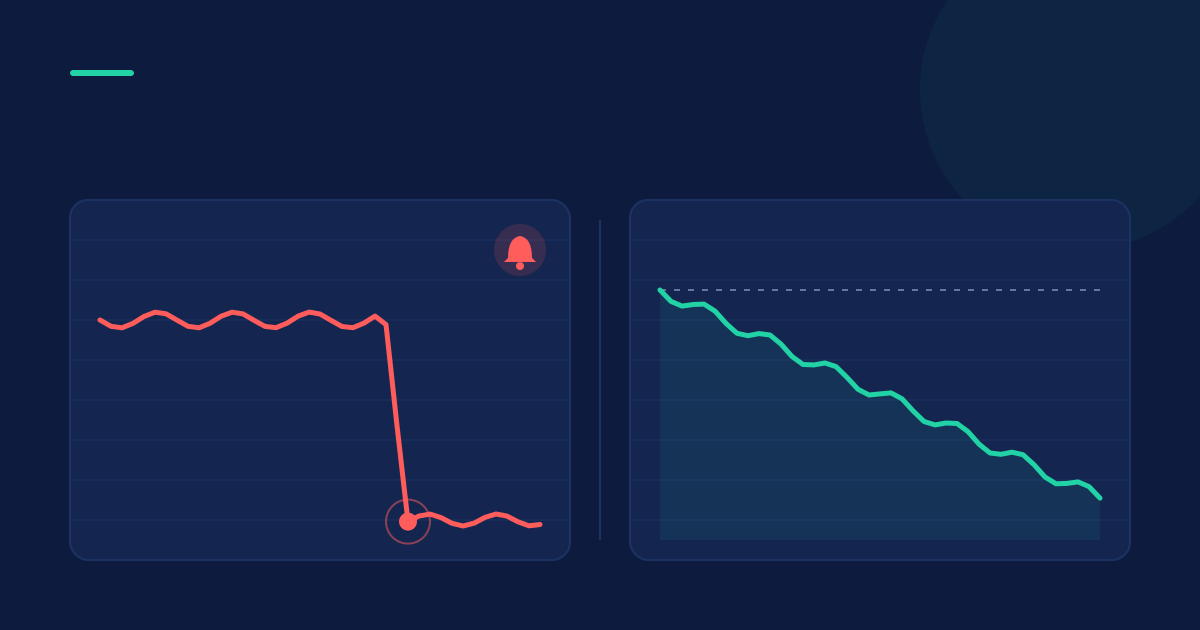
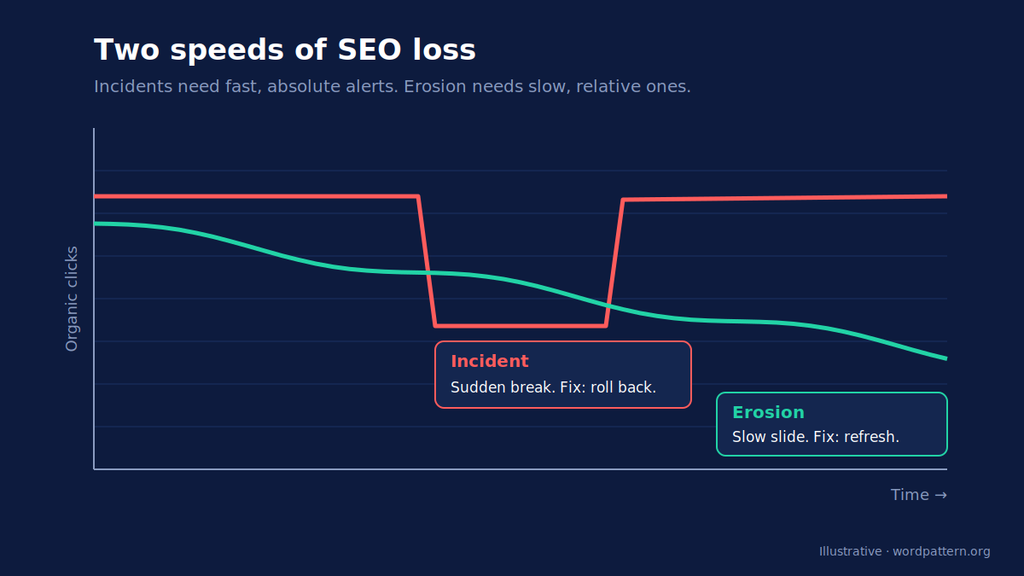
The part most setups miss is that SEO problems arrive at two speeds.
Incidents are sudden. A deploy adds noindex to your blog template, a redirect map gets wiped, a server starts throwing 5xx errors. Traffic falls off a cliff in a day or two, and the fix is usually a rollback.
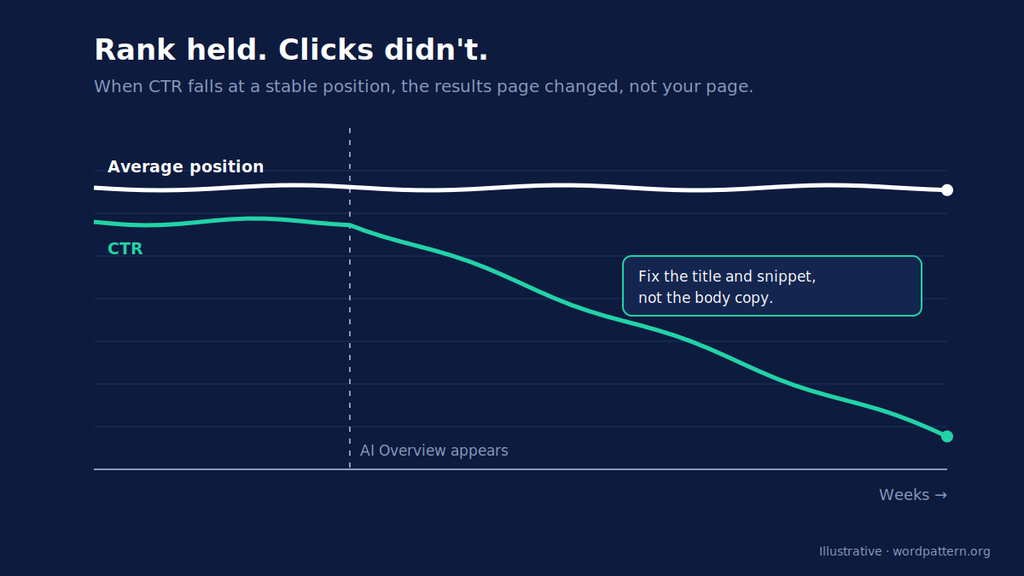
Erosion is slow. A page loses a few queries a month, its CTR slides because Google added an AI Overview above it, or a competitor’s refresh nudges it from position 3 to 6. No single day looks alarming. Six months later the page earns half of what it used to.
Incident alerts want absolute thresholds and fast checks. Erosion alerts want relative thresholds (compared against the page’s own history) and patience. If you run both through the same “traffic down 20% this week” rule, you’ll get noise from the first kind and silence from the second.
That’s why automated SEO alerts need to be split by speed. One rulebook for breaks, another for drift.
The 8 signals worth alerting on
Here’s the automated SEO monitoring setup we’d start with on a B2B content site of a few hundred to a couple thousand pages. Treat every number as a starting point. Run it for 60 to 90 days, see what fires, then tighten or loosen.
| # | Signal | Speed | Starting threshold | Check | Why this number |
|---|---|---|---|---|---|
| 1 | Indexability change (noindex, canonical, robots.txt) | Incident | Any change on a URL that earned clicks in the last 28 days | Daily crawl diff | There’s no “acceptable” accidental noindex. Scoping to pages with clicks keeps it from firing on tag archives. |
| 2 | Status code on traffic pages | Incident | Any non-200 response on a URL with clicks in the last 28 days | Daily (hourly for top 50) | A 404 on a page people search for is lost traffic from the moment it happens. |
| 3 | Sitewide organic clicks | Incident | 25% below the same weekday’s 4-week average, 3 days running | Daily | Same-weekday comparison removes the weekend dip. Three days filters out preliminary data and one-off blips. |
| 4 | Lost referring domain to a top page | Incident | Loss of any referring domain linking to one of your top 20 pages | Weekly | Most lost links don’t matter. A lost link to a page that drives pipeline does. |
| 5 | Page clicks vs. its own baseline | Erosion | Down 20%+ vs. prior 28 days AND vs. the same 28 days last year, with at least 100 clicks in the baseline | Weekly | The year-over-year check strips out seasonality. The 100-click floor stops tiny pages from swinging on noise. |
| 6 | CTR drop at a stable position | Erosion | CTR down 25%+ over 28 days while average position moves less than 1 spot | Weekly | If rank held and clicks fell, the SERP changed, not your page. |
| 7 | Query loss | Erosion | Page gets clicks from 20%+ fewer distinct queries, 28 days vs. prior 28 | Weekly | A shrinking query footprint usually shows up before a click drop does. |
| 8 | Position slip on priority queries | Erosion | Average position worsens by 3+ on a top-20 query, held for 14 days | Weekly | Core updates take about two weeks to roll out. A 14-day hold stops you reacting mid-rollout. |
Four incident alerts, four erosion alerts. You can add more later. Most teams are better off with fewer.
Incident alerts: catch the breaks the day they happen
These four exist to answer one question fast. Did we break something?
Indexability and status codes
Signals 1 and 2 use “any change” as the threshold on purpose. There’s no healthy amount of accidental noindex. The trick is scope. Alert only on URLs that actually earned clicks recently, or a crawler will flood you with changes to paginated archives and old tag pages nobody visits.
A daily crawl diff is enough for most sites. If you ship code several times a week, run it after every deploy too.
Sitewide click drops
Signal 3 compares each day to the same weekday over the past four weeks. Mondays look nothing like Saturdays on a B2B site, so comparing Monday to Sunday will fire every week.
The three-day hold matters because Google says the newest Search Console data can be preliminary and may still change. One bad day is a data point. Three in a row is a pattern.
Lost links and Core Web Vitals
Signal 4 is narrow by design. Alerting on every lost backlink is how a monitoring channel gets muted. Alert on links to the 20 pages that matter and review the rest in a monthly report.
Core Web Vitals sit just outside the eight. They’re worth watching per template, and the thresholds are published: Google’s Web Vitals guidance puts “good” at LCP of 2.5 seconds or less, INP of 200 milliseconds or less, and CLS of 0.1 or less, measured at the 75th percentile. A weekly check against those numbers is plenty for a content site.
Erosion alerts: catch the slow bleed
This is where most automated SEO monitoring goes quiet. Erosion never crosses a weekly “down 30%” line, because it moves a few percent at a time.
The fix is to compare each page to itself.
Page clicks vs. its own baseline
Pages don’t follow one curve. Fractl’s look at 719 pieces of content found the typical piece peaks about four months after publishing, while research and data pieces peak within a month and lose most of their traffic by month three. A sitewide average hides all of that.
Signal 5 asks two questions at once. Is this page down against last month? Is it down against this time last year? If both say yes, it’s probably not seasonal. That double check is what separates real decay from a slow August.
CTR erosion at a stable position
Signal 6 is the one we’d add first if you only add one. Here’s why.
When average position holds and CTR drops, something changed on the results page. Often it’s an AI Overview. Pew Research found Google users clicked a traditional result in 8% of visits when an AI summary appeared, compared with 15% when none did.
Getting cited is a different job from ranking. Google tends to pull from pages that answer the question early, show who wrote them, and cover the topic in depth.This guide to getting cited in Google AI Overviews breaks down what that looks like on the page.
Query loss and position slips
Signal 7 catches decay early. Say a page used to pull clicks from 140 queries and now gets them from 105. It’s losing ground at the edges, even if its head term looks fine. (Sometimes the missing queries went to another page on your own site. That’s content cannibalization, and it needs a different fix.)
Signal 8 has a 14-day hold for a specific reason. Google’s March 2026 core update took about 12 days to roll out. Rankings bounce during a rollout. Judge the page after it settles.
When an erosion alert fires, you’re not rolling anything back. You’re deciding whether to refresh, rewrite, merge, or leave it alone. Our guide on how to find and fix content decay walks through that call. And if you’d rather not run signals 5 through 8 by hand across hundreds of URLs, that’s the job WordPattern was built for: it watches Search Console data for every page and flags decay patterns before they turn into a big drop.
False alarms: the alerts that will fire anyway
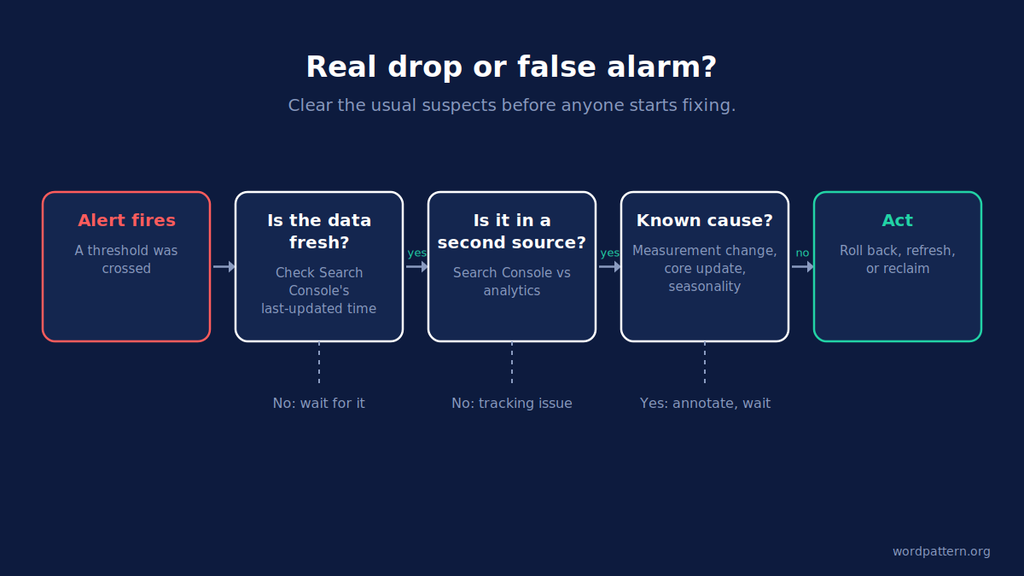
Every monitoring setup produces false alarms. Yours will too. The goal isn’t zero. It’s knowing the usual suspects so you can clear them in minutes.
Google changed how it counts
In September 2025, Google stopped supporting the &num=100 results parameter that rank trackers relied on. Search Engine Land reported that across 319 properties, 87.7% of sites lost impressions and 77.6% lost unique ranking queries in Search Console. Average position looked better at the same time, with no real ranking gain behind it.
If your query-loss alert (signal 7) had been live that week, it would have fired on nearly everything. When Google changes measurement, annotate the date and rebuild your baselines from that point forward.
Search Console is late
Search Console reports lag, sometimes badly. In late 2025, performance report delays ran past 70 hours before Google cleared them. In June 2026, the Page Indexing report stopped updating from June 11 for more than two weeks.
A stale report can look like a drop. Check the “last updated” time before you check anything else.
A core update is rolling out
If several pages slip at once during a confirmed update, wait for the rollout to finish before you touch them. Check Google’s Search Status Dashboard first. If the losses hold after the update completes, that’s a different conversation, and our core update recovery process starts there.
Seasonality and broken tracking
Year-over-year comparison handles seasonality, but only if you have the history. Search Console keeps 16 months of data, so export it somewhere if you want longer baselines.
Broken tracking is the other classic. If analytics shows a crash and Search Console clicks look normal, you have a tagging problem, not an SEO problem.
The rule that clears most of these: confirm the drop in a second data source before anyone starts fixing. Then once a quarter, review which alerts fired and which ones led to action. Delete the ones that never did.
SEO monitoring tools mapped to each signal
You don’t need one platform that does everything. You need each of the eight signals covered by something.
| Tool | Signals it covers | Notes |
|---|---|---|
| Google Search Console | 3, 5, 6, 7, 8 (data source) | Free, first-party click and query data. Custom thresholds need a script or dashboard on top. |
| Screaming Frog SEO Spider | 1, 2 | Scheduled crawls with automatic comparison of the last two crawls |
| Change monitors (ContentKing, SEO Radar, Little Warden) | 1, 2 | Scheduled or near-real-time alerts when page elements change |
| Ahrefs Alerts | 4 | Emails on new and lost backlinks for a domain, folder, or URL |
| Looker Studio, BigQuery, or a scheduled script | 3, 5, 6, 7, 8 | Where custom thresholds actually live if you build your own |
| WordPattern | 5, 6, 7, 8 | Page-level decay detection across the whole library from Search Console data |
A few notes on the technical side. Screaming Frog’s May 2026 release added the option to auto-compare the last two scheduled crawls and include the changed issues in the notification email. That turns a desktop crawler into a decent daily diff for signals 1 and 2. Dedicated change monitors run those checks more often and keep a log of exactly what changed on each page.
For backlinks, Ahrefs Alerts can watch a single URL for lost links, which is exactly the scope signal 4 needs.
The erosion signals are where off-the-shelf SEO monitoring tools thin out. Search Console has the data but no threshold logic. You either build the comparisons yourself in a dashboard, or use a decay-focused tool. We compared the options in our roundup of the best content decay tools.
Start with four, add four
If you set up nothing else this week, set up the four incident alerts. They’re the backbone of any automated SEO monitoring stack. Cheap to build, too. And they catch the failures that cost the most per day.
Then give it a month. Let Search Console collect clean baselines, check that the incident alerts aren’t firing on junk, and add the erosion alerts one at a time. CTR at a stable position first.
The goal isn’t to watch more. It’s to know, on any given Monday, which three pages actually need you.
FAQs
It’s software that checks your search performance and site health on a schedule and alerts you when a signal crosses a threshold you’ve set. That covers indexability, errors, clicks, rankings, CTR, and backlinks. Unlike a monthly report, it’s meant to flag problems while they’re still small and cheap to fix.
Match frequency to how fast the damage spreads. Indexability and status code checks should run daily, or after every deploy if you ship often. Sitewide click alerts can run daily with a multi-day hold. Erosion signals like CTR and query loss work best weekly on 28-day windows, since daily movements are mostly noise.
Partly. Google says Search Console will email you when it finds new issues on your site, so you don’t need to log in every day. What it won’t do is let you set your own thresholds on clicks, CTR, or position. For that you need the Search Console API feeding a dashboard, a script, or a monitoring tool.
Scope automated SEO alerts to pages that matter. Use relative thresholds where traffic swings, and add a hold period to noisy metrics like rankings. Confirm drops in a second data source before acting. Then review your alerts every quarter and delete any that never led to a decision.