
For almost a year, Google Search Console got its own numbers wrong. A logging error misreported impressions from May 13, 2025 until April 27, 2026 (Google’s notice), and the damage spread to CTR and average position. Clicks were fine. The old data won’t be fixed.
So if your rank reports from that stretch looked strange, you weren’t imagining it.
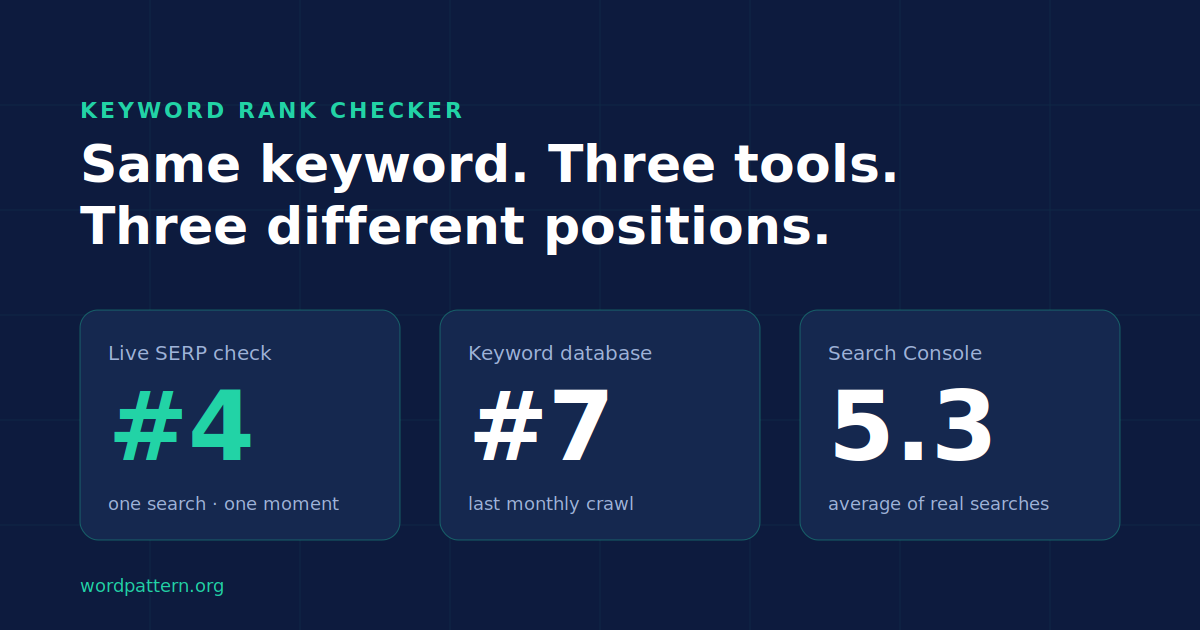
And that’s just one source of confusion. Open Semrush and a keyword sits at position 4. Ahrefs says 7. Search Console says 5.3. Your manager googles it on her phone and sees you at 9.
Every keyword rank checker swears it’s accurate. So which one goes in the report?
Here’s the uncomfortable answer: often, all of them are telling the truth. They’re just measuring different things.
What a Keyword Rank Checker Actually Measures
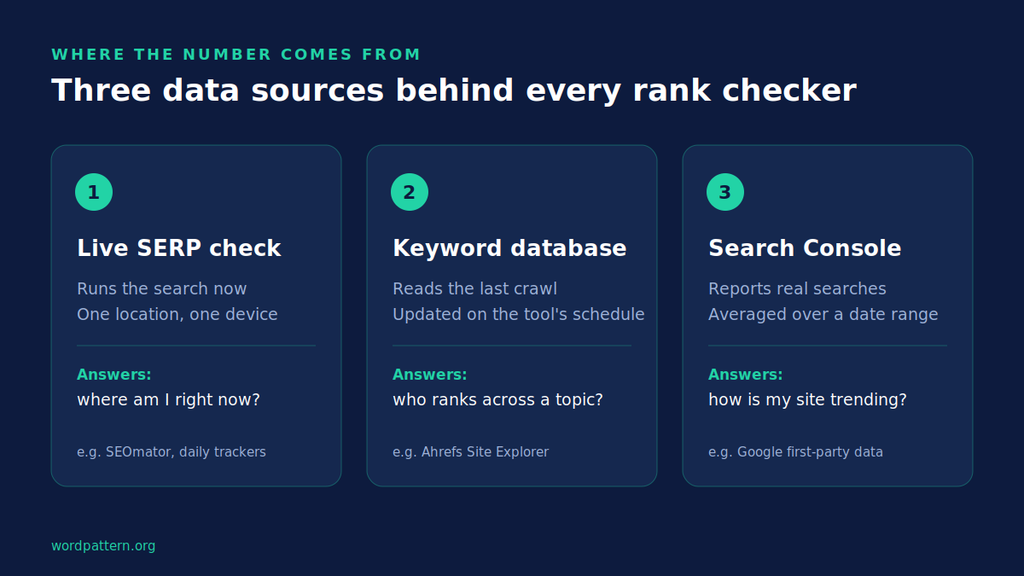
A keyword rank checker tells you where a URL shows up in Google for a given search. Simple enough, right? The trouble is how each tool gets that number, because there are really only three ways to do it.
Live SERP checks. The tool runs the search right now, from a set location and device, and reads the page. Free tools like SEOmator and SmallSEOTools work this way, and so do daily trackers.
Database snapshots. The tool crawls millions of keywords on its own schedule and stores the results. When you look up a keyword, you’re reading the last crawl, not a fresh search. Ahrefs’ Site Explorer is the classic example.
First-party data. Search Console doesn’t check anything. It reports what real searchers were actually shown, averaged over the date range you pick.
Every keyword position checker you’ll ever use sits in one of those buckets (some mix two). Once you know which bucket a number came from, most rank tracking arguments settle themselves.
This matters more for B2B SaaS teams than most. Your keyword sets tend to be small, high-value and mostly non-local, so a two-position gap between tools can look like a win or a loss in a monthly review when nothing actually moved.
Why Two Rank Checkers Show Different Positions
This is the part nobody explains. Tool pages promise “accurate rankings” and move on. But the gaps between one keyword rank checker and the next follow a handful of predictable causes, and you can check for each one.
They’re answering different questions
A rank tracker asks: where did this URL appear in one search, from one place, on one device, at one moment?
Search Console asks something else entirely. Its average position takes the topmost spot your site held in each search and averages those spots across every search where you appeared (Search Engine Journal breakdown). Rank 2 for one searcher and 3 for another gives you 2.5. Google’s John Mueller has said the number you see yourself can differ because of geo-targeting or personalization. Short-lived visibility plays a part too.
So “5.3 in GSC” and “4 in Semrush” aren’t a contradiction. One is a snapshot. The other is an average of thousands of snapshots you never saw.
Not every tool counts the page the same way
What counts as a “position”? Tools don’t agree.
Google’s own rule for Search Console is that an AI Overview takes up a single position, and every link inside it gets that same position (as Search Engine Journal reported). Per Google, other blocks like image packs and People Also Ask also count as one position each, while ads don’t count at all.
Third-party tools make their own choices. Some report only the organic blue links. Others report an “absolute” rank that includes every SERP feature above you. Same page, same moment, two honest numbers two or three spots apart.
Check your tool’s help docs for which one it reports. It matters more than people think.
Location matters more than personalization
“It’s personalization” is the go-to excuse. It’s mostly wrong.
Google has said there is very little personalization in its search rankings, limited to your location or context from a search you just ran.
Location is the big one, and it depends on the query. A Northeastern University study compared results across 59 US locations for 30 days. Local-intent searches showed 4 to 5 different results per page, while general terms showed almost no change (study summary).
For a SaaS keyword like “content audit template,” location barely moves things. For “SEO agency Chicago,” a tracker set to New York and one set to Chicago are basically checking two different SERPs.
Mobile and desktop are separate races
Google finished moving the web to mobile-first indexing in October 2023, which means it mostly crawls and indexes the mobile version of your page. But the results pages themselves still differ by device. Layouts change. SERP features stack differently, and rankings can shift with them.
If one tool defaults to desktop and another to mobile, you’ll get two numbers. Neither is broken.
Some numbers are live, some are weeks old
Freshness is the sneakiest cause. Ahrefs, for example, says its keyword data comes from a database of about 500 million keywords, updated monthly. That’s great for research across a whole site. It’s a poor fit for asking “did yesterday’s update work?”
A daily keyword rank checker and a monthly database will drift apart any time the SERP moves. Pretty normal, honestly.
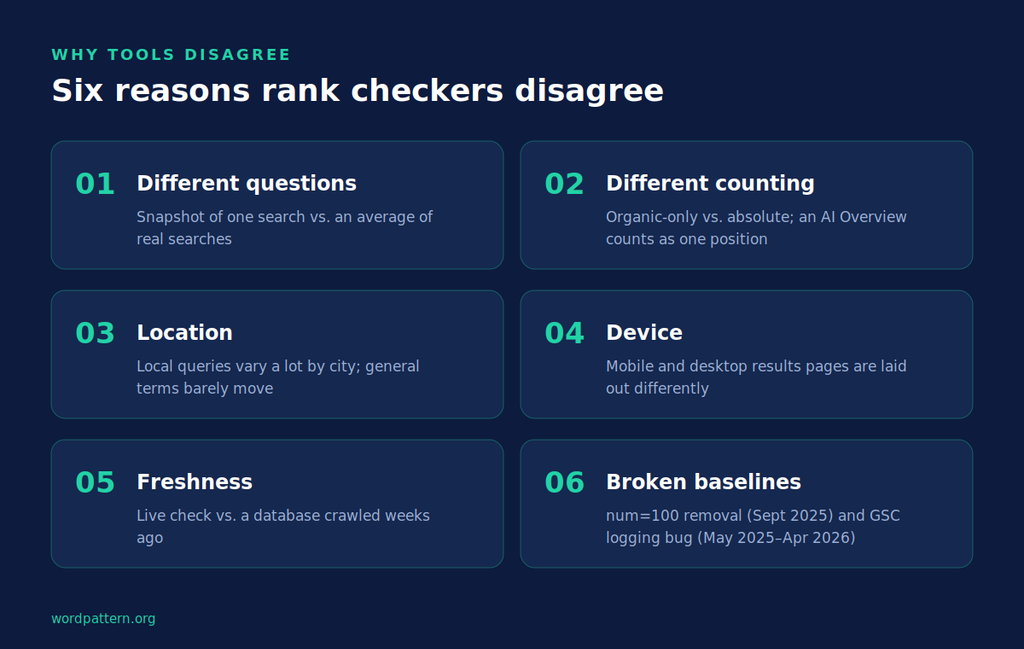
2025–2026 broke a lot of baselines
Two changes made old comparisons shaky.
First, in September 2025 Google stopped honoring the &num=100 parameter that let tools load 100 results in one request. Google told Search Engine Land the parameter was not something it formally supports, and rank checkers were thrown into chaos. Tools now need around ten requests to see what one used to show.
It hit Search Console too. In an analysis of 319 properties, 87.7% of sites lost impressions and 77.6% lost unique ranking queries (Search Engine Land data) after the change. Fewer queries showed up on page 3 and beyond. Average position looked better, even where nothing real had changed.
Second, there’s the logging bug from the intro, which bent average position for roughly 50 weeks.
The takeaway? Don’t compare a 2026 average position against a mid-2025 one and call it progress. Annotate those dates in every report.
So which number do you report?
Pick based on the question you’re answering.
Reporting on overall visibility to leadership? Use Search Console. It’s the only source built from real impressions, so it holds up best in a room full of skeptics. Just filter by country and device first, and never quote the site-wide average position on its own (it blends your brand terms with page-9 long-tail queries).
Checking whether a specific update worked? Use a daily tracker, set to the one location and device your buyers actually use. You want a clean before-and-after, not an average.
Researching a competitor or a whole topic? A database tool is fine here. Monthly data is plenty for “who owns this keyword cluster.”
The one thing you shouldn’t do is mix sources in a single chart. A line that’s GSC in March and Semrush in April will show a jump that never happened.
How to Check Keyword Ranking Manually, Step by Step
Tools are faster. But when a keyword rank checker hands you a number that looks off, or a client doesn’t believe the dashboard, a manual check settles it. Here’s the method.
1. Strip out account effects. Sign out of Google or open a private window. Personalization is light, but you don’t want your own clicks in the mix. Google’s Search Liaison has pointed out you can turn off account-based personalization through the Web & App Activity setting.
A private window doesn’t hide your location, though. Google still knows roughly where you are from your IP.
2. Set the location, language and device on purpose. The most reliable free way is Google Ads’ Ad Preview and Diagnosis tool. It lets you preview a live results page for a chosen keyword, location, language and device (Semrush walkthrough) without logging fake ad impressions. You’ll need to sign in to Google Ads to use it.
3. Pick a counting rule before you count. Organic-only or absolute? Write it down and stick with it. Switching rules between checks will create “movement” that never happened.
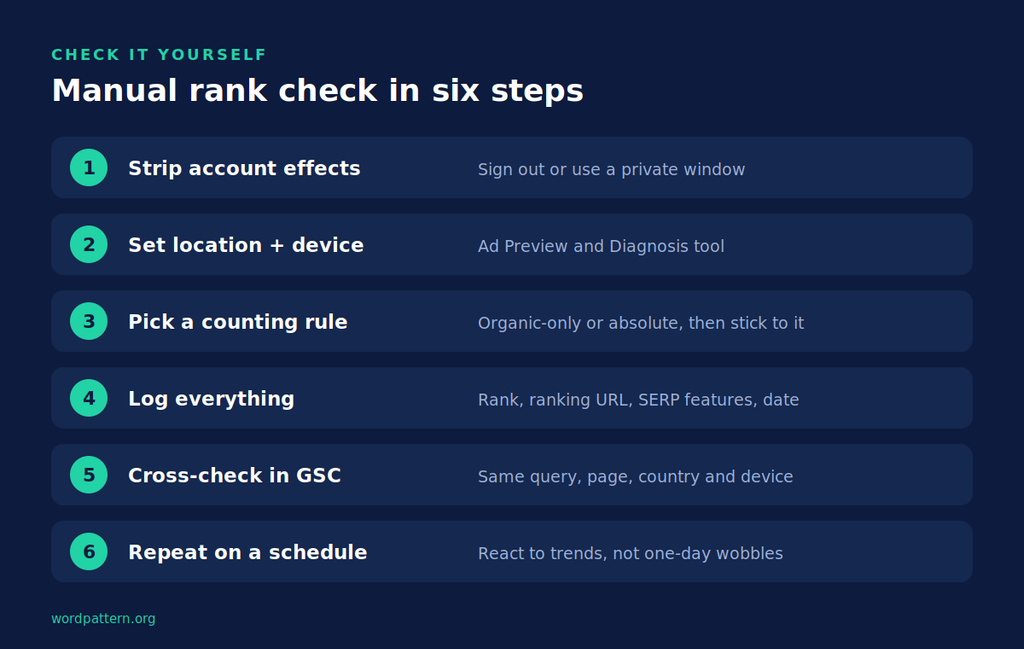
4. Log everything. Rank, the exact URL that ranks (it’s not always the one you expect), SERP features present, date and time. A plain spreadsheet works.
That ranking URL column pays off faster than you’d think. If two of your own pages keep swapping places for the same keyword, you’re probably looking at cannibalization rather than a ranking drop, and the fix is consolidation instead of more optimization.
5. Cross-check in Search Console. Filter the Performance report by query and page, then match the country and device you just checked. Look at the last 7 days. If your manual number sits inside the range GSC suggests, you’re fine.
6. Repeat on a schedule. One check is a data point. Weekly checks are a trend. React to trends, not single-day wobbles.
That’s it. Twenty minutes, and you can defend any number you put in a deck.
The Best Keyword Rank Checker Tools
No single keyword rank checker wins every job. Here’s where each one fits.
Google Search Console:
Free, and the only source based on what real searchers saw. It covers your verified sites only, shows averages rather than live ranks, and carries the data caveats above. Every other tool should be checked against it.
Semrush:
Its free keyword rank checker is powered by its Position Tracking tool, works in any location, and shows the top 10 results for the keyword. The paid Position Tracking adds daily tracking, competitors and SERP feature data. Best for teams that already live in Semrush.
Ahrefs:
The free checker covers hundreds of locations with no registration, and you can flip between desktop and mobile. Because the data comes from a monthly-updated database, treat it as a research tool first and a daily tracker second. The paid Rank Tracker is the better fit for scheduled monitoring.
SE Ranking:
A paid rank tracker built around daily updates, and a common pick for teams that mainly need rank tracking rather than a full SEO suite. There’s a trial if you want to test it on your own keywords first.
SEOmator:
A free Google SERP checker with 213 countries, desktop and mobile, and the top 100 results, no signup. Handy for a quick live check in a market you don’t normally track.
SmallSEOTools Keyword Position Checker:
Free, with a small batch of keywords per check. Basic, but fine for spot checks. Don’t build a monthly report on it.
How do you choose? Start with the question you need answered most often. If it’s “how is my own site trending,” Search Console covers it for free. If it’s “did this page move after Tuesday’s update,” you need daily, location-specific tracking, which usually means paying. And if it’s “who owns this topic,” a database tool with monthly data is plenty, since you’re looking for patterns across hundreds of keywords rather than exact daily positions.
Looking for a google rank tracker free forever? GSC is the honest answer. Free live checkers are great for spot checks, but none of them store history the way a paid tracker does.
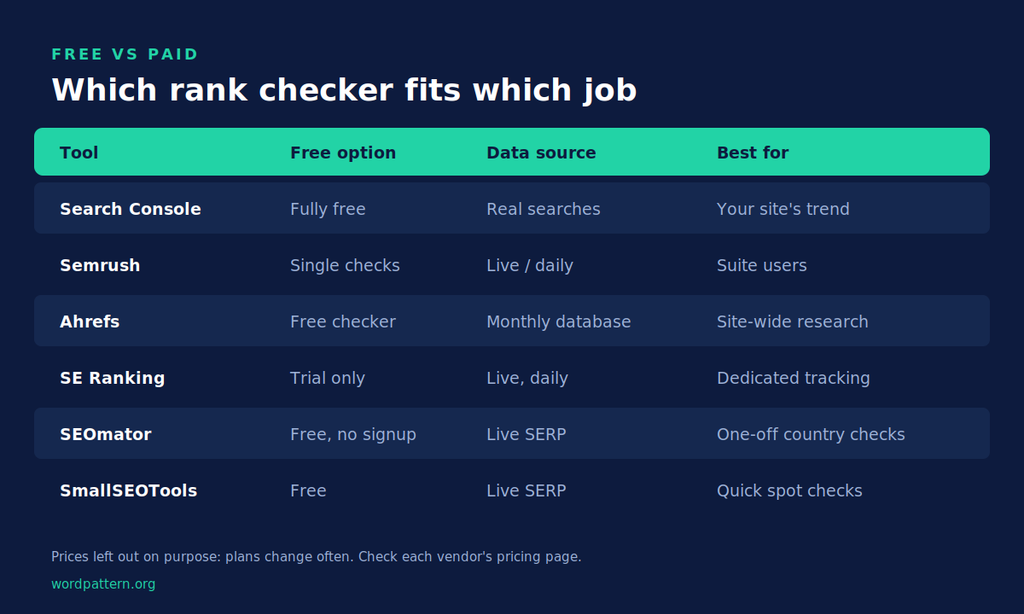
Free vs Paid Rank Checkers Compared
| Tool | Free option | Data source | Best for | What paying adds |
|---|---|---|---|---|
| Google Search Console | Fully free | Real searches (first-party) | Trend truth for your own site | N/A |
| Semrush | Free single checks | Live SERP / daily tracking | Suite users, competitor tracking | Daily tracking, projects, competitors, SERP features |
| Ahrefs | Free checker, no signup | Keyword database (monthly) | Site-wide research | Rank Tracker, deeper reports |
| SE Ranking | Trial only | Live SERP, daily | Dedicated rank tracking | Everything (paid tool) |
| SEOmator | Free, no signup | Live SERP | One-off checks in any country | Check vendor |
| SmallSEOTools | Free | Live SERP | Quick spot checks | Check vendor |
We’ve left prices out on purpose. Plan names and limits change often, and the pricing pages we checked didn’t agree with each other. Check each vendor’s pricing page before you buy.
The simple rule: a free keyword rank checker answers “where am I right now?” A paid tracker answers “where have I been, and what changed?” If you report rankings every month, you need the second question answered.
What to Do With Rank Data Once You Trust It
Clean rank data is only useful if it changes a decision.
Start with reporting. Pick one source per metric, note the counting rule, and annotate the September 2025 and April 2026 data changes. Our guide to SEO monthly reporting covers how to structure that for stakeholders.
Next, use rank history to plan. A keyword stuck at position 8 for three months tells you something different from one sliding from 3 to 8. That history is the raw input for SEO forecasting, where realistic position targets turn into traffic estimates you can actually defend in a planning meeting.
And watch the slow slides. A page that loses a spot or two every month rarely sets off alarms, but it’s often the first sign of content decay. WordPattern flags that pattern through content decay detection before the traffic drop shows up.
Final Thoughts
Your keyword rank checker isn’t lying to you. They’re answering slightly different questions. Often from a different city, on a different device, a few weeks apart. Once you know which question each tool answers, the “which number is right?” debate mostly goes away.
Use Search Console for the trend. Use a live checker or a tracker for the snapshot. Check manually when the two disagree.
And the next time someone asks why Semrush and Ahrefs don’t match, you’ve got a real answer instead of a shrug.
FAQs
Search Console shows an average of your topmost position across every search where you appeared, over the date range you selected. Your own search is one result from one location and device. Location and device both move the number, and so do short bursts of visibility. A gap of a few spots is normal.
Google Search Console is the best free option for your own site, because it’s based on real searches and keeps 16 months of history. Free live checkers like Ahrefs’, Semrush’s and SEOmator’s are good for one-off checks, but they don’t track history over time.
Partly. Incognito removes signed-in account effects, but Google still uses your IP to set your location, and your device still shapes the results page. You’ll get a cleaner view, not a neutral one. For a specific city or device, the Ad Preview and Diagnosis tool is more reliable.
Weekly is enough for most content teams. Daily tracking helps when you’ve just shipped a big update or you’re watching a volatile, high-value keyword. Monthly reports should summarize trends, not single-day positions, because day-to-day shifts are often noise.