
Want to know if Google’s AI Overviews cite your site? You can find out in about five minutes. No tool or signup. Just a browser.
How to Check AI Overviews Manually (No Tool Needed)
- Open a private window. Use incognito or a signed-out browser so your search history doesn’t skew the answer.
- Search the exact query you want to own. Phrase it the way a real person would. Pew Research found that longer searches and full questions trigger AI summaries more often.
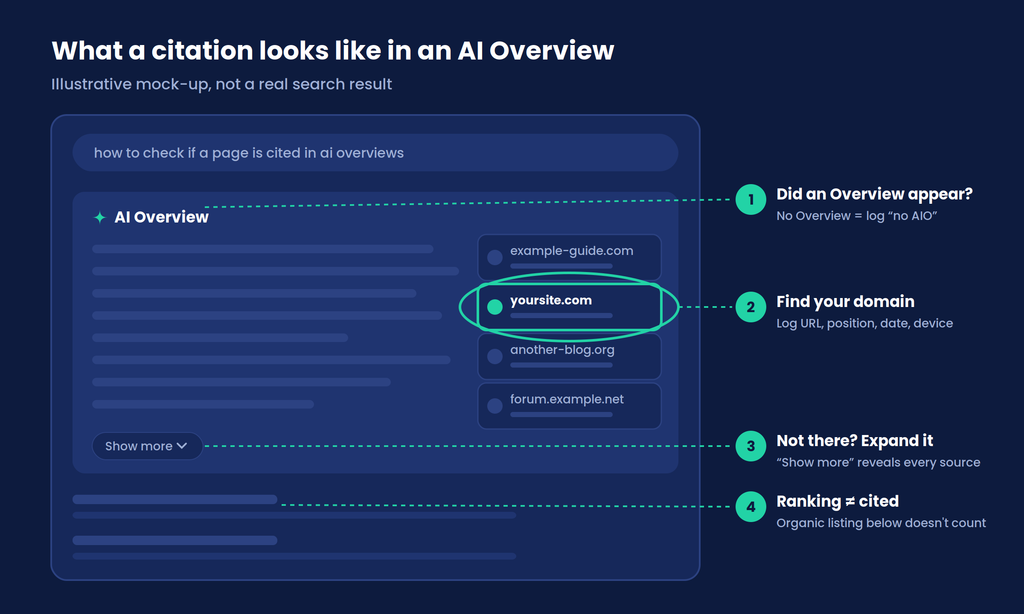
- Confirm an AI Overview shows up. No Overview means there’s nothing to be cited in. Log “no AIO” and move on.
- Expand it and open the sources. Click “Show more,” then check the source links next to or under the answer.
- Look for your domain. Note the exact URL cited, where it sits in the source list, and whether your brand is named in the text.
- Screenshot and log it. Record the query, date, device, and location in a sheet.
- Repeat on mobile, then again next week. One check is a snapshot. Two is the start of a trend.
That’s the whole “am I in AI Overviews” test. It works fine for a dozen queries. Past that, you’ll want Search Console and maybe a dedicated AI Overviews checker, both covered below.
Why a Citation Matters More Than a Ranking Now
You can rank first and still lose the click.
Ahrefs looked at 300,000 keywords and found that an AI Overview on the page correlates with a 58% lower click-through rate for the top-ranking result, comparing Search Console data from December 2023 with December 2025. Its first run of the same study, in April 2025, put the drop at 34.5%. So it’s getting worse, not better.
And the links inside the Overview don’t make up for it. Pew tracked the browsing of 900 U.S. adults in March 2025. Only 1% of visits to a results page with an AI summary ended in a click on one of the summary’s cited sources. About 18% of the searches in that sample showed a summary at all.
Google sees it differently. It says clicks from results pages with AI Overviews are higher quality, meaning people stay on the site longer. Maybe. Either way, if the Overview is going to sit on top of your listing, being one of its sources is the best seat left.
New to the acronym? Our explainer on AIO meaning in SEO covers what AI Overviews are and how they pick sources.
Cited, Mentioned, or Just Ranking?
Three outcomes look alike in a screenshot. They aren’t.
- Cited. Your URL is one of the Overview’s source links. This is the real win.
- Mentioned. The Overview names your brand but links somewhere else. Nice for awareness, but it isn’t a citation.
- Ranking only. You show up in the organic results below, and the Overview ignored you.
Log these in separate columns. A tool that rolls all three into one “visibility score” will flatter you.
One more trap. AI Overviews and AI Mode are different surfaces. Google says the two may use different models and techniques, so the links they show will vary. Gemini is a separate app again. A citation in one doesn’t prove a citation in the other, so check the surface your audience actually uses.
The Free AI Overviews Checker You Already Have: Search Console
Here’s what most guides on this keyword still get wrong. Google’s Generative AI performance report in Search Console rolled out to every website worldwide as of August 31, 2026. A lot of articles still call it a limited test.
It’s free. It’s first-party data. And it shows how often links to your pages appeared in AI Overviews and AI Mode on Google Search.
What you get:
- Impressions grouped by page, country, device, or date
- A filter for text searches versus multimodal ones (Lens, Circle to Search)
- An export button for the chart and table
What you don’t get: queries. The report tells you which pages earned AI impressions, not which searches triggered them. It also lumps AI Overviews and AI Mode together, and it has no click data.
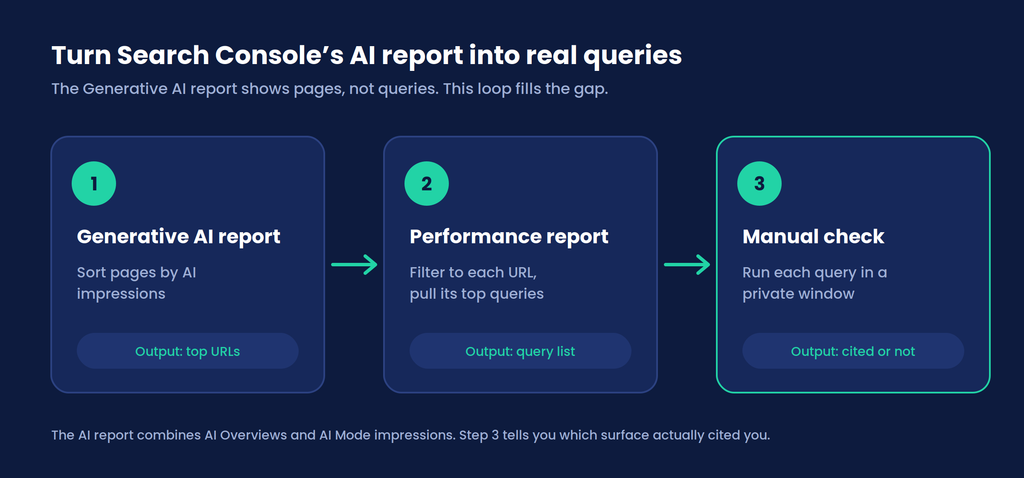
So use it as a map, not an answer. Here’s the loop:
- Find your pages. Sort the Generative AI report by impressions. Note the top 10 URLs.
- Find their queries. Open the regular Performance report, filter to each URL, and pull its top queries.
- Confirm the citation. Run those queries through the manual check above to see which surface cites you, and which URL.
That’s how you check AI Overview ranking for real queries instead of guessing which ones matter. Pair it with a decent keyword rank checker and you’ll see organic position and AI visibility for the same page side by side.
Can’t find the report? Google says that usually means your site hasn’t earned enough impressions in generative AI features yet, or it’s been excluded from them.
AI Overviews Checker Tools Compared
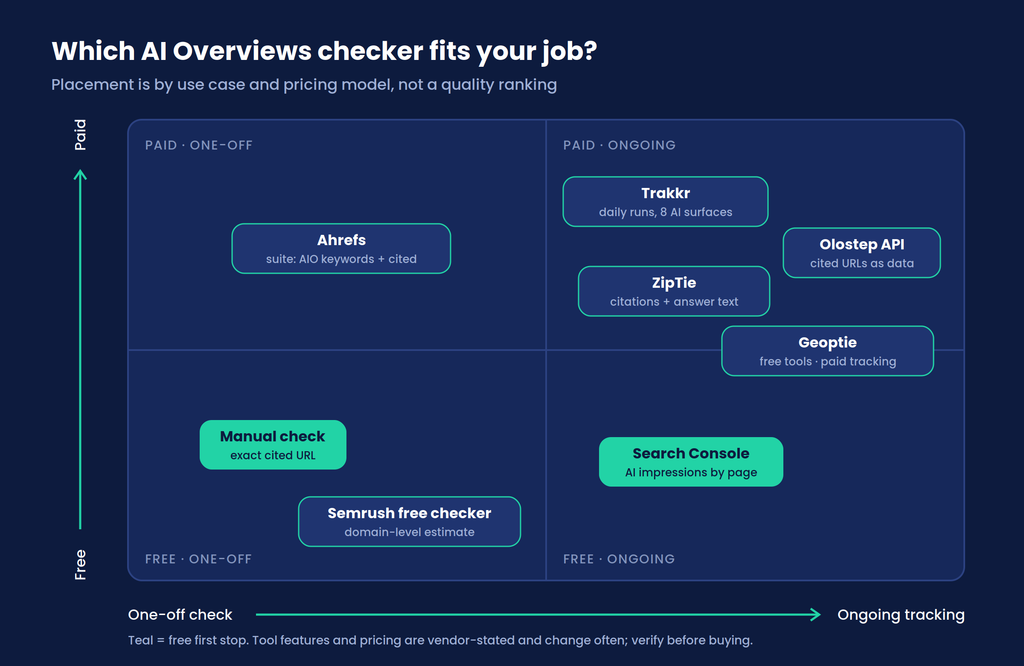
Once you’re tracking more than 20 queries, the manual method turns into a chore. That’s when a proper AI Overviews checker earns its keep. Tools fall into four rough groups: Google’s own data, free one-off checkers, SEO suites, and dedicated AI visibility trackers.
| Tool | Type | What it checks | Shows the exact cited URL? | Cost |
|---|---|---|---|---|
| Manual incognito check | DIY | Any query, any Google surface | Yes | Free (your time) |
| Google Search Console | First-party report | AI Overview + AI Mode impressions by page | No, impressions only | Free |
| Semrush AI Overviews Visibility Checker | Free one-off checker | Domain-level estimate of keywords where you appear in AI Overviews | No, estimate | Free single check; more inside paid plans |
| Ahrefs | SEO suite | Which keywords trigger Overviews and who gets cited | Depends on report | Paid |
| Trakkr | AI visibility tracker | Daily fixed prompts across eight AI surfaces, including AI Overview source links | Yes | 14-day trial, plans from $100/mo |
| ZipTie | AI search tracker | Crawls AI Overviews for your keyword set and captures the answer text | Yes | Paid |
| Geoptie | GEO toolkit | Free audit tools plus a tracker covering several AI engines, including AI Overviews | Varies | Free tools; tracking is paid |
| Olostep (API) | Developer API | Runs a live Google search and returns whether an Overview appeared plus its cited URLs | Yes | API pricing |
Which AI Overviews checker fits you? Doing a one-time audit for a client pitch? The manual method plus Semrush’s free check will do. Reporting monthly on 50+ queries? You need a tracker that stores history. Building your own dashboard? An API gets you raw data without another login.
One rule, though. Do the manual check before you buy anything. You can’t judge whether a tool’s output is right if you’ve never seen what a real citation looks like for your own queries.
Why Your Results Won’t Match a Tool’s
You’ll run a query, a tool will say something else, and a colleague will see a third thing. That’s normal.
AI Overviews don’t show for every query. Google says they appear only when its systems decide they add something over classic results, so they often don’t trigger. Location, device, signed-in state, and tiny wording changes all shift what you see. The cited sources can also change from one check to the next.
So keep your conditions fixed. Same device and location. Same wording. Then judge trends over weeks, not a single screenshot.
Checker vs Tracker: When a One-Off Check Isn’t Enough
A checker answers one question: am I cited today? A tracker answers a harder one: am I gaining or losing citations over time, and who’s taking them?
If you’ve got a handful of priority pages, a monthly manual pass plus Search Console is plenty. Managing hundreds of queries, or reporting to a client? That’s tracking territory. Our guide to AI Overview tracking walks through setting that up, and the post on automated SEO monitoring covers alerting so you’re not refreshing dashboards all day.
Not Cited? Check These First
Google’s AI features documentation is refreshingly blunt here. There are no extra requirements to appear in AI Overviews. A page needs to be indexed and eligible to show with a snippet. That’s it.
So rule out the boring stuff first:
- Is it indexed? Run the URL through Search Console’s URL Inspection tool.
- Are snippets blocked?
nosnippet,data-nosnippet, andmax-snippetlimit what Google can show in AI features too. - Can Googlebot reach it? Check robots.txt and any CDN rules.
Then compare yourself with the pages that are cited. Do they answer the question more directly? Are they fresher? Pages lose citations the same way they lose rankings, by slowly going stale. Catching that decay early is exactly what WordPattern was built for.
You don’t need special schema or an “AI text file” either. Google says so outright.
Check First, Buy Later
The fastest AI Overviews checker is still a private browser window and seven minutes of attention. Start there. Then open Search Console’s Generative AI report, find the pages that are already picking up AI impressions, and trace them back to real queries.
Only buy a tracker once the query list outgrows your patience. Most small sites never get there. Bigger ones get there fast.
And if you’re not cited anywhere yet? That’s useful too. Now you know which pages to fix first.
FAQs
Partly. The Generative AI performance report shows impressions when links to your pages appeared in AI Overviews or AI Mode, grouped by page, country, device, and date. It doesn’t show queries, clicks, or which of the two surfaces cited you. Use it to find pages worth checking, then confirm citations by hand.
Yes, a few. The best free AI Overviews checker is the manual incognito method: it costs nothing and shows the exact cited URL. Search Console’s Generative AI report is free and now open to all sites, though a site with very few AI impressions may not see it yet. Semrush also offers a free one-off AI Overviews Visibility Checker that estimates how often a domain shows up. Paid trackers only make sense once you need history across many queries.
Weekly is a sensible rhythm for your most important queries, since sources can change between checks. Monthly is fine for everything else. Keep the device, location, and query wording the same each time so you’re comparing like with like.
Ranking and citation are related, not identical. Google says its AI features run several related searches across subtopics (it calls this query fan-out), so they can link to a wider spread of pages than a classic results page. Compare your page with the cited ones on format, directness, and freshness.